Claude's Verification Wall: What "Complete Verification to Continue" Actually Asks For
Claude does not text you a code. It does not send a confirmation link. It asks you to hold a government-issued photo ID in front of a phone camera, in a session run by a third-party identity company, before it will answer a two-word message. We went through the flow far enough to photograph every screen and then stopped. This page is what those screens say, what Anthropic publishes about them, and the one thing the "just verify and carry on" advice never mentions.
Short answer: "Complete verification to continue" sends you to Anthropic's Verification Portal, which hands the actual check to Persona Identities. What it wants is a physical, government-issued photo ID plus a live selfie taken on a phone with a camera. There is no email or SMS shortcut, and the "Not now" button only closes the dialog — the chat still loads, and it still will not reply. Anthropic describes this as a rollout for "a few use cases" and routine integrity checks, so not every account sees it. And the part that matters if you are reading this from a country Claude does not officially serve: verifying your identity does not change where you are. Anthropic's supported-country list does not include mainland China, and coverage of the rollout named unsupported locations as one of the groups the check is meant to catch. We are not going to explain how to get around it.
How we got here, exactly
- What we used: claude.ai in Microsoft Edge on Windows 11, a free account with no subscription, one browser tab, no extensions blocking scripts
- When: 28 October 2026 for the first attempt, 29 October for the follow-up. Same account both times, same result
- Network: a mainland-China connection. We did not log the network path, so we cannot tell you whether the request left from a residential IP or through a proxy. We are saying that out loud because anyone drawing conclusions about geography from our screenshots should know the limit of what we recorded
- What we did not test: a paid Pro or Max account, the iOS or Android app, a fresh account created on the same day, or any account outside this one region. If you are on a paid plan and see the same wall, that is information we do not have
- Where we stopped: at the camera step. We did not upload an ID and we did not complete a selfie check
Screen one: the chat loads, and only the useful part is switched off
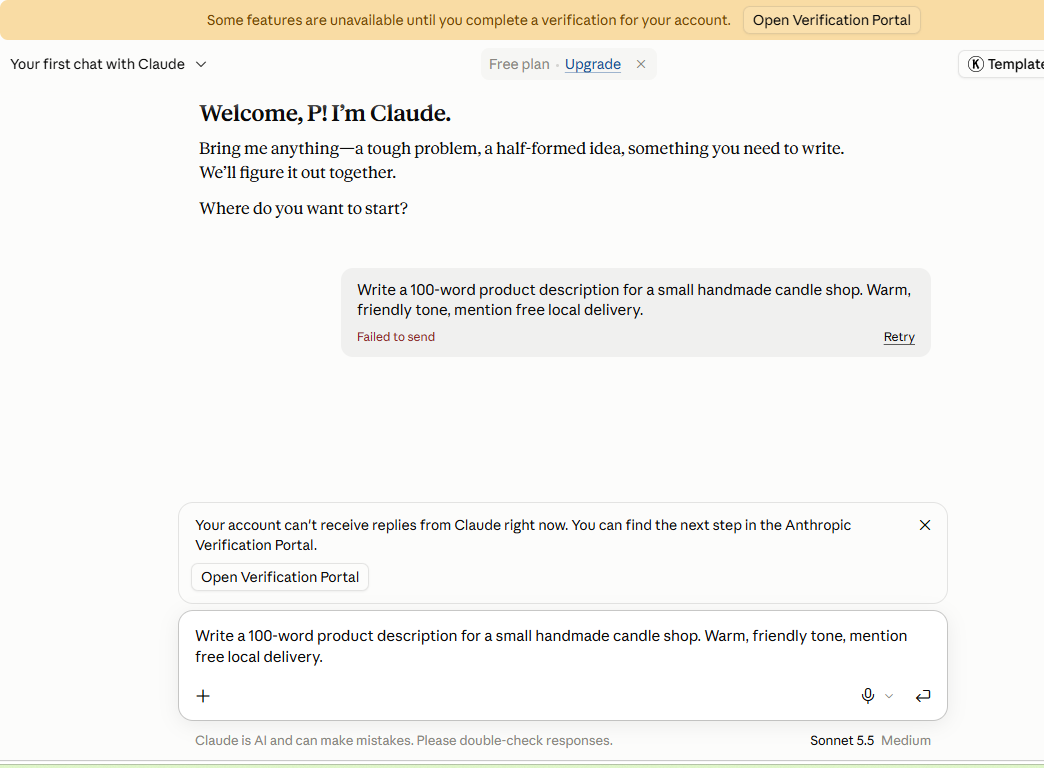
The page is not broken. The greeting appears, the model name sits in the corner reading "Sonnet 5.5 · Medium", the composer at the bottom accepts typing. If you only glanced at it you would think you were in.
Then you notice two things. A yellow banner across the top: "Some features are unavailable until you complete a verification for your account." And a dialog in the middle: "Complete verification to continue", with one clarifying line underneath — "This includes replies from Claude."
That second sentence is the whole story. It is not the file uploads that are missing, or the projects, or the longer context window. It is the reply.
There is a "Not now" button, which is the first thing anyone clicks. It dismisses the dialog. The banner stays. We typed a short message, pressed send, and got "Failed to send" — the same generic error you would get from a bad connection, which is probably why so many people assume their network is at fault and spend an hour restarting their router.
Screen two: the Verification Portal has exactly one job
"Open Verification Portal" leaves the chat and lands on a page titled, in its own words, a place to "Apply for and manage trust programs for your Claude usage." That phrasing tells you something useful: this is not a login check bolted onto the chat. It is a separate trust-and-safety product with its own workflow.
Inside, there is a single task card: Identity verification. Under it, the name of the company doing the work — Persona. Anthropic runs the front door; Persona runs the check.
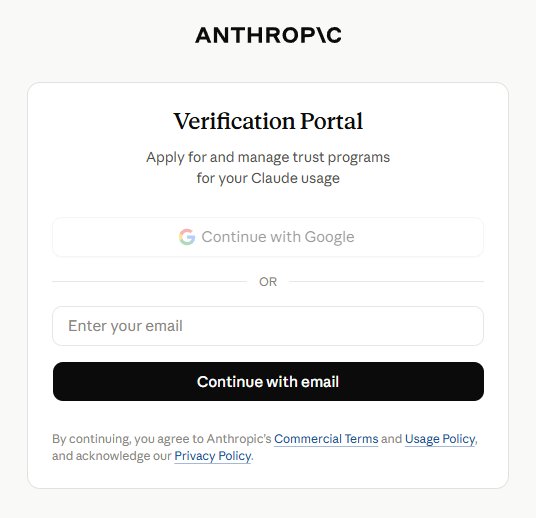
This handoff is where most confused searches come from. People look for "Claude verification" and find nothing in their account settings, because the record lives with the vendor, not with Anthropic's own account page.
Screen three: it is a phone camera, not a form
The last screen is the one that decides it for most people. The portal explains that to verify your identity it needs access to your camera, and offers two routes: scan a QR code with your phone, or receive a secure link to continue on another device. It adds that no app download is required.
So the check is a live capture. A photo of your passport sitting in a folder is not the input; a phone pointed at the passport, in your hand, with your face in the same session, is.
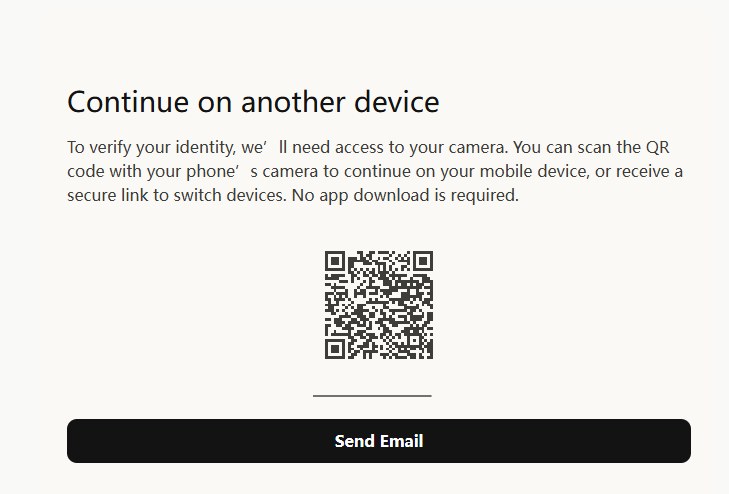
We closed the tab there. Not because the flow looked sketchy — Persona is a real vendor used across the industry — but because handing a passport and a face scan to a free chatbot, for the privilege of asking it a question, is a trade we are not willing to make on the record, and we did not want to write a tutorial that pretends it is a formality.
What Anthropic says it is for
The help page is short and worth reading in full. Two lines do most of the work. First: "Identity verification helps us prevent abuse, enforce our usage policies, and comply with legal obligations." Second, and this is the one that explains why the wall appears for some people and not others: "We're rolling out identity and business verification for a few use cases. You may see a verification prompt when accessing certain capabilities, as part of our routine platform integrity checks, or other safety and compliance measures."
Read that second sentence again. "Certain capabilities." "Routine." "Other measures." Anthropic is deliberately not publishing a list of triggers, which means no third-party article — including this one — can tell you with confidence why your account was picked. Anyone claiming otherwise is guessing.
The ID rules, as published
This part is concrete, and it is where most people get rejected on the first try.
| Accepted | Rejected |
|---|---|
| Passport | Photocopy, screenshot, scan, or a photo of a photo |
| Driving licence or state / provincial ID | Digital or mobile ID (for example a phone driving licence) |
| National identity card | Student card, employee badge, library card, bank card |
| Physical, undamaged, unexpired, readable, with your photo | Any temporary paper document |
You also need a phone with a working camera. Anthropic's page says the vendor may ask for a live selfie. Press coverage of the rollout put the typical duration under five minutes, which matches the shape of the flow — two captures and a wait.
The part the "just verify and you're in" posts leave out
Here is where a lot of advice quietly breaks. Verification answers one question: is this the person on this document? It says nothing about whether Claude is available where you are sitting.
Anthropic publishes a list of countries where Claude is supported rather than a list of banned ones. Mainland China is not on that list. When the verification rollout was reported in April 2026, the coverage was blunt about the targets: repeat usage-policy offenders, accounts created from unsupported locations, terms-of-service violators, and users under 18.
Put those two facts next to each other and the conclusion is uncomfortable. If your reason for being stuck is that you are in a place Claude does not serve, the ID check is not a door — it is the exit. Handing over a passport tells Anthropic exactly which jurisdiction issued it. The same coverage noted that accounts can still be closed after verification, for unsupported location among other reasons, and that an appeal route exists for people who think a closure was a mistake.
That is also why we are not writing the "how to get in anyway" section. Routing around a regional restriction breaks Anthropic's terms, buying a pre-verified account means trusting a stranger with an identity document, and a document that has been edited to look like it came from somewhere else is the kind of thing that stops being a support ticket and starts being a legal problem. A tutorial site is not the right place to teach any of that, and doing it would put this page on the wrong side of the policy it is trying to explain.
If the check fails on you
Anthropic's page covers the ordinary failure cases, and they are all about image quality rather than eligibility: blurry captures, documents that cannot be read, expired IDs. You get more than one attempt. If you run out, the page points you to Anthropic support for review.
One thing worth knowing before you start: the portal's own language is about applying for and managing trust programmes, which implies a case record, which implies someone can look at it. If you have already been through the flow and it went wrong, that record is the thing to reference in an appeal — not a fresh attempt.
What we could not verify
- What happens on success. We never submitted an ID. Everything above about the flow is what the screens said, not what came after
- Whether paying changes anything. We only tried a free account. Pro and Max users may hit the same wall or never see it; we do not know
- How long the process really takes. The "under five minutes" figure comes from press coverage of the rollout, not from our stopwatch
- What triggers the prompt. Anthropic does not publish it, and our single sample cannot establish a pattern
- What Persona does with the data in practice. We are quoting Anthropic's description of the arrangement, not an audit of it
If you just need an AI that answers today
Two free options cleared our tests without asking for anything: ChatGPT's free plan ran three tasks — a résumé rewrite, a maths problem, a short piece of writing — with no identity check anywhere in the flow, and Gemini answers from a plain Google sign-in. Neither is a like-for-like replacement for Claude's writing voice, and neither will tell you what Claude would have said. But if the question is "which of these can I actually use in the next five minutes", the answer is not the one behind an ID check.
If you want the side-by-side version, including the three tests we ran on both and the exact screens where Claude stopped: ChatGPT vs Claude, same three free tests.
Frequently asked questions
Does every Claude account get this wall?
No. Anthropic's wording is "a few use cases", which is why two people on identical free plans can see different screens. Our account hit it twice on two consecutive days, so for us it was persistent rather than a one-off prompt.
Is "Not now" the same as skipping verification?
No. It closes the dialog and leaves the banner. Replies stay blocked, and sending produces a generic failure rather than a message explaining the block. If you dismissed the prompt and assumed the site was down, that is probably what happened.
Can I verify with a photo of my passport I already have?
No. Anthropic's page rules out photocopies, screenshots, scans and photos of photos, and it wants the physical document present. The camera step exists precisely to make a stored image useless.
Does Anthropic train on the ID and selfie?
Its page says no — that verification data is used only to confirm identity and meet legal and safety obligations, and that Persona is contractually limited to providing verification and fraud prevention. Anthropic also says the images live with Persona rather than on Anthropic's systems, and that it can view records through Persona when reviewing an appeal.
I am outside Claude's supported countries. Is verifying worth trying?
We would not spend a passport on it. Verification establishes identity, not eligibility, and unsupported location was named among the groups the rollout targets. If access matters to you that much, the honest move is to use a service that serves your region rather than to hand identity documents to one that does not.