What we found first (the short version)
Eighteen tests and one pattern emerged: Canva's free tier is not a demo — it's a real workflow with a few very specific walls. The walls are almost never where the marketing implies. Templates are mostly free; the fonts that make them look professional are not. Exporting is free; exporting bigger is not. Printing is free to design; the colour profile for professional print is not.
Pro template density, measured 8 times
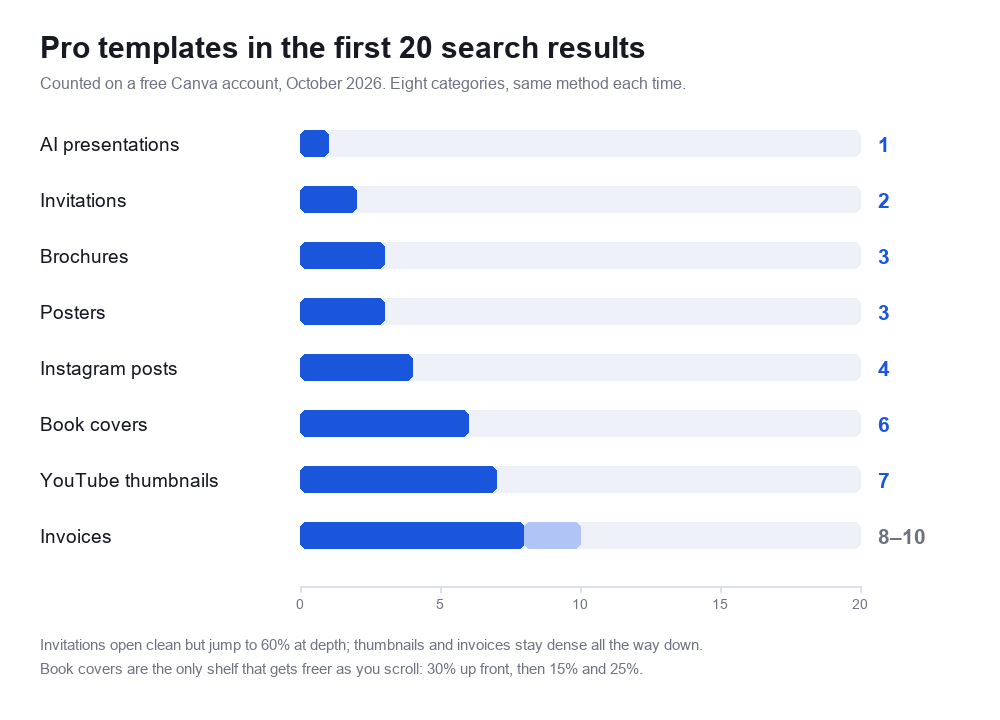
We counted how many results on the first 20 of a search carry the Pro crown, in every category we tested. This is the single most useful number for anyone planning a project on the free plan:
| Category searched | Pro crowns in first 20 | What happens deeper | Test |
|---|---|---|---|
| AI presentations | 1 / 20 (5%) | Cleanest shelf measured — but the AI assistant itself is metered monthly | AI presentation test |
| Invitations | 2 / 20 (10%) | Jumps to 60% from result 21 — a bait shelf | Invitation test |
| Brochures | 3 / 20 (15%) | Rises steadily | Brochure test |
| Posters | 3 / 20 (15%) | Rises steadily | Poster test |
| Instagram posts | 4 / 20 (20%) | Dense throughout | Instagram test |
| Book covers | 6 / 20 (30%) | Thins out to 15% then 25% — the only shelf that gets freer as you scroll | Book cover test |
| YouTube thumbnails | 7 / 20 (35%) | Still 35% at 21–40 — an even spread, no bait shelf | Thumbnail test |
| Invoices | 8–10 / 20 (40–50%) | Dense, and the count shifts between refreshes | Invoice test |
Three shelving strategies, one platform. Categories used by occasional users (invitations) get a clean first screen as bait, then jump to 60% Pro from result 21. Categories used by weekly creators (thumbnails, invoices) get Pro templates spread evenly, because those users are already in the habit of converting. And book covers — the newest shape we've measured — open at a middling 30% and then thin out to 15% and 25%, the only shelf that gets freer the deeper you scroll. Free templates in every category are usable; what changes is how far you have to scroll to find the good ones.
Three walls that no pricing page mentions
- The font wall is global. The same locked fonts — Aprilime, Archetype Aubette, Avenir — appear crowned in every category we opened, and even "Upload a font" is Pro. The template is free; the typography that makes it look designed is not.
- CMYK is Pro, in all four print products tested. Brochures, invoices, posters and invitations: every PDF Print panel offered RGB free and put the crown on CMYK. If a printer asks for CMYK, the free plan can't ship it.
- Upscaling is Pro. The PNG export slider starts at 1× (your design's native size, which is fine for web) and crowns everything above it. Transparency, quality presets and resizing a design to another format are on the same side of the wall.
Size labels: sometimes honest, sometimes not
We measured the exported files instead of trusting the labels, and got both outcomes:
- Invoice: template said A4, exported PDF measured US Letter. Wrong.
- Poster: 18 × 24 in label, exported PDF measured 18.0 × 24.0 in. Right.
- Invitation: 5 × 7 in label, exported PDF measured exactly 5.00 × 7.00 in. Right.
- YouTube thumbnail: 1280 × 720 px label, exported PNG measured exactly 1280 × 720. Right — and 1.17 MB, under YouTube's 2 MB limit.
- Book cover: 1410 × 2250 px label, exported PNG measured exactly 1410 × 2250. Right — but 190 × 310 px short of Amazon KDP's 1600 × 2560, and the slider that would close the 13.5% gap is crowned.
Start here
Your first Canva design, step by step
The absolute beginner path: pick a size, choose a template, replace the text, export. Written for someone who has never opened Canva before.
Canva Free vs Pro: what actually changes
The feature-by-feature comparison, including the AI usage quotas (20 premium AI uses a month on Free) and the stock photo difference: 4.7 million vs 141 million.
How much is Canva Pro, really
Every price we saw on our own screen: US$18/month or US$144/year for Pro, US$25 or US$250 for Business — plus the math behind the "save 16%" badge and the "+ applicable tax" asterisk.
Exporting and file formats
Why your Canva export looks blurry (and how to fix it)
The real cause of fuzzy downloads, what each export preset actually does, and which settings keep text sharp.
Resizing images and designs without Pro
Canva's Resize tool is Pro — the checkbox won't move and the only button is a trial. Here's the free workaround we actually completed: Custom size plus copy-paste, which even arrives as editable text.
Removing a background for free
Clicking Canva's Background Remover on a free account opens an upgrade screen — confirmed later by Canva's own comparison table. Here's what free accounts can do instead.
Design categories we've tested end to end
Making a logo on the free plan
Real logo built with free templates and elements, including what happens when you need a transparent PNG.

Canva's QR code generator
A free QR code, tested and scanned with a real phone — including how long the code keeps working and what the Pro version adds.
Flyers: design and print prices
A complete flyer on a free account, plus the per-unit print ladder at every quantity tier.
Resumes that survive an ATS
We built a resume in Canva and ran it through a real applicant tracking system. What Canva's templates get right, and the layout habit that gets resumes auto-rejected.
Brochures and the fold-order trap
The editor shows Page 1 and Page 2 with no inside/outside labels — the print panel quietly maps Outside 1 and Inside 2 for you. Plus the print ladder down to $0.36 a copy.
Canva's invoice templates aren't tables
Proving that the invoice "table" is separate text boxes: you can't insert a row, and the total doesn't add up on its own. Also the A4 template that exported as US Letter.
Posters, and who actually prints them
Four price tiers from $17.60 to $61.99, free delivery, an 18 × 24 in export that measured exactly right — and the plot twist: Canva routes poster printing to VistaPrint.
Invitations: the cleanest free shelf, the strictest fonts
Only 2 of the first 20 templates are Pro — then the shelf turns 60% paid. Print runs $12.94 for one card down to $0.36 each at 1,000, envelopes add $8, and this time the label says "By Canva," not VistaPrint.
Instagram posts: buttons you can see but not press
The direct-publish and Schedule options sit on the first screen of Share — and click straight into a Business plan wall. Also: the export measured 1080 × 1350, not the square everyone assumes.
AI presentations: a full deck free, then the monthly wall
Canva's new AI chat assistant generated a complete 8-slide deck — editable text, real photos, free PPTX export — then revealed our monthly AI allowance was spent after two tasks. Canva's own numbers: Business gets "20x more AI usage" for $25/month.
YouTube thumbnails: specs that pass, text that dies
Exported at exactly 1280 × 720 and 1.17 MB — under YouTube's 2 MB limit. Then we shrank it to YouTube's real sidebar size: the big title survives, the small template text is unreadable. Big words win, and now you've seen the proof.
Book covers: the right shape for Kindle, the wrong pixel count
Canva's free template is 1410 × 2250 — a 1.596 ratio that matches Amazon KDP's 1.6 almost exactly, and 190 px short of its 1600 × 2560 ideal. That 13.5% gap sits behind the Pro crown, and KDP's two help pages disagree about whether PNG is even accepted. We measured both files.
How all of this was tested
One free Canva account, a browser, and screenshots taken at every step. No payment details entered, no 30-day trial started, no Pro feature used through a loophole. When we quote a price, it was on our screen. When we quote a file size or a pixel dimension, we measured the exported file with software rather than reading the label. The full method is on our how we test page.
If you're deciding whether Pro is worth paying for, start with Free vs Pro and what it costs — then use the category tests above to check whether the specific thing you need (CMYK, resizing, fonts, transparent PNG) is behind the wall.