DeepSeek API Key: How to Create One and Fix Common API Errors
Creating a DeepSeek API key is only the first step. Your first request may still fail with an authentication, balance, rate-limit or request-format error. This guide shows how to create a DeepSeek API key, then covers account access, the current model names and the API errors documented by DeepSeek. We checked the relevant official documentation on 3 November 2026.
DeepSeek's API key page is platform.deepseek.com/api_keys. The login screen we viewed showed a phone-number field pre-filled with +86 and a WeChat QR-code option. The documentation lists two current model names: deepseek-flash, which supports image input, and deepseek-v4-pro, which is text-only. Both have a 1M-token context window and a maximum output of 384K tokens. The OpenAI-compatible base URL is https://api.deepseek.com; Anthropic-compatible clients use the /anthropic path. The documented concurrency limits are 2,500 for Flash and 500 for Pro, measured at account level rather than per API key. This guide explains the main errors and how to tell them apart.
Account access: what to expect at login
DeepSeek's API documentation links to the API key page. If you are not signed in, the link opens the platform login page. You need to complete this step before you can create a key.
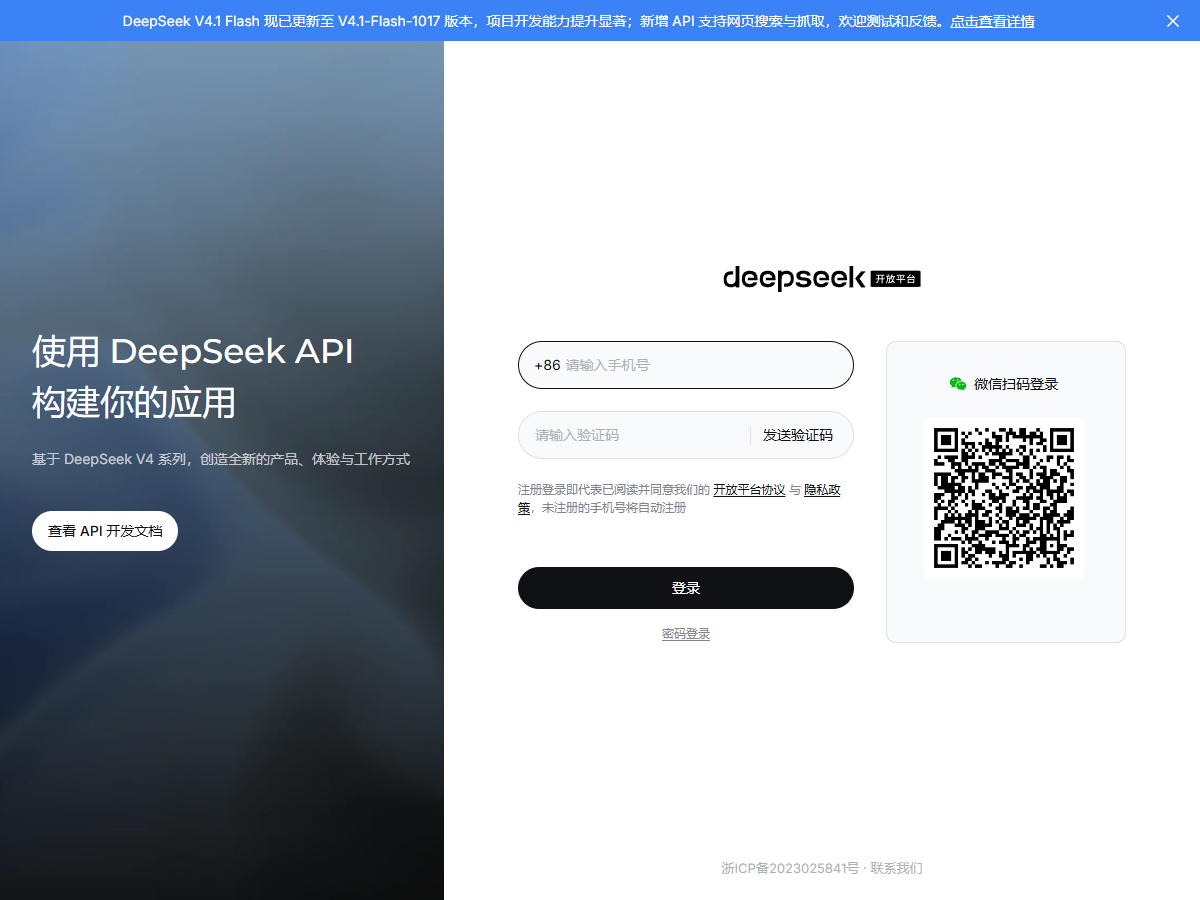
The login screen we viewed showed a phone-based sign-in flow with +86 pre-filled in the number field. We did not test whether the country code can be changed, so we cannot confirm whether numbers from other countries are accepted. The console also appeared in Chinese by default. If you are looking for a billing option labelled "Balance", the language may make it harder to find.
DeepSeek's API FAQ also includes a section about failed real-name verification. We did not complete verification, so this guide cannot confirm which documents are accepted or how long the process takes.
Complete account access first, then create the key, and only then start testing code. This order helps you distinguish a login or verification issue from an API authentication error.
Create and protect your API key
After signing in, open platform.deepseek.com/api_keys and create a key. Copy it when it is shown, then store it in an environment variable. DeepSeek's code examples use DEEPSEEK_API_KEY rather than placing the key directly in source code. The same approach helps keep credentials out of repositories and shared files:
# macOS / Linux
export DEEPSEEK_API_KEY="sk-your-key-here"

# Windows PowerShell
$env:DEEPSEEK_API_KEY = "sk-your-key-here"
An API key is tied to the account, not to a separate concurrency allowance for each project. DeepSeek's rate-limit documentation says the limits apply regardless of which key is used, so creating another key will not increase the account's capacity. If a key is exposed, replace or rotate it and update the services that use it. Do not rely on deleting an application as a substitute for revoking a leaked credential.
Current model names and retired aliases
The model name in your request determines which model handles it. DeepSeek's documentation checked on 3 November 2026 lists two current names, each mapped to a dated model build:
| Model name you send | Context | Max output | Concurrency |
|---|---|---|---|
deepseek-flashDeepSeek-V4.1-Flash-1017 · reads images | 1M tokens | 384K tokens | 2,500 |
deepseek-v4-proDeepSeek-V4-Pro-0813 · text only | 1M tokens | 384K tokens | 500 |
The documentation also says that deepseek-v4-flash and deepseek-v4-flash-vision-exp are still accepted, even though the models they originally referred to have been retired. Requests using those names are served by DeepSeek-V4.1-Flash-1017 and billed at the Flash rate. If you are maintaining code copied from an older tutorial, check the model string before investigating differences in output.
Thinking mode is enabled by default for both models, according to the model table. The example below sets it explicitly and uses reasoning_effort=high. Setting it in the request makes the intended behaviour clear when you later compare response times or results.
Send your first API request
The following request follows DeepSeek's official quick-start example. The key is read from an environment variable rather than written directly into the command:
curl https://api.deepseek.com/chat/completions \
  -H "Content-Type: application/json" \
  -H "Authorization: Bearer ${DEEPSEEK_API_KEY}" \
  -d '{
        "model": "deepseek-flash",
        "messages": [
          {"role": "system", "content": "You are a helpful assistant."},
          {"role": "user", "content": "Hello!"}
        ],
        "thinking": {"type": "enabled"},
        "reasoning_effort": "high",
        "stream": false
      }'
You can send the same request from Python with the OpenAI SDK. Set the DeepSeek base URL and use the model name shown in the current documentation:
from openai import OpenAI

client = OpenAI(
    api_key=os.environ["DEEPSEEK_API_KEY"],
    base_url="https://api.deepseek.com",
)

r = client.chat.completions.create(
    model="deepseek-flash",
    messages=[{"role": "user", "content": "Hello!"}],
)
print(r.choices[0].message.content)
For Anthropic-compatible clients, use https://api.deepseek.com/anthropic as the base URL. Check the client documentation for the required configuration fields.
Understand the main API error codes
DeepSeek documents five relevant status codes in its error-code guide: 401, 402, 429, 400 and 422. The table below summarises the documented causes and fixes, alongside the distinction that is useful when troubleshooting.
| Code | DeepSeek's cause | DeepSeek's fix | What it usually is not |
|---|---|---|---|
| 401 Authentication Fails | Authentication fails due to the wrong API key. | Check your API key, or create one first. | It is not an expired balance. |
| 402 Insufficient Balance | You have run out of balance. | Check the account balance, then use the top-up page. | It is not a bad key. A wrong key returns 401. |
| 429 Rate Limit Reached | You are sending requests too quickly, or have exceeded a concurrency or QPS limit. | Pace your requests reasonably. | It is not your monthly quota. There is no monthly quota. |
| 400 Invalid Format | Invalid request body format. | Fix the body according to the hint in the error message. | It is usually not the network. |
| 422 Invalid Parameters | Your request contains invalid parameters. | Fix the parameters according to the hint. | It is not the same as 400: the body parsed, a value inside it did not. |
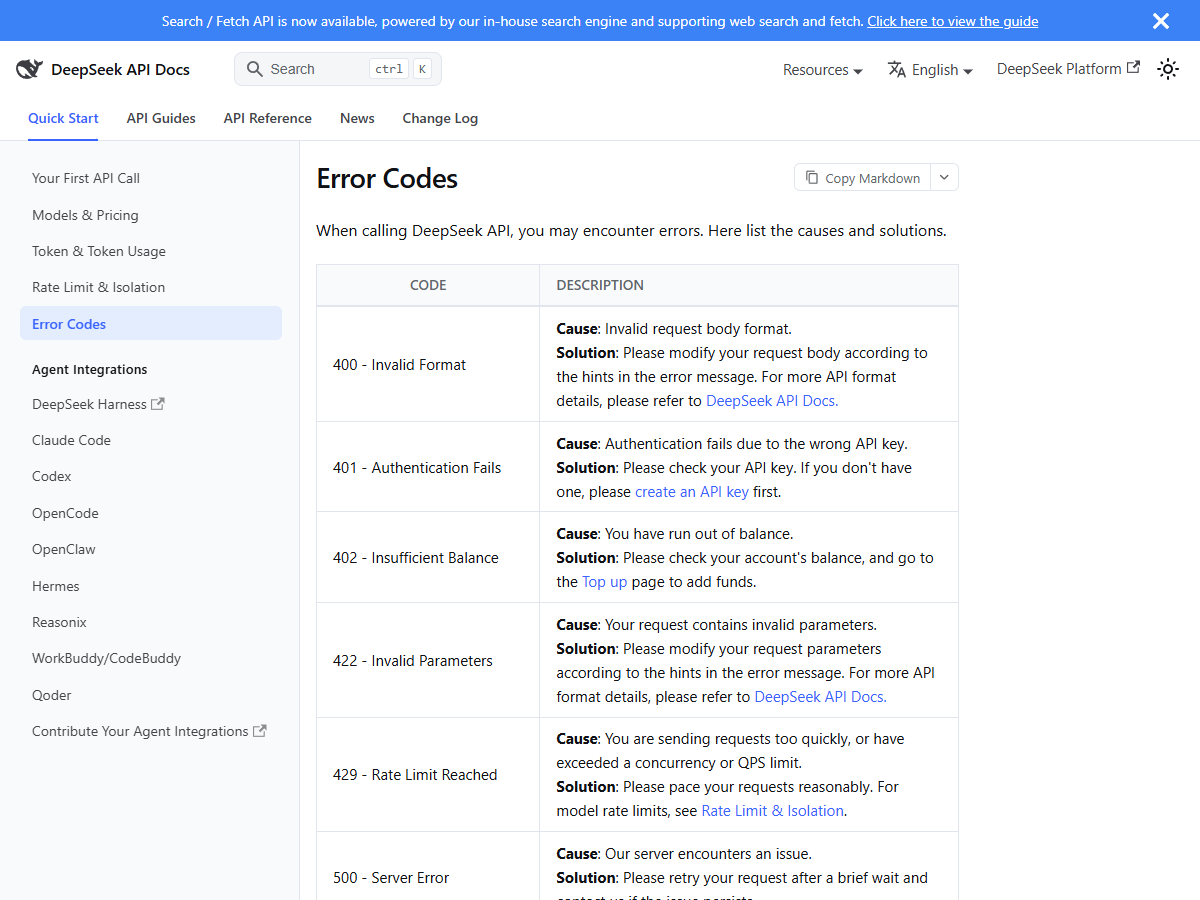
When troubleshooting, record the numeric status code as well as the response message. A 401 points to the key; a 402 points to the account balance. Do not keep retrying a 402 with exponential backoff: the request will continue to fail until the balance issue is resolved.
Handle keep-alive lines in responses
A request that is waiting in DeepSeek's queue may keep the HTTP connection open. The documentation says non-streaming requests can return empty lines while waiting, while streaming responses can include the SSE comment : keep-alive. If your code sends the raw response body straight to json.loads, these lines may cause a parsing error even though the request has not failed.
DeepSeek's rate-limit documentation states that the server closes the connection if inference has not started within 10 minutes. A shorter wait may simply mean the request is still queued.
The simplest option is to use the official SDK, which handles the response protocol for you. If you are parsing HTTP responses yourself, skip empty lines before parsing. For streaming responses, treat lines beginning with a colon, including : keep-alive, as SSE comments rather than data events.
Concurrency limits apply to the account
DeepSeek lists a concurrency limit of 2,500 requests for deepseek-flash and 500 for deepseek-v4-pro. The rate-limit documentation also explains how these limits are counted:
- A request counts against the limit from the moment it is sent until the model finishes responding, so long outputs hold a slot for longer than you expect.
- Limits are calculated at the account level, whichever key you use.
- Exceeding the limit returns 429, not a queue position.
If your application needs more capacity, the documentation links to a capacity-expansion request form and says there is no additional charge. For multi-tenant products, DeepSeek also recommends passing a user_id value to separate cache and content handling by end user. The documentation describes separate limits for each user_id on accounts with expanded capacity.
Pre-deployment checklist
- The key is read from an environment variable, not committed to the repo.
- The model string is
deepseek-flashordeepseek-v4-pro— not a name from a tutorial written before October 2026. - Your 401 path and your 402 path are separate branches; neither says "check your API key".
- A 429 triggers a paced retry, and a 402 triggers a notification to a human.
- Whatever reads the response body tolerates empty lines.
Frequently asked questions
- Is the DeepSeek API free?
- No. The chat app and website are free, but API calls are billed per token against a balance. As of 3 November 2026 no free allowance is advertised on the pricing page; usage is deducted from a topped-up balance or a granted balance.
- Can I use the OpenAI Python SDK with DeepSeek?
- Yes. Set base_url to https://api.deepseek.com and the model to deepseek-flash or deepseek-v4-pro. Anthropic-format clients use https://api.deepseek.com/anthropic instead.
- Why do I get 401 instead of 402 when my balance is empty?
- 401 means the key itself failed to authenticate. 402 means the key was fine and the wallet was empty. If you see 401, check the key string and whether it was copied with a trailing space; the balance is not the cause.
- Does creating more API keys raise my rate limit?
- No. DeepSeek's documentation states concurrency limits are calculated at the account level, regardless of which API key is used. Additional keys share the same 2,500 (flash) or 500 (pro) ceiling.
- Where can I see the remaining balance without opening the console?
- Call GET /user/balance with the same Authorization header. It returns is_available plus a balance entry per currency, splitting total_balance into granted_balance and topped_up_balance.
- Is deepseek-v4-flash still usable?
- It is accepted but retired. Requests are served by DeepSeek-V4.1-Flash-1017 and billed at the Flash price. The name still works, the model behind it is not the one the name implies.
Sources and what we could not test
| Claim | Where it came from | Date checked |
|---|---|---|
| Key page location and the pre-filled +86 phone login | platform.deepseek.com/api_keys, observed 3 Nov 2026 | 3 Nov 2026 |
| Both model names, the dated builds behind them, 1M context, 384K max output, vision support and the 2,500 / 500 concurrency figures | DeepSeek API docs — Models & Pricing | 3 Nov 2026 |
| Retired names deepseek-v4-flash and deepseek-v4-flash-vision-exp are still accepted and billed at the Flash price | Footnote (1) under the same pricing table | 3 Nov 2026 |
| Base URLs, the curl example, the DEEPSEEK_API_KEY environment variable and thinking mode defaults | DeepSeek API docs — Your First API Call | 3 Nov 2026 |
| Exact 401 / 402 / 429 / 400 / 422 cause and solution wording | DeepSeek API docs — Error Codes | 3 Nov 2026 |
| Keep-alive empty lines, the 10-minute waiting cap, account-level concurrency and user_id isolation | DeepSeek API docs — Rate Limit & Isolation | 3 Nov 2026 |
We did not verify the signed-in appearance of the key page, whether a non-Chinese phone number can complete signup, the real-name verification process or any minimum top-up amount. The model names, limits and error-code explanations in this article come from the official documentation checked on 3 November 2026; they were not tested in a funded API account.