DeepSeek 402 Insufficient Balance: Causes and How to Fix It
A 402 Insufficient Balance response does not mean that your API key is invalid. It means the request was authenticated but the account did not have enough available balance to process it. This distinction matters because creating a new key will not solve a balance problem. DeepSeek documents the error code and provides an endpoint for checking the account balance; this guide explains how to use that information.
DeepSeek's error-code guide describes 402 as "You have run out of balance." A wrong key returns 401, while a rate-limit problem returns 429. To investigate a 402, check the account balance before adding funds. The GET /user/balance endpoint returns is_available and separate granted_balance and topped_up_balance values for each currency. DeepSeek says granted balance is deducted first, so an expired grant may explain why an account that previously showed credit can no longer make API calls.
What the 402 response means
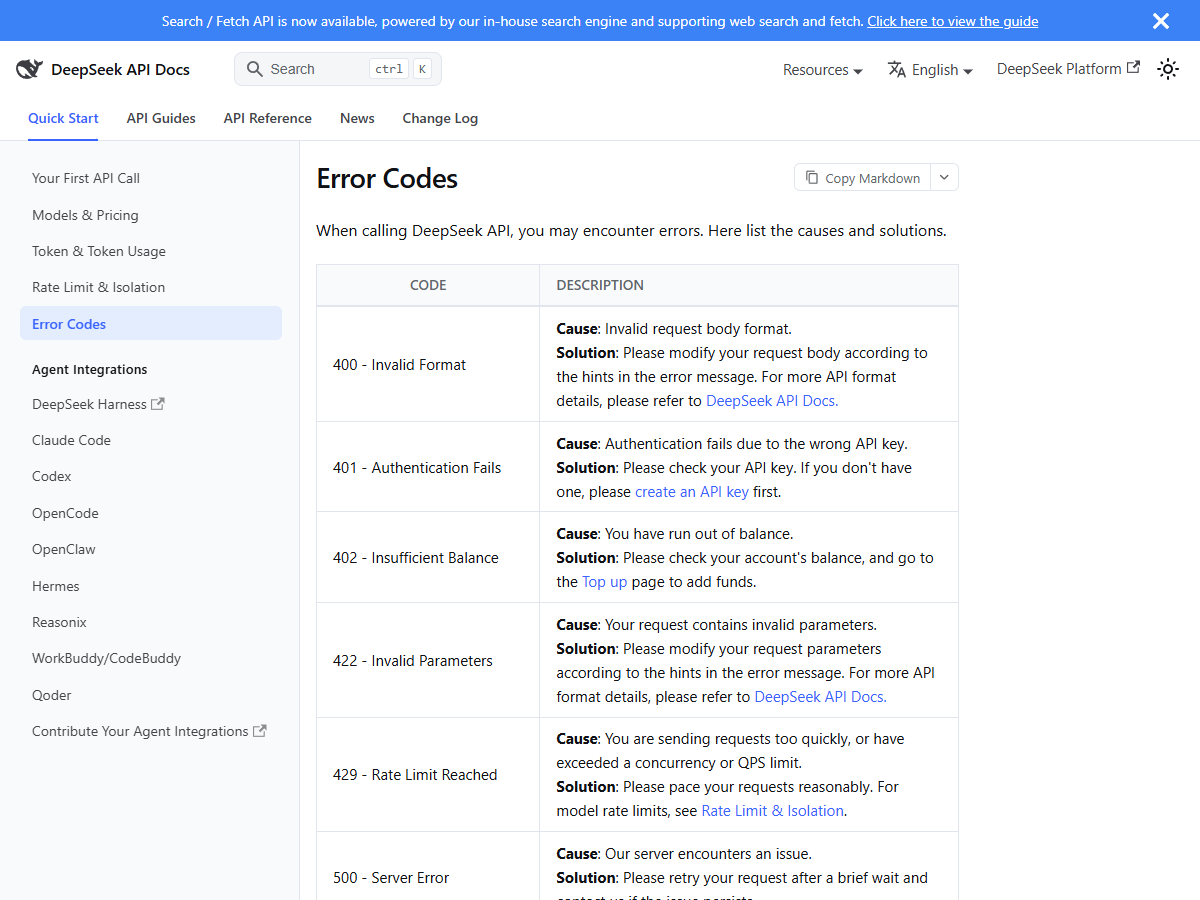
DeepSeek's error-code documentation gives the following cause and recommended action for status 402:
Cause: You have run out of balance.
Solution: Please check your account's balance, and go to the Top up page to add funds.
The error-code entry identifies the balance as the issue, but it does not explain how the account balance is calculated or how to inspect its components. Those details are covered in DeepSeek's balance and pricing documentation.
How 402 differs from 401 and 429
These three status codes point to different problems. Check the code before changing your key, adding funds or adjusting request volume:
| Code | What actually failed | What to do | What not to do |
|---|---|---|---|
| 401 Authentication Fails | The key itself was rejected | Check the key string, then create a new key | Do not top up; money will not fix a bad key |
| 402 Insufficient Balance | The key was fine, the wallet was empty | Check the balance, then top up | Do not regenerate keys; that changes nothing |
| 429 Rate Limit Reached | You exceeded concurrency or QPS | Slow down or queue requests | Do not top up; there is no per-month quota to refill |
DeepSeek does not list a monthly API allowance in the pricing information checked for this article. A 402 is a balance issue; a 429 is a rate-limit issue. Adding funds will not resolve a 429 response.
A batch can also use up its available balance while it is running. If later requests in the same batch begin returning 402, check the balance again rather than assuming that the API key has suddenly become invalid.
Check the balance through the API
DeepSeek provides a balance endpoint that can be called from your application or server. This is useful when you want to check the account without signing in to the web console.
curl https://api.deepseek.com/user/balance \
  -H "Authorization: Bearer ${DEEPSEEK_API_KEY}"
The documented response includes the following fields:
| Field | What DeepSeek says it is |
|---|---|
is_available | Whether the user's balance is sufficient for API calls |
currency | CNY or USD — one entry per currency the account holds |
total_balance | The total available balance, including the granted and the topped-up balance |
granted_balance | The total not expired granted balance |
topped_up_balance | The total topped-up balance |
If is_available is false while a balance entry appears to show funds, check that you are looking at the correct currency and compare the granted and topped-up amounts. The API response is more useful than relying on a single total shown elsewhere.
Understand granted and topped-up balances
DeepSeek's pricing documentation says that fees are deducted from the topped-up balance or granted balance, with the granted balance used first when both are available.
The balance endpoint defines granted_balance as the amount of granted credit that has not expired. This means a grant may no longer be available even if you remember receiving credit earlier. Check the current balance fields rather than relying on an old screenshot or a previous total.
For example, an account may have shown a $20 grant in the past, but that credit may have expired. The balance endpoint separates granted and topped-up funds, which can help identify what remains available.
Reasons a funded account may still return 402
The following situations are consistent with the balance and pricing rules in DeepSeek's documentation. We have not reproduced them in a funded account, so treat them as troubleshooting possibilities rather than live test results:
- The granted credit has expired. The API reports the remaining, non-expired granted balance. A grant that was available previously may no longer be usable.
- You are checking the wrong
currencyentry. The endpoint can return separate CNY and USD balances. Make sure you are checking the currency used by your account or payment. - Your usage cost was higher than expected. DeepSeek's published rates differ between peak and off-peak periods. If a job runs during a peak period rather than the off-peak period used in your estimate, it may use the balance more quickly.
Steps to resolve the error
If the balance endpoint confirms that no usable balance remains, open platform.deepseek.com/top_up and follow the account's top-up process. Then check the balance again before retrying the request.
If the console appears to show funds but the API still returns 402, call the balance endpoint and compare granted_balance and topped_up_balance for each currency. This can help identify expired granted credit or a currency mismatch.
DeepSeek's FAQ also lists questions about incorrect top-up balances and refunds. We did not make a top-up or request a refund, so this guide does not describe those processes or promise a particular outcome.
Handle 402 responses in your code
A 402 response should be handled as a billing condition, not as a temporary network failure. The following steps can prevent repeated requests from failing for the same reason:
- Treat 402 as non-retryable until the balance issue is resolved. Stop the affected job, alert the person responsible for billing and preserve any completed results.
- Check
is_availablebefore starting a large batch. This will not guarantee that the balance remains sufficient throughout the job, but it can catch an account that is already unable to make requests. - Log the numeric status code and the response body. This makes it easier to distinguish 402 from 401, which requires checking the key.
Handle 429 separately. It is a rate-limit response and may call for slower request pacing; adding funds does not address it.
Frequently asked questions
- Does 402 mean my API key is invalid?
- No. A wrong key returns 401 Authentication Fails. A 402 response means the key was accepted but the account did not have enough available balance.
- Where do I top up?
- The top-up page linked from DeepSeek's error-code documentation is
platform.deepseek.com/top_up. - Why do I still get 402 after topping up?
- Check the
GET /user/balanceresponse. It reportsgranted_balanceandtopped_up_balanceseparately for eachcurrency. DeepSeek deducts granted balance first, and the granted amount is defined as credit that has not expired. - Is 402 the same as hitting a monthly quota?
- No monthly API allowance is listed in the pricing information checked for this article. A 402 indicates insufficient balance; a 429 indicates a rate-limit problem.
- Can I check the balance without the console?
- Yes. Send GET https://api.deepseek.com/user/balance with the same Bearer token used for API authentication. The response includes
is_availableand balance details for eachcurrency.
Sources and what we could not test
| Claim | Where it came from | Date checked |
|---|---|---|
| Exact 402 cause and solution wording, plus the top-up link | DeepSeek API docs — Error Codes | 3 Nov 2026 |
| 401 and 429 definitions used in the triage table | Same Error Codes page | 3 Nov 2026 |
| Balance endpoint, and the is_available / currency / total_balance / granted_balance / topped_up_balance field descriptions | DeepSeek API docs — Get User Balance | 3 Nov 2026 |
| Granted balance is deducted before topped-up balance | DeepSeek API docs — Deduction Rules | 3 Nov 2026 |
| Peak window 01:00–04:00 and 06:00–10:00 UTC on weekdays, off-peak at half price | Same pricing page, footnote (2) | 3 Nov 2026 |
We did not reproduce a live 402 response, test how quickly a top-up appears in the API or confirm a minimum top-up amount. The troubleshooting steps here are based on DeepSeek's published error, balance and deduction documentation, checked on 3 November 2026.