How to Install DeepSeek Harness (dsh) on Windows: What We Hit on Each Route
DeepSeek Harness is DeepSeek's open-source agent runtime. It includes a desktop app and a Node.js command-line tool called dsh. We tested three Windows installation options on 4 November 2026: installing the npm package, running it through npx, and downloading the desktop installer. During testing, the first npx launch failed with a zod module-resolution error affecting 17 plugins. A later run using the cached files started successfully. We also found a PyPI package with a similar name, but it is a different product. This article uses version 0.2.1-rc.5, which the latest npm tag pointed to on the test date.
The three options behave differently. The local npm install is the option that worked consistently in our tests: it installed 616 packages in about six minutes, and all later tests passed. The first npx run failed during startup, although a later run with a warm cache worked. We therefore cannot say that npx always fails; we observed a failure on a first run with no cached copy of the package. The desktop installer is available from download.deepseek.com, but we checked the download files without installing them. Also, do not use pip install deepseek-harness for this product: that command installs an unrelated third-party API client.
The three official routes, and which one we recommend
DeepSeek provides the npm CLI and desktop installers. A similarly named package is also available on PyPI, but it is not the official Harness runtime:
| Route | Command or file | What we observed on 4 Nov 2026 |
|---|---|---|
| npm CLI (local) | npm install @deepseek-ai/dsh | 616 packages, roughly six minutes; every test afterwards worked |
| npx shortcut | npx -y @deepseek-ai/dsh web | First run (cold cache) failed at startup; a later warm-cache run booted |
| Desktop installer | dsh-latest-windows-x64.exe / macOS dmg | Files exist and are current (Last-Modified 30 Oct 2026); we did not install them |
| PyPI namesake | pip install deepseek-harness | A different product - an unofficial API client, not the agent runtime |
The desktop installer is separate from the npm CLI. The README reserves the desktop profile name for the Electron app, and the npm CLI rejects attempts to boot that profile. If you want the packaged desktop app, use the Windows .exe or macOS .dmg installer rather than the npm CLI. We checked that both installer URLs returned HTTP 200 and that the files had a 30 October 2026 modification date. We did not install either file, so this article does not assess the desktop app.
The npx failure we hit, verbatim
Our first-ever run, on a machine that had never touched this package:
npx -y @deepseek-ai/dsh web --no-openIt downloaded, then died at boot:
dsh: startup failed: 1 required plugin did not activate
Failed plugins (17):
typert (@deepseek-ai/dsh-typert-registry)
failed to import: Error: Cannot find package '...\node_modules\zod\index.js'
Did you mean to import "zod/index.cjs"?
The package downloaded, but the zod dependency could not be imported from the path requested by the plugin. Node suggested index.cjs instead of index.js, which points to a mismatch between the import path and the files available in the package. The same import error appeared in 17 plugins, and startup stopped.
Later that day, we ran the same command again with a warm npx cache, and it started successfully. We also tried a fresh download, but installation did not finish before our test timeout. We cannot tell from these tests whether the cold-cache error happens every time. The result is limited but useful: we saw the error once on a fresh run, and the same command worked later with cached files.
For a more consistent result in our tests, use the local installation described below.
The local install that just worked
npm install @deepseek-ai/dsh
./node_modules/.bin/dsh --version      # 0.2.1-rc.5
In our test, the local install added 616 packages and took about six minutes on our broadband connection. We inspected the installed zod package and found both index.js and index.cjs. All subsequent startup tests using this installation succeeded.
There are two version details to check before installing. On 4 November 2026, the latest npm tag pointed to 0.2.1-rc.5, which was published on 29 October. Version 0.2.2-alpha.3 was available only under the alpha tag. A 0.2.2 release candidate appeared on the next tag later that day, after our tests ran, and it does not change what a plain install gets. The project labels this release a developer preview and warns that compatibility-breaking changes may occur. Check the installed version with dsh --version. This command only reports the version; it does not confirm that all plugins will start successfully.
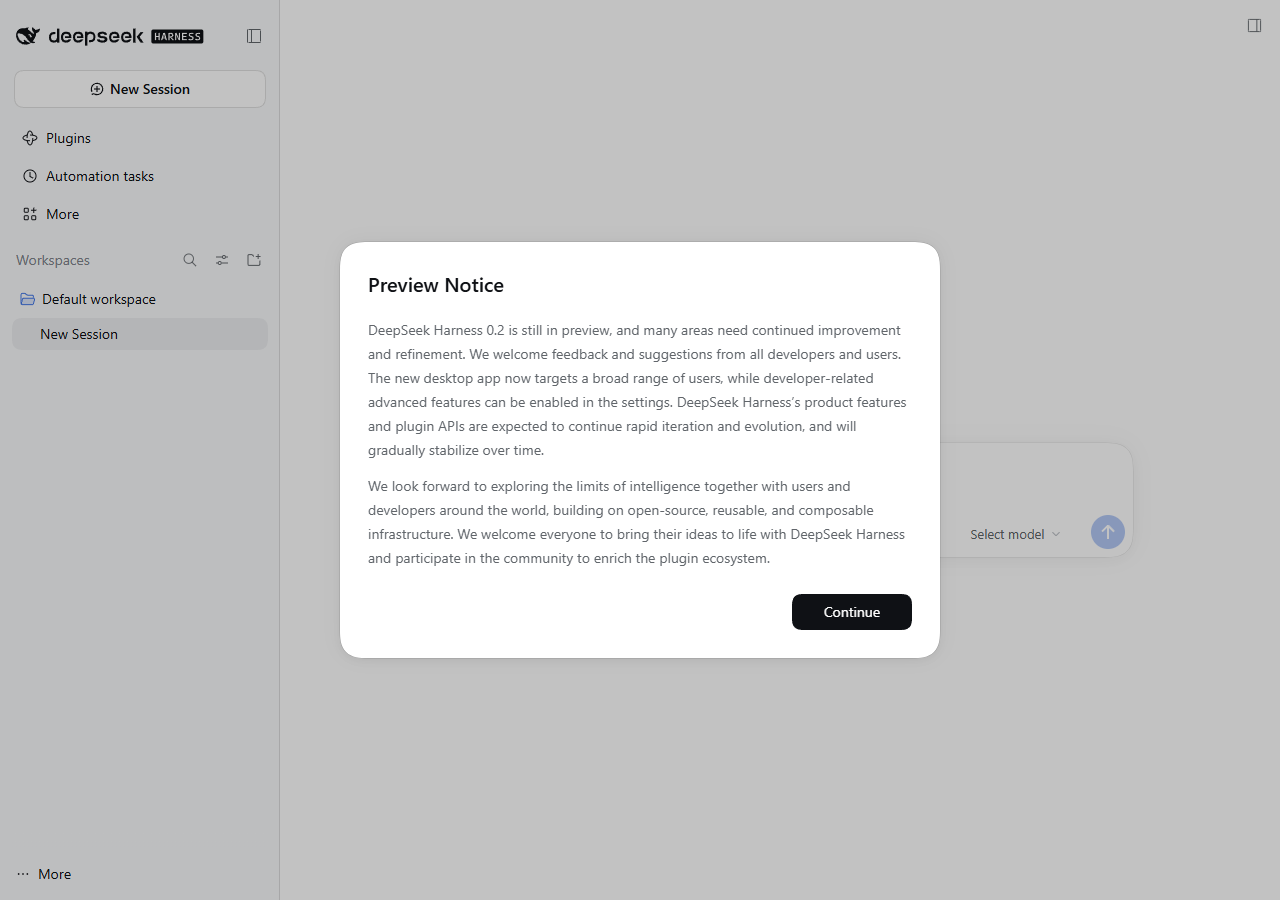
dsh web in our test, version 0.2.1-rc.5. The screen displays a preview notice, and no model is selected when the app first opens.What the first launch actually asks of you
dsh web prints one line:
dsh web: http://127.0.0.1:3080/?token=…
The output contains three details to note:
- The token is used to authenticate the browser session. If you open
http://127.0.0.1:3080/without the query string, the server returns 401 and the message: "dsh web authentication required. reopen the URL printed by dsh web." Copy the complete URL from the terminal, including the token. A new token is generated each time dsh web starts. - The server listens on localhost by default. According to
dsh web --help,--hostaccepts one IPv4 or IPv6 address assigned to a local interface and rejects wildcard addresses. The help output also lists TLS and trusted-host options for configurations that need access beyond the local machine. - No model is selected automatically. The composer displays "please choose a model" until you select a model and configure a DeepSeek API key. On our test machine, the interface appeared in Chinese, matching the system language. You can add the key on the Models page, which stores it in a credentials file under
$DSH_HOME, or setDEEPSEEK_API_KEYin the environment before launch.

The PyPI package that is not this product
A search for "deepseek harness pip" also returns the command pip install deepseek-harness. We checked its PyPI listing on 4 November 2026. Version 0.3.1 describes itself as a "Protocol-aware client for DeepSeek V4-Pro / V4-Flash / Vision." It is an unofficial third-party client for the DeepSeek API, not the Harness agent runtime discussed here. It does not provide the dsh command, profiles, or Harness plugins.
The official Harness installation options we found were the npm package and the desktop installers. The PyPI package is maintained separately and serves a different purpose. Check the package name and publisher before following an installation guide; similar names do not mean that two packages are related.
The tui command in the help text does not ship
dsh --help uses dsh tui in three of its own examples. On our install, dsh tui fails:
Error: dsh: profile "tui" does not exist; create it with 'dsh plugin --profile tui add <package>'
In version 0.2.1-rc.5, the automatically initialized profiles in the installed code are web, headless, sdk, sdk-minimal, and acp. There is no shipped tui template. The README qualifies its example by saying that the tui profile must already be installed, but the help screen does not include that qualification. As a result, copying the help example on a fresh installation produces the error shown above. Our CLI guide explains the differences between these entry points.
Frequently asked questions
- Is DeepSeek Harness free to install?
- The npm package and desktop installers are free to download. Running tasks through Harness requires a DeepSeek API key, and API usage is billed at DeepSeek's published token rates.
- What Node version do I need for dsh?
- We tested dsh with Node v22.22.2. The package also declares a required Node engine range and checks it at startup. If your Node version is outside that range, the command should return a version error.
- Why does my browser show 401 when dsh web is running?
- The URL dsh prints includes a
?token=…query string and that token is the authentication. Opening the bare address gives a 401. Copy the whole line from the terminal, token included; the token changes each time you restart the server. - Is the PyPI deepseek-harness package official?
- No. It is an unofficial third-party API client by a different author. The official DeepSeek Harness ships via npm (
@deepseek-ai/dsh) and desktop installers on download.deepseek.com. - Should I use npx or install locally?
- For a quick test, npx may be convenient; it worked in our warm-cache run. For repeated use, we recommend the local npm installation because it worked consistently in our tests. Our first cold-cache npx run failed, but we could not reproduce that failure in a completed second cold run.
Sources and what we could not test
| Claim | Where it came from | Date checked |
|---|---|---|
| npm @deepseek-ai/dsh: latest = 0.2.1-rc.5 (3 Nov 2026), alpha = 0.2.2-alpha.3; 41 versions since 10 Aug 2026 | npm registry, package metadata | 4 Nov 2026 |
| Developer preview notice and 'tui profile is installed' qualification | deepseek-harness README (the copy installed with 0.2.1-rc.5) | 4 Nov 2026 |
| Desktop installers exist and current: dsh-latest-windows-x64.exe / dsh-latest-macos-arm64.dmg, Last-Modified 30 Oct 2026 | download.deepseek.com, HTTP HEAD check | 4 Nov 2026 |
| Shipped profile list (web/headless/sdk/sdk-minimal/acp) and reserved desktop name | dsh-app-boot source shipped inside the installed package | 4 Nov 2026 |
| PyPI deepseek-harness 0.3.1 = third-party 'protocol-aware client', not the agent | PyPI project page | 4 Nov 2026 |
| All quoted errors, the 616-package install, boot behavior and screenshots | our own runs, Windows 11 + Node v22.22.2 | 4 Nov 2026 |
We did not install the desktop .exe or .dmg; we only checked that the download URLs existed and that the files were current at the time of testing. We observed the cold-cache npx startup failure once, but could not reproduce it in a completed repeat test because the fresh installation did not finish before the timeout. We also did not have a funded DeepSeek API key on the test machine, so testing stopped at the model-selection screen. This article does not cover a live chat session.