Grok Free Tier, Tested: 30 Requests per 24 Hours, Two Models, and the Exact Limit Screen
We tested Grok's free account on 5 November 2026. We signed in with Google, without using an X account or entering payment details or a phone number. We then sent chat requests and checked the rate-limit information exposed by grok.com. This article reports what appeared in that one account: the available model options, the request limit, and the message shown when the Fast-model allowance was exhausted.
In our account, the model picker showed Fast and Build as available; Auto, Expert, and Heavy displayed "Requires SuperGrok". The Fast-model rate-limit endpoint reported 30 requests in a rolling 24-hour window. As we used the remaining allowance, its counter moved from 3 to 2, then 1 and 0. A separate grok-4 bucket showed a limit of 7 requests per 24 hours, but we did not use those requests. When the Fast counter reached zero, Grok displayed an upgrade offer and a countdown. We also found that resubmitting a request could use quota even when we did not receive a complete answer.
Signing up without an X account
The sign-in page at accounts.x.ai/sign-in showed five options: Google, X, Apple, GitHub, and email. We selected Google. After signing in, the page asked for a full name and age and required the user to confirm they were at least 18. We reached the Grok chat interface without creating an X account or entering a phone number or payment-card details. This describes the sign-up flow we saw on 5 November 2026; the available options may change.
A cookie-consent popup appeared about twenty minutes into our session. It blocked the message input until we dismissed it. In our session, selecting "Reject All" closed the popup.
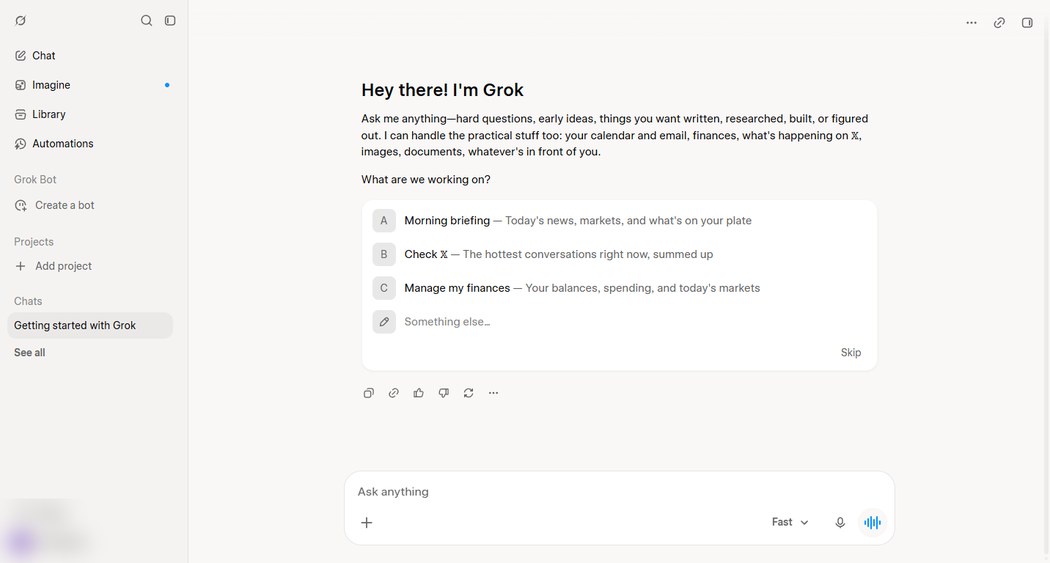
Which models a free account can use
Opening the model picker above the input box shows five options. Here is the full menu with each option’s state on a free account:
| Model | Free account |
|---|---|
| Fast | Available — the default selection |
| Build | Available |
| Auto | Requires SuperGrok |
| Expert | Requires SuperGrok |
| Heavy | Requires SuperGrok |
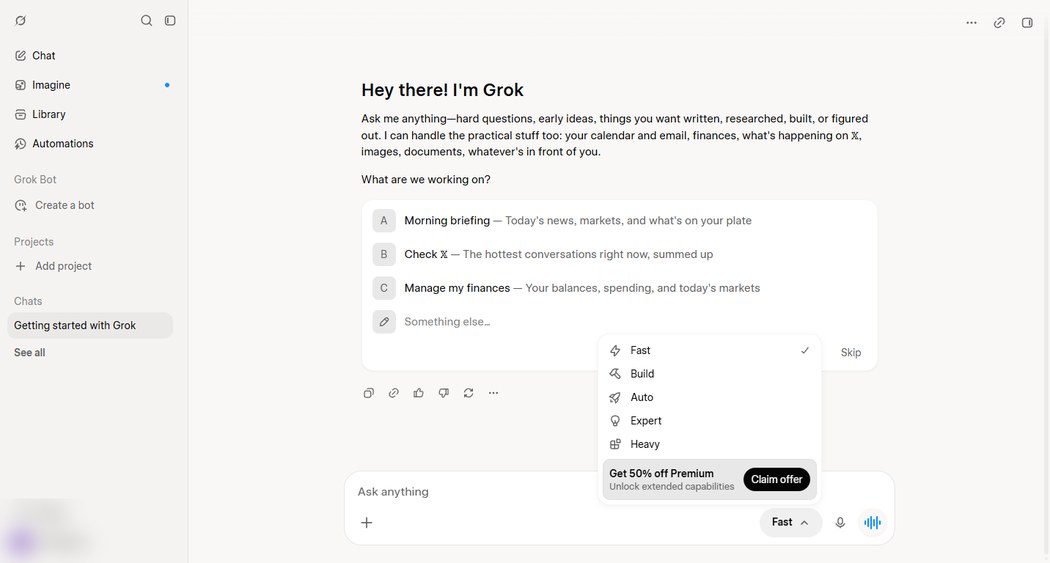
The "Requires SuperGrok" label is inconsistent with the current plan names shown on the pricing page we checked. That page listed Plus, Premium, Super, and Ultra, but not SuperGrok. We could not verify which current subscription unlocks Auto, Expert, or Heavy. See the Grok pricing article for the side-by-side comparison.
The 30-request limit, measured one request at a time
To measure the Fast-model allowance, we repeatedly sent the same short prompt: "Reply with the single word OK and nothing else." After each submission, we checked grok.com's rate-limit endpoint (POST /rest/rate-limits, with modelName set to "grok-3", the bucket used by Fast in our test). The response included these fields:
windowSizeSeconds: 86400— a rolling 24-hour windowtotalQueries: 30— thirty requests per windowremainingQueries— what is left right now
Near the end of the test, the remaining count moved from 3 to 2, then 1 and 0, with each submission reducing it by one. At zero, the endpoint returned waitTimeSeconds: 84491, or about 23 hours and 28 minutes. This is consistent with a rolling window: requests become available again as earlier requests age out, rather than all resetting at midnight. The countdown displayed in the interface is time-sensitive, so the exact minute shown may differ from the endpoint value by the time a reader checks it.
The endpoint also showed a separate grok-4 bucket with totalQueries set to 7 per 24 hours. It still showed 7 of 7 remaining at the end of our session. We did not send requests through that bucket, so its actual behavior is untested. The 30-request finding applies only to the Fast bucket we exercised.
The limit screen, quoted
When the count reached zero, the app did not block the input box or show an error. Instead it inserted a card into the conversation flow, which reads:
“Upgrade for higher limits — now 50% off”
“Or wait 23 hours 27 minutes before the limit is gone”
[Claim offer]
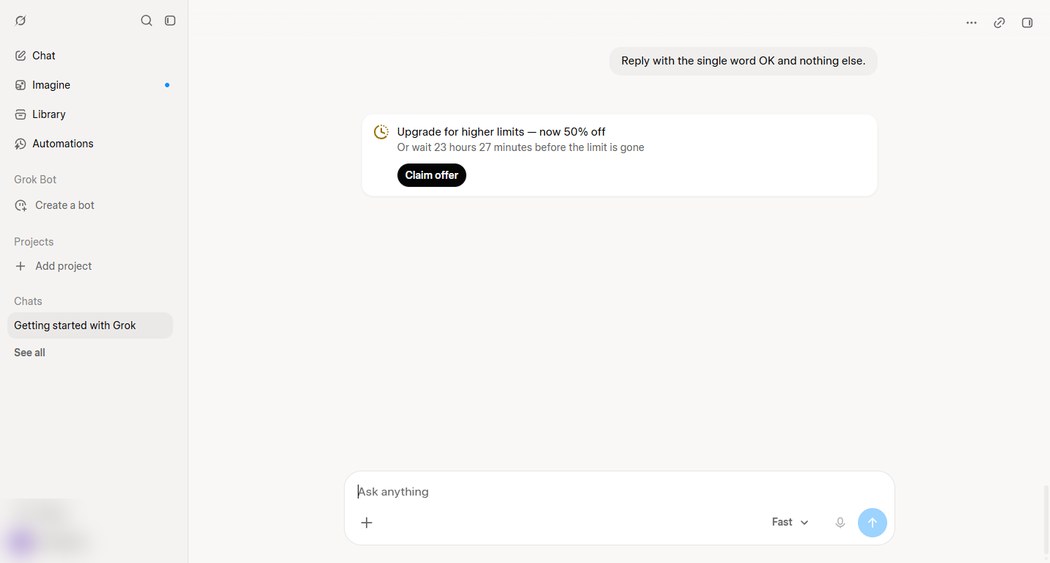
After the limit was reached, a new prompt still appeared in the conversation, but Grok did not generate a reply. This can look like the model has stopped responding, even though the request limit may be the reason. Check the limit card or wait for an earlier request to age out before repeatedly resending the prompt.
Interrupted requests still count
During the session, we restarted some requests by pressing Enter again while an answer was streaming or after the interface appeared to stall. Those extra submissions consumed quota even when we did not see a complete answer. At the end of the session, the counter indicated 27 requests used, while we had seen replies to roughly 15 submissions. Because we did not log every retry separately, we cannot give an exact breakdown of the difference.
For practical purposes, assume that each submission may use one request, even if you stop the answer or the interface appears stuck. Before pressing Enter again, check whether the previous request is still processing. This is a precaution based on our session, not a guarantee about how every interrupted request is counted.
What the official pages say — and where they disagree with the app
The Free column on the pricing page uses terms such as "Limited AI usage", "Limited Chat requests", and "Limited agent requests"; it does not state a number. The FAQ says plan allowances refresh weekly, while the Fast-model endpoint in our free account reported a 24-hour rolling window. One possible explanation is that the paid-plan usage pool and free-chat request limit are separate meters, but we could not verify that. The safest conclusion is to keep the two observations separate rather than assume that the weekly rule applies to the free tier.
We cannot say whether every free account receives 30 Fast requests, whether the allowance changes as an account ages, or what happens when the separate grok-4 bucket is used. Those points were outside this test.
Frequently asked questions
- How many messages do you get on Grok for free?
- In our free account, tested on 5 November 2026, the Fast-model endpoint reported 30 requests per rolling 24-hour window (totalQueries: 30; windowSizeSeconds: 86400). We watched the remaining count fall by one with each submission. A separate grok-4 bucket showed 7 requests per 24 hours, but we did not test it. Limits may differ for other accounts or regions.
- Do you need an X (Twitter) account to sign up for Grok?
- No X account was needed in our test. The sign-in page offered Google, X, Apple, GitHub, and email; we used Google. The flow asked for a name and age confirmation (18 or older). We did not need to enter a phone number or payment details.
- Does the free limit reset at a fixed time?
- No fixed midnight reset appeared in our test. The endpoint reported a rolling 24-hour window, and the interface displayed a countdown. Earlier requests should become available again as they age out of that window; the exact remaining time depends on when each request was made.
- What happens when the Grok free limit is reached?
- In our session, Grok inserted an upgrade card with a countdown when the Fast-model allowance reached zero. New prompts still appeared in the conversation, but no reply was generated. The wording and countdown may change, so treat the quoted card above as a dated screenshot rather than a permanent interface description.
- Is Grok Build free to use?
- Build was selectable in the model menu on our free account, and the pricing page marked Grok Build as "Limited" on Free. We did not run a full Build session, so we cannot describe its practical limits or confirm how many Build requests are available.
Sources and what we could not test
| Claim | Where it came from | Date checked |
|---|---|---|
| 30 requests / rolling 24h on Fast (totalQueries, windowSizeSeconds, remainingQueries, waitTimeSeconds) | our own account, grok.com /rest/rate-limits endpoint read between sends | 5 Nov 2026 |
| Model menu: Fast and Build available; Auto/Expert/Heavy 'Requires SuperGrok' | model picker on our free account (screenshot above) | 5 Nov 2026 |
| Limit card text and minute-precise countdown | limit card shown at zero quota (screenshot above) | 5 Nov 2026 |
| Five sign-in options; age gate 'How old are you?', 18+ | accounts.x.ai sign-in page, walked through with a Google login | 5 Nov 2026 |
| Free column 'Limited AI usage / Chat requests / agent requests'; FAQ weekly-refresh wording | x.ai/pricing page text | 5 Nov 2026 |
We never spent the 7-per-24-hour grok-4 bucket, so its behavior when used is unverified. Voice, image generation, and agent features on the free tier were not probed. We did not run long enough to confirm the exact moment a spent request returns to the pool, only the countdown's word for it. Whether the 30-request figure is identical for accounts in other regions or of different ages, we cannot say.