What Is SuperGrok? The Old Plan Name and the Four Current Tiers
Search results for “SuperGrok” can be confusing. The Grok app still uses “Requires SuperGrok” for Auto, Expert and Heavy, but xAI’s current pricing page lists Plus, Premium, Super and Ultra. We checked the app’s model picker and its plans page on 5 November 2026. Here is what those screens confirm — and what they do not.
SuperGrok is xAI’s retired subscription name. The current product page sells four plans — Plus ($8/mo), Premium ($15 first month, then $30/mo), Super ($50, then $100/mo) and Ultra ($100, then $200/mo) — but the app’s model picker still gates Auto, Expert and Heavy with the label “Requires SuperGrok”, and no page we could find says which of the new tiers the label means. What the in-app plans page does publish, and what almost nobody else quotes, is the usage math: Premium = 4x more usage than Plus, Super = 15x, Ultra = 50x, each with a discounted first month. On a free account, only Fast and Build are selectable.
SuperGrok is the old name — here is where it still shows up
SuperGrok was the name of xAI’s paid chatbot subscription before the current lineup. When the pricing page was rebuilt around Plus, Premium, Super and Ultra, the name disappeared from the sales pages — but not from the product. It survives in at least two places we saw ourselves on 5 November 2026:
- The model picker on grok.com. Three of the five options — Auto, Expert, Heavy — carry the label “Requires SuperGrok” instead of a price or a tier name.
- Third-party pages. A whole cluster of independent sites (some in our own SERP capture for this article) still describe SuperGrok as if it were the current plan, which keeps the confusion alive.
In short, SuperGrok is an older subscription label that still appears in the app. The current plans page lists four paid tiers, but it does not say which tier first unlocks Auto, Expert or Heavy. We could not confirm that from a free account — the full list of what we could not verify is at the end of this page.
What the app locks behind SuperGrok on a free account
Opening the model picker on our free account shows the full menu and its gating:
| Model option | Free account state |
|---|---|
| Fast | Available — the default |
| Build | Available |
| Auto | Requires SuperGrok |
| Expert | Requires SuperGrok |
| Heavy | Requires SuperGrok |
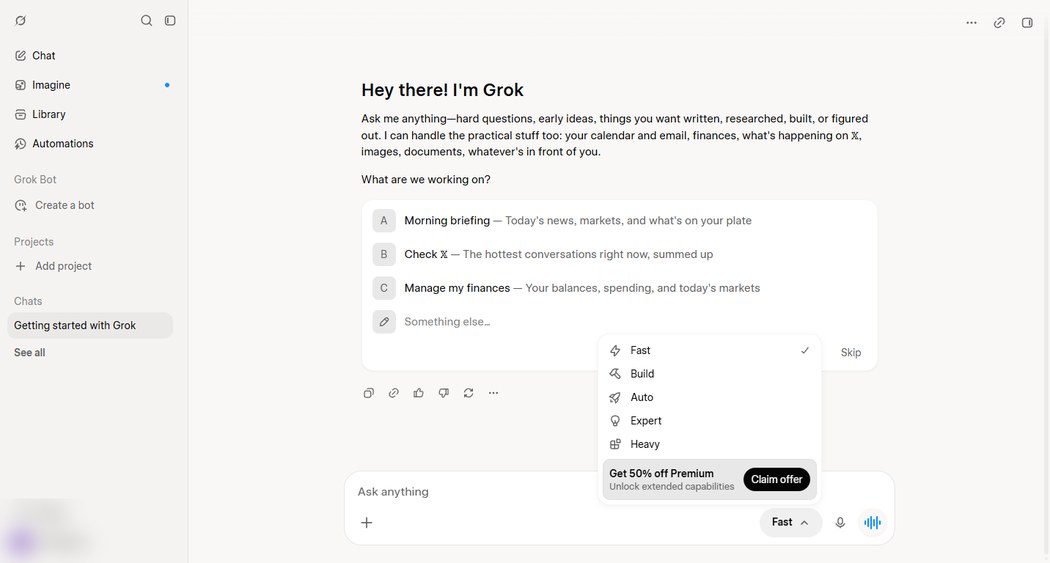
Two details from that same menu are worth pinning down. The upgrade banner at the bottom read “Get 50% off Premium — Unlock extended capabilities — Claim offer”. And when we drained our free Fast quota, the limit card also advertised “Upgrade for higher limits — now 50% off”. Both prompts we saw pointed users to Premium; the plans page also labels Premium as “Most popular”.
The four current tiers, with prices and what each includes
The in-app plans page (opened from the model picker’s upgrade entry) lists four plans. Here is the page’s own description of each, with the prices it showed us:
| Plan | Price shown | What the page says it includes |
|---|---|---|
| Plus | $8/mo | “Our introductory plan” — a shared usage pool; Grok Chat, Voice, Imagine, Build; Grok API access; Cursor; X perks |
| Premium | $15 first month, then $30/mo | “Most popular”; 4x more usage compared to Plus; the latest models; cloud agent; fewer ads on X |
| Super | $50 first month, then $100/mo | 15x more usage; 1080p video generation; priority during peak hours |
| Ultra | $100 first month, then $200/mo | 50x more usage; the strongest models; earliest access to new capabilities |
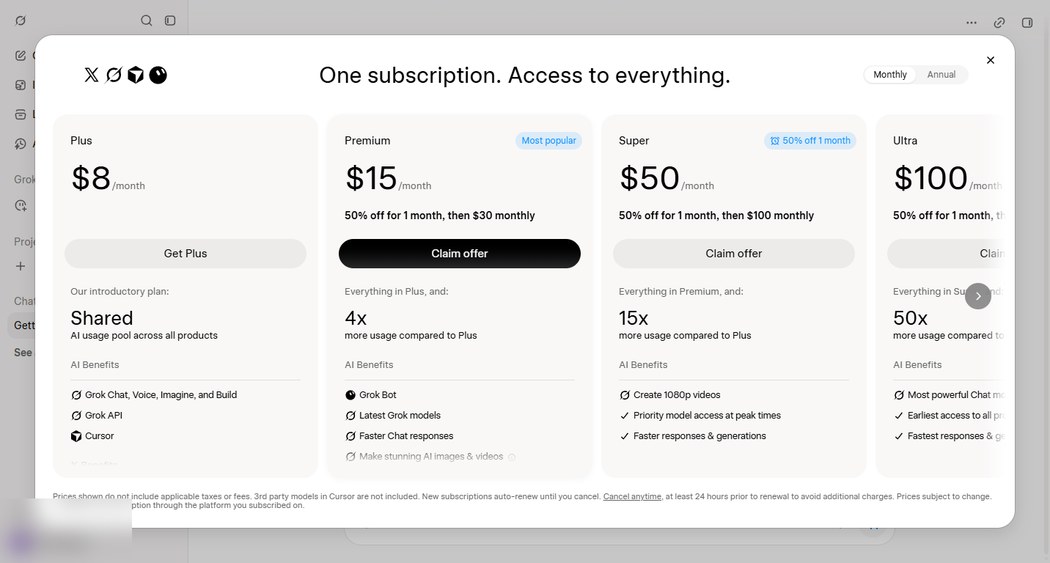
Same four plans appear on x.ai’s public pricing page at the same regular prices ($8 / $30 / $100 / $200, plus a Teams plan at $30/user that the in-app page did not show us). The full price-table breakdown, tier by tier, is in our Grok pricing article.
The usage multipliers: 4x, 15x, 50x
This is the part of the plans page we value most, because it is the only place the tiers are actually compared to each other. The page states the usage allowances relative to Plus:
- Premium: 4x more usage compared to Plus
- Super: 15x more usage
- Ultra: 50x more usage
For scale: the free tier we measured the same day allows 30 chat requests per rolling 24 hours, metered per model. The plans page lists Premium at 4x the Plus usage allowance, Super at 15x and Ultra at 50x. It does not give an exact number of messages for any paid tier, so these ratios cannot be converted into reliable message counts — the ratios themselves are the plans page’s own words, not our estimate.
The first-month promo prices, quoted
All three higher tiers were discounted for the first month when we looked:
| Plan | First month | After |
|---|---|---|
| Plus | $8 | $8/mo |
| Premium | $15 | $30/mo |
| Super | $50 | $100/mo |
| Ultra | $100 | $200/mo |
Premium’s discount was labeled on the page as “50% off for 1 month” ($15 instead of $30). Super and Ultra’s first-month figures came as strikethrough prices on the same page. These are promotional prices we observed on 5 November 2026; they are the kind of numbers that change without notice, so treat them as a snapshot, not a quote.
What we would check before paying
Before subscribing, check the tax amount shown at checkout, the renewal date and the cancellation deadline. The plans page footer states, in its own words:
- Prices exclude tax. The $30/$100/$200 figures will not be what your card statement shows.
- Subscriptions auto-renew, and cancellation requires notice at least 24 hours before renewal. That is the page’s own wording. We break the full text out in our Grok subscription article.
- Third-party models in Cursor are not included. Plus lists Cursor among its perks, but the footer carves out third-party models inside Cursor — check that combination before subscribing if Cursor is why you are buying.
- The pricing page’s FAQ describes plan allowances as refreshing weekly, while our free chat quota ran on a 24-hour rolling window. Two different meters, or two different wordings — we could not confirm which from the outside, and we say so in both places.
Which tier makes sense for what
We will not pretend to recommend a size without knowing your usage. What the page itself supports is this decision shape:
- You mainly want the gated models (Auto/Expert/Heavy): the app gates them with “Requires SuperGrok”, which implies a paid plan unlocks them — but since the plans page never maps the label to a minimum tier, verify before paying. This is our biggest open question, and the full list of what we could not verify is at the end of this page.
- You hit the free 30-message limit most days: the app’s own prompts point at Premium (both the menu banner and the limit card advertise it), and Premium is the first tier with a published multiple over the baseline pool (4x).
- You need video or peak-hour priority: that is Super’s pitch (15x usage, 1080p video, priority at peak).
- You want the newest models first: Ultra (50x, earliest access).
And if the answer is “neither”, the free tier’s real shape — two usable models, 30 requests per rolling 24 hours — is measured in our Grok free tier article.
Frequently asked questions
- Is SuperGrok still available?
- Not as a plan name. The current pricing page sells Plus ($8/mo), Premium ($30/mo), Super ($100/mo) and Ultra ($200/mo), plus Teams. The name survives only in the app's model picker, which still gates Auto, Expert and Heavy with 'Requires SuperGrok', and in older third-party articles.
- What does 'Requires SuperGrok' mean in the Grok model picker?
- It means those three models (Auto, Expert, Heavy) are not selectable on a free account. The app does not say which current tier removes the label - see 'Which tier makes sense for what' above.
- How much does SuperGrok cost?
- The name is retired; the paid tiers now cost $8/mo (Plus), $30/mo (Premium), $100/mo (Super) and $200/mo (Ultra), with first-month promos of $15, $50 and $100 on the higher tiers when we checked on 5 November 2026. Prices exclude tax per the plans page footer.
- What is the difference between Super and Ultra?
- Per the plans page: Super is 15x more usage than Plus, adds 1080p video generation and priority during peak hours, at $50 first month then $100/mo. Ultra is 50x more usage, the strongest models and earliest access, at $100 first month then $200/mo.
- Does buying a plan unlock the Expert and Heavy models?
- The model picker gates them with 'Requires SuperGrok', which implies a paid plan unlocks them, but neither the app nor the plans page names a minimum tier, and we have not purchased one. The full untested list is in 'Sources and what we could not test' below.
Sources and what we could not test
| Claim | Where it came from | Date checked |
|---|---|---|
| Model picker gating: Auto/Expert/Heavy 'Requires SuperGrok'; Fast and Build available on free | model menu on our own free account (screenshot above) | 5 Nov 2026 |
| Four plans, prices, 4x/15x/50x multipliers, 'Most popular' label, first-month promos | in-app plans page (screenshot above) | 5 Nov 2026 |
| Footer fine print: tax excluded, auto-renew, 24h cancellation notice, Cursor third-party models excluded | in-app plans page footer | 5 Nov 2026 |
| Same regular prices ($8/$30/$100/$200) plus Teams $30/user on the public page | x.ai/pricing | 5 Nov 2026 |
| Upgrade banner 'Get 50% off Premium' and limit card 'now 50% off' | model picker banner and limit card on our free account | 5 Nov 2026 |
We did not pay for any plan, so we cannot show the unlocked model menu, confirm which tier removes the 'Requires SuperGrok' label, or measure what 4x usage means in actual message counts. The multipliers are quoted from the plans page, not experienced. Prices are a 5 November 2026 snapshot and change without notice. The Teams plan appears only on the public pricing page, not in the app flow we walked.