Free AI Voice Generator: 4 Tools, One Sentence, and What You Can Download Without Paying
Every "free AI voice generator" listicle claims its tools are free. So we did the boring thing: we typed the same 148-character sentence into four different tools on free accounts, generated the audio, and downloaded every single file. Three of the four free tiers stop at exactly 10,000 characters a month, all four handed over an audio file for $0, and the quality gap between them is bigger than any of them admits. Here are the numbers — and you can press play on all four samples below.
Short answer: All four tools we tested let you generate and download speech on a free account, with no watermark and no payment screen. The catch is the meter, not the download button: ElevenLabs, CapCut and Luvvoice all cap the free tier at 10,000 characters per month (we watched the counters drop). Luvvoice additionally limits a single conversion to 3,000 characters. Audio quality differs a lot — ElevenLabs gave us a 128 kbps MP3 while Luvvoice gave us 48 kbps for a sentence of the same length.
The four tools, side by side
| Tool | Free allowance | Per-generation limit | Free download? | Our file |
|---|---|---|---|---|
| ElevenLabs | 10,000 credits/month (1 character = 1 credit) | Counted against the monthly total | Yes — direct MP3, no paywall | 167 KB · 9.4 s · 128 kbps |
| CapCut | 10,000 characters/month | Not stated | Yes — "Audio only" export | 89 KB · 11.1 s · 64 kbps |
| Clipchamp | Not displayed | Not stated | Yes — "Audio only" is the default export option | 242 KB · 10.0 s · AAC (largest file) |
| Luvvoice | 10,000 credits/month | 3,000 characters per conversion | Yes — direct MP3 | 64 KB · 10.8 s · 48 kbps |
None of the four asked for a card. None of the four added a spoken watermark or an attribution message to the beginning of the file. We paid $0 total.
What we did (so you can repeat it)
One sentence, pasted into every tool, unchanged:
Good morning! This is a short test recording. We are comparing how each free AI voice generator sounds, and what it lets us download without paying.
That's 148 characters — long enough to be a real sentence, short enough that any per-generation limit would show up. We used each tool's default or first available English voice, generated once, downloaded, and then measured the file. We did not sign up for a trial, and we did not enter payment details anywhere.
1. ElevenLabs — the best-sounding file, and the only one that tells you exactly what you spent
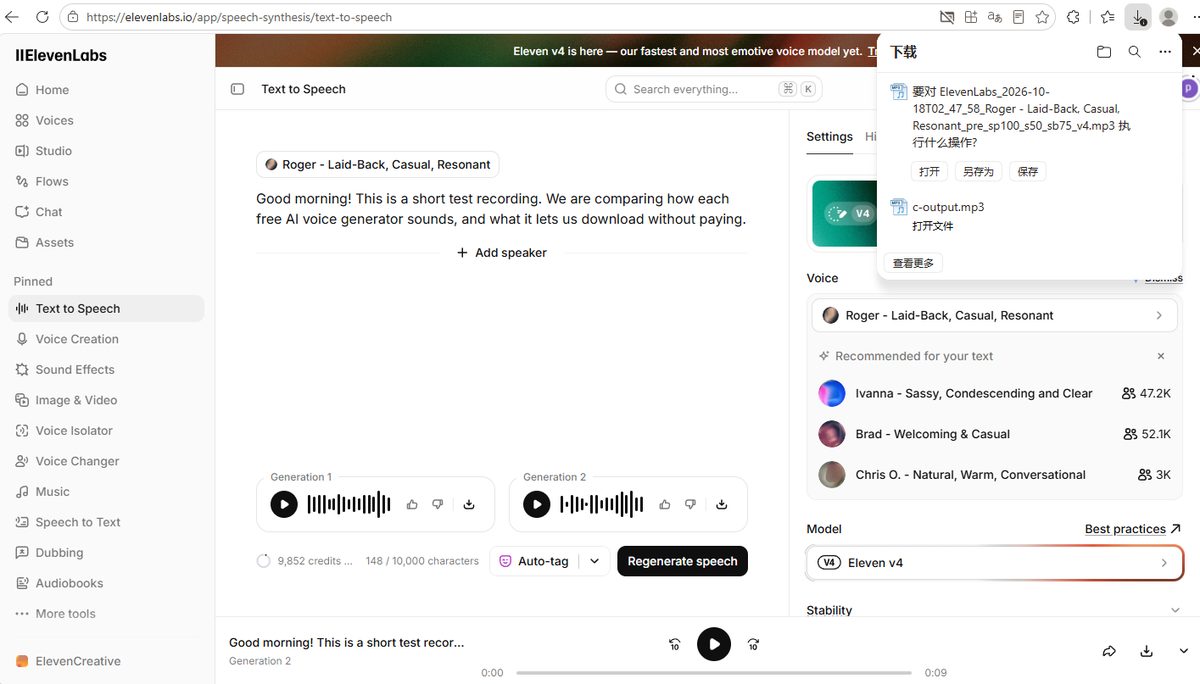
ElevenLabs is the tool most people mean when they say "AI voice," and on a free account it was the most transparent of the four. Our test text used 148 of our 10,000 monthly credits, and the counter updated to 9,852 right after the second generation — so on ElevenLabs, one character really does cost one credit.
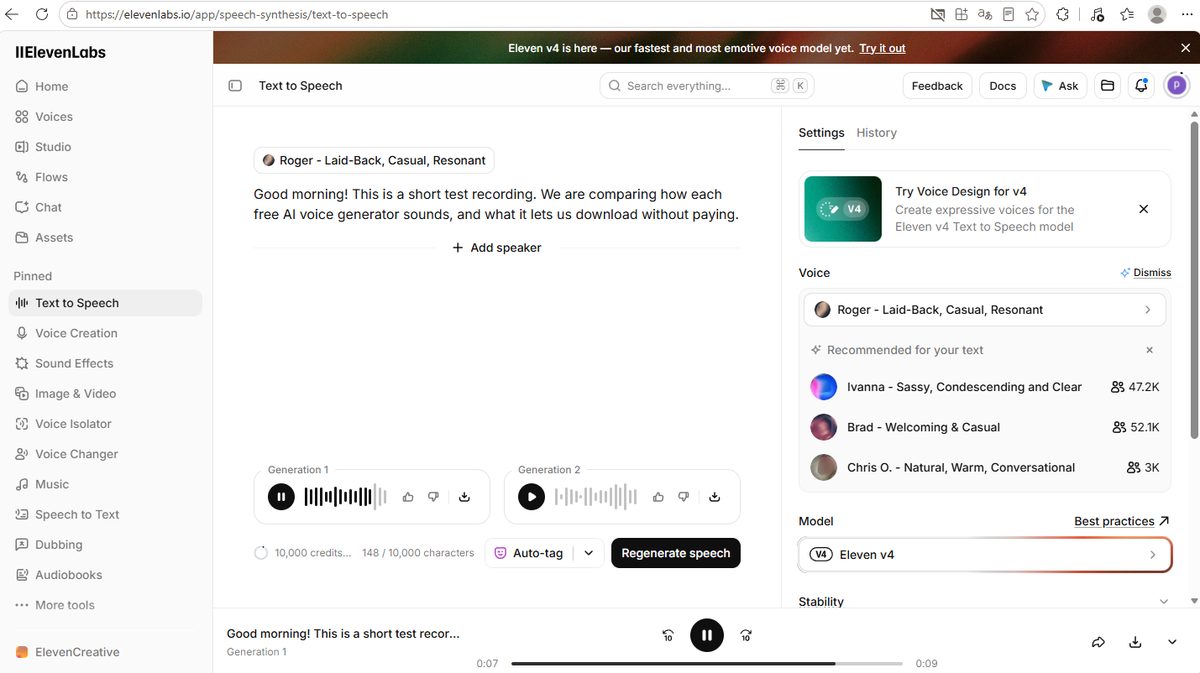
Two things worth knowing: the free account was running Eleven v4, the newest model, and the default voice on our screen was Roger (described right there in the interface as "Laid-Back, Casual, Resonant"). Free users aren't being fobbed off with an older model.
The download button behaved the way everyone hopes it will — no upgrade dialog, no trial offer, just an MP3 with the voice and settings in the filename.
Listen to it
ElevenLabs, free account, Eleven v4 model, Roger voice — 167 KB MP3 at 128 kbps, 9.4 seconds.
The part free users need to know: commercial use is a paid feature
ElevenLabs shows its paid plans during signup, and one line on that page matters more than the prices:
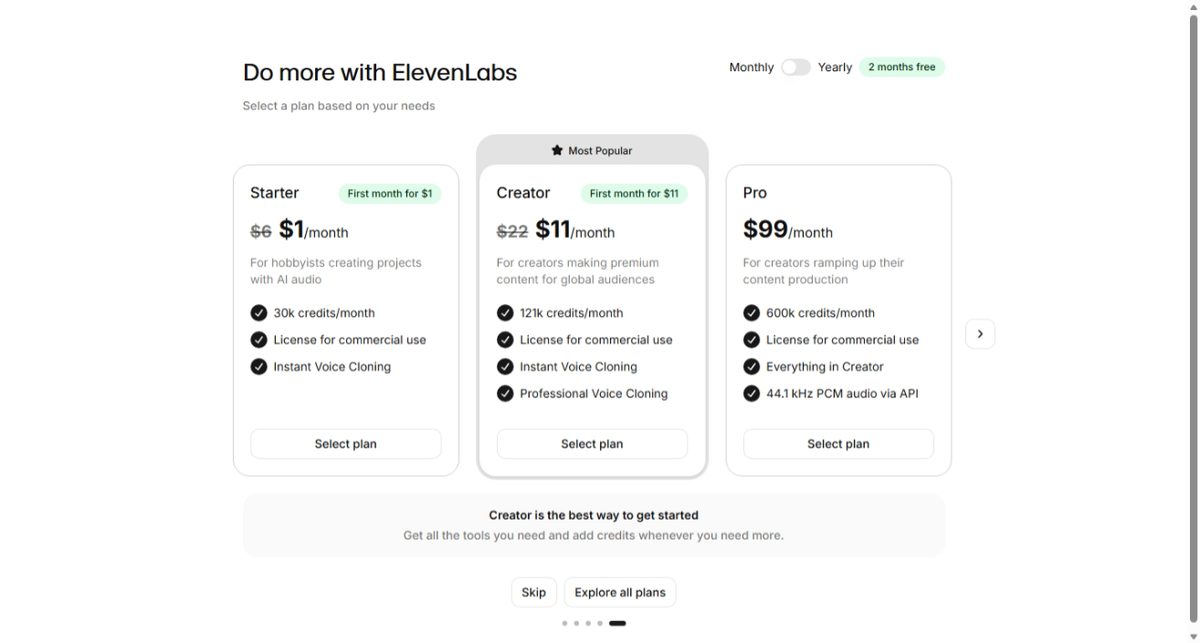
- Starter: US$1 for the first month, then US$6/month — 30,000 credits.
- Creator: US$11 for the first month, then US$22/month — 121,000 credits.
- Pro: US$99/month — 600,000 credits.
- Yearly billing takes two months free.
- "License for commercial use" is listed on all three paid plans — and it is not listed for the free tier.
Read that last line twice. Downloading is free; using the audio in paid or commercial work is a different question, and on ElevenLabs it's tied to a subscription. If you're making a YouTube video, a course, or a client ad with free-plan audio, check the licence before you publish — this is the single most misunderstood thing about "free" AI voices, and most comparison articles skip it entirely.
2. CapCut — 376 voices, and free ones work even at zero credits
CapCut's web text-to-speech page looks generous at first glance: 376 voices in the library, sorted into categories like Trending, TikTok and Narration. Most of the voices we saw carried a purple crown icon, which marks the paid "Pro" voices — but plain voices without the crown are there and they work.
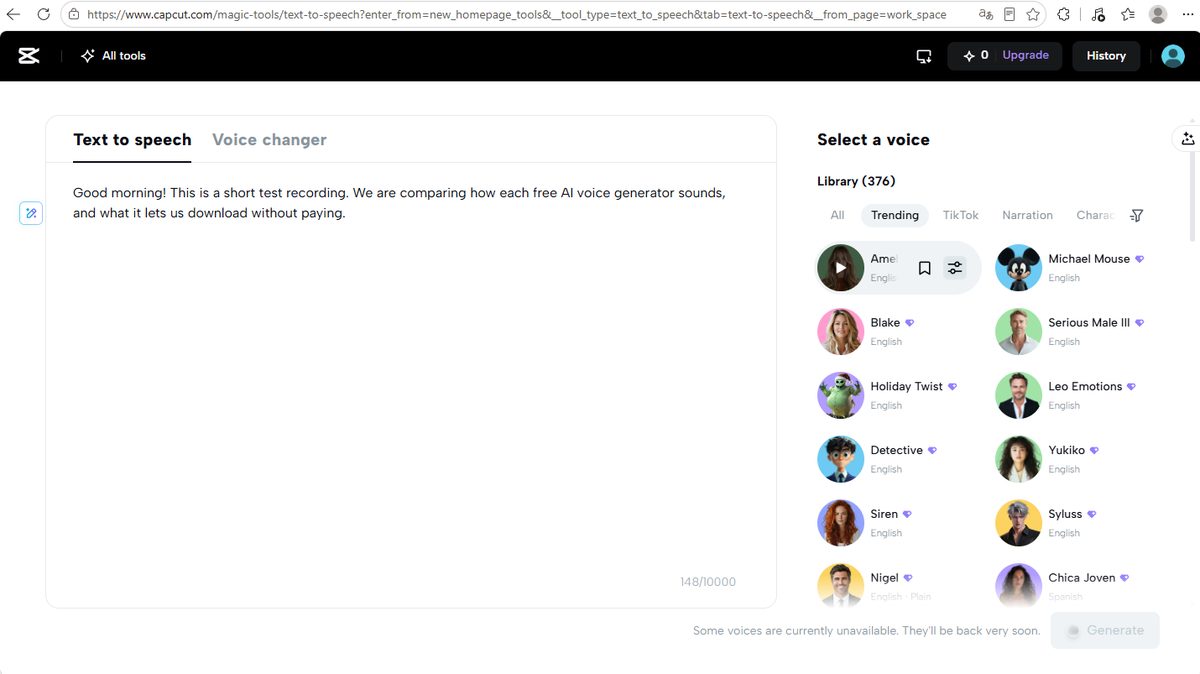
The odd detail: our credit balance in the top bar read 0, and the generation still completed. Free voices on CapCut's TTS page didn't appear to consume credits at all. Same 10,000-character ceiling applies to the input box, though — our counter sat at 148/10,000.
Export was friendlier than we expected: the result panel offered a straight download with an "Audio only" option, so you don't have to render a whole video just to get the voice.
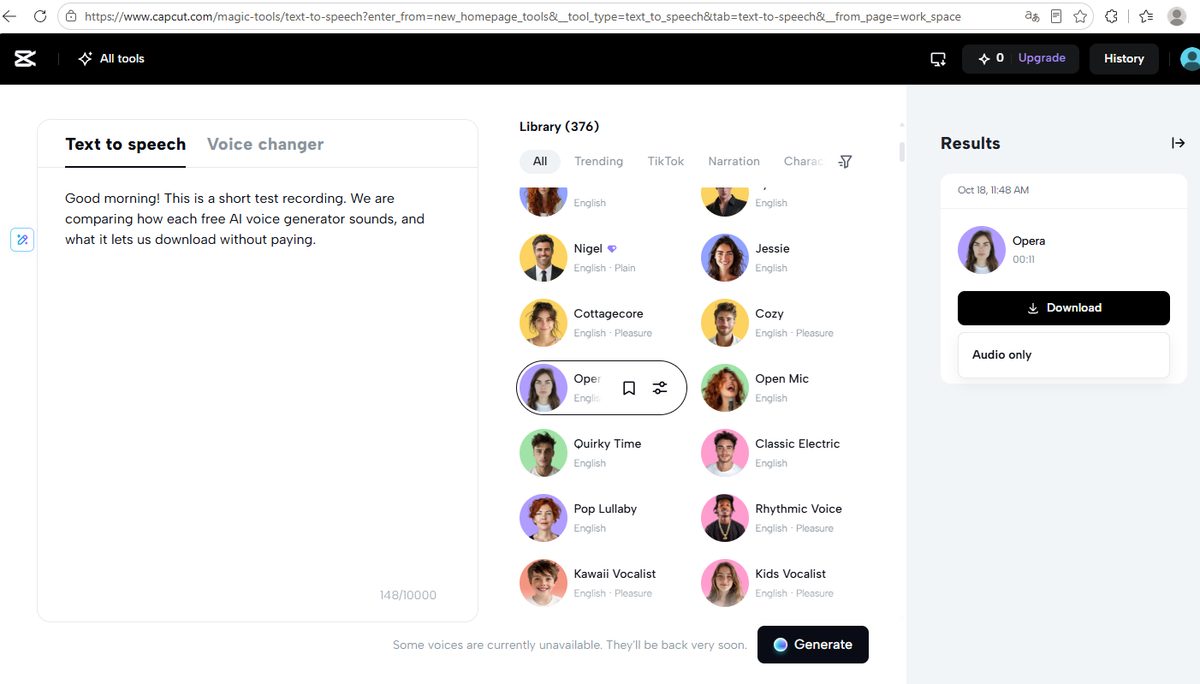
CapCut, free voice — 89 KB MP3 at 64 kbps, 11.1 seconds.
3. Clipchamp — Microsoft's editor, and the only one where "audio only" is the default
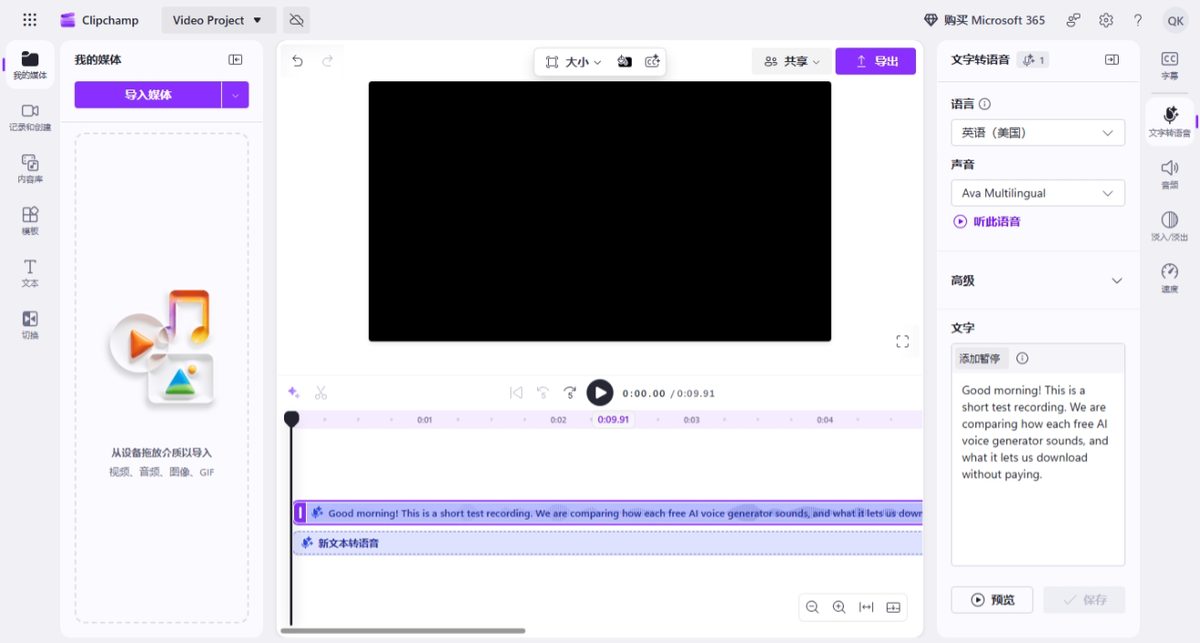
Clipchamp is Microsoft's video editor, and its text-to-speech tool lives inside a project. We pasted the same sentence, picked Ava Multilingual with English (United States) as the language, and the 10-second clip landed on the timeline.
Then came the nice surprise. When we opened the export menu, the first option — and the one already selected — was "Audio only" (.m4a). You don't have to export a video file to walk away with the voice. The only paid marker in that menu was a small diamond next to 4K video; audio-only, 1080p and 720p were free.
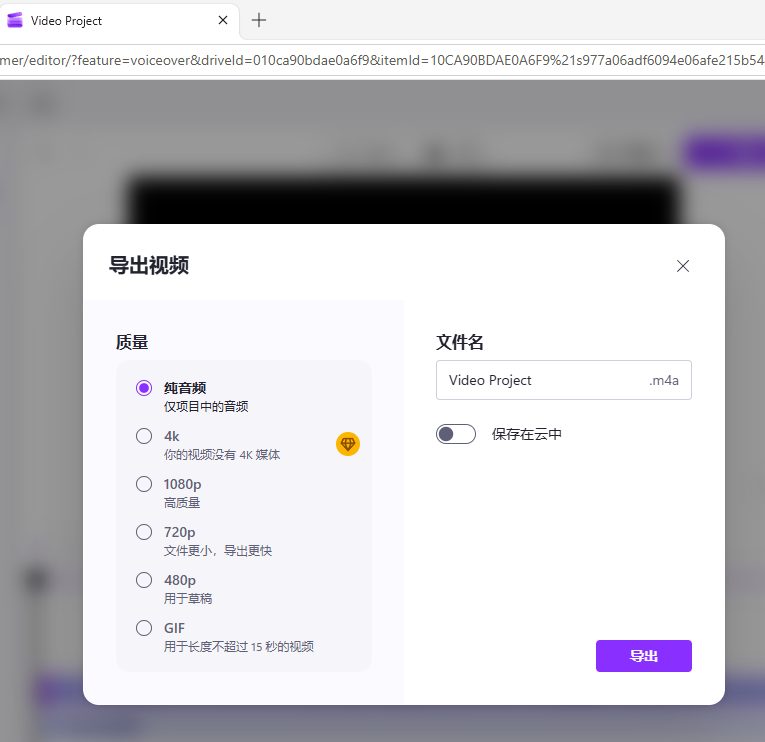
Clipchamp, Ava Multilingual — 242 KB M4A, 10.0 seconds. One note on the screenshot: our Clipchamp session displayed in Chinese because of the account's region setting; the controls and options are the same as the English interface.
4. Luvvoice — no signup, but a hidden 3,000-character ceiling per conversion
Luvvoice is the one that markets itself as the simple, unlimited-feeling option, and it's also the only one of the four where a per-conversion limit is spelled out on screen: 3,000 characters maximum each time you convert. Our 148-character sentence showed as 149/3,000.
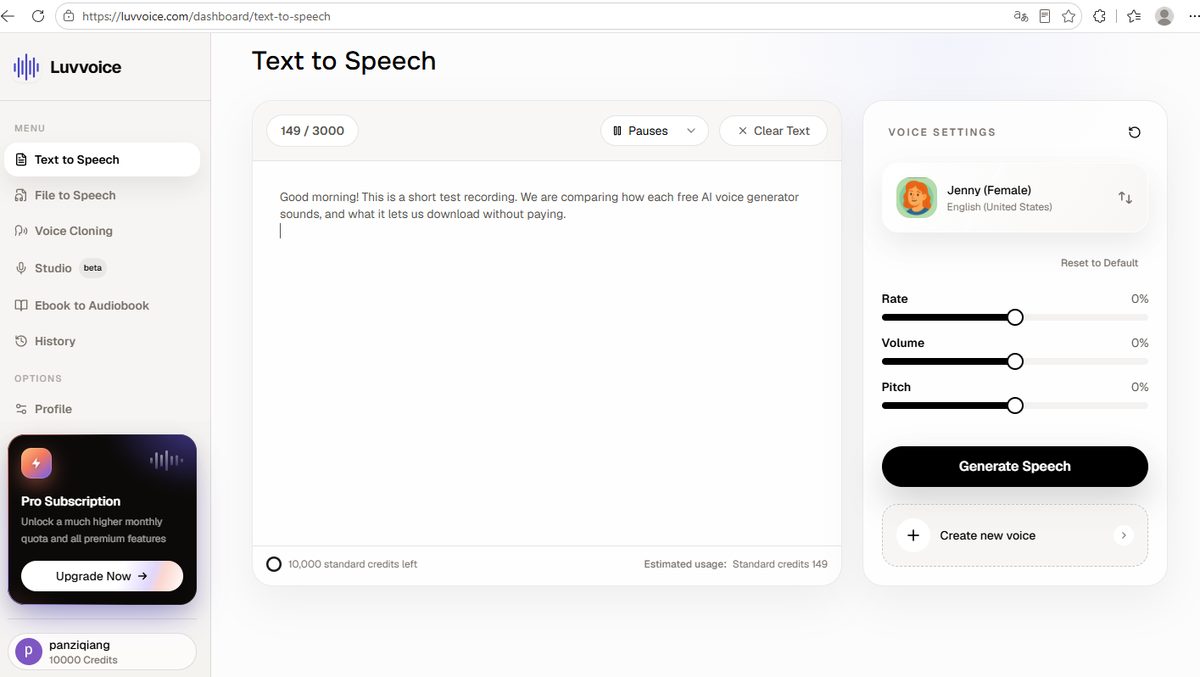
The other number on that screen: 10,000 credits left. So despite the "free forever" feel, Luvvoice meters you the same way the others do — and after our conversion the counter read 9,850, meaning that 149-character sentence cost 150 credits. There's a Pro subscription banner in the sidebar, as usual.
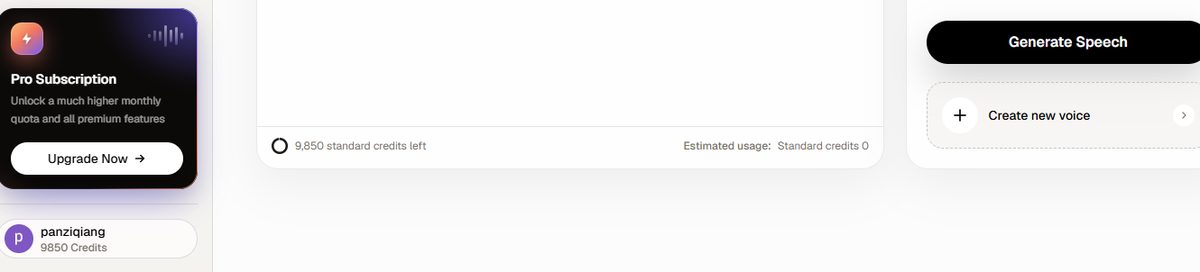
Luvvoice, Jenny (Female) — 64 KB MP3 at 48 kbps, 10.8 seconds. The smallest and lowest-bitrate file of the four.
The pattern nobody mentions: 10,000 is the free-tier ceiling
This is the finding that surprised us most. Three of the four tools that showed a number — ElevenLabs, CapCut and Luvvoice — all stop at 10,000 characters per month. Not 10,000-ish. Exactly 10,000.
What does 10,000 characters buy you? Based on our own test, where 148 characters produced about 10 seconds of finished audio, a full free month is roughly 67 sentences like ours, or about 11 minutes of audio — around 1,700 written words. That's plenty for a short voiceover here and there, and nowhere near enough for a daily podcast or a full audiobook.
It's the same playbook we documented with image tools: in our 6-tool free AI image generator test, Adobe Firefly handed out a couple of generations a day and NightCafe gave 20 freebies in writing, while Canva's own comparison table puts Free users at 20 premium AI uses per month. Different tool, different unit, same idea: the free tier is a sample, not a supply.
Quality: the file sizes tell the story
We're not going to tell you which voice sounds "most human" — that's your ear, not ours. But the files tell an objective story, because all four read the same sentence at roughly the same pace:
| Tool | Format | Size | Length | Bitrate |
|---|---|---|---|---|
| Clipchamp | M4A (AAC) | 242 KB | 10.0 s | ≈ 194 kbps |
| ElevenLabs | MP3 | 167 KB | 9.4 s | 128 kbps |
| CapCut | MP3 | 89 KB | 11.1 s | 64 kbps @ 24 kHz |
| Luvvoice | MP3 | 64 KB | 10.8 s | 48 kbps @ 24 kHz |
The spread is real: the largest file is nearly four times the smallest for a sentence of the same length. If you're putting the voice over music, or exporting for a video, the 48 kbps file is the one that will sound thin when it's compressed again by YouTube. If you just need a quick scratch voiceover to time a slide, any of them will do.
One honest limitation: we measured bitrate and format, not perceived quality. Press play on all four samples above and judge for yourself — that's exactly why we left them on the page.
Which one should you use?
| If you want… | Use | Why |
|---|---|---|
| The highest-quality MP3, with an exact spending counter | ElevenLabs | 128 kbps, newest v4 model on the free plan, 1 character = 1 credit shown on screen |
| Lots of voice choices for social clips | CapCut | 376 voices, categories built around short-form video, audio-only export |
| The simplest path to an audio file | Clipchamp | "Audio only" is the pre-selected export option — no hunting |
| No signup at all | Luvvoice | Generate and download without creating an account, 3,000 characters per conversion |
| To use the audio commercially | Check the licence first | ElevenLabs lists commercial use only on its paid plans — free-tier commercial rights are not a given anywhere |
Frequently asked questions
Is there a completely free AI voice generator?
There are free tiers, not unlimited tools. All four tools we tested let you generate and download audio for $0 with no watermark, but three of them stop at 10,000 characters per month, and Luvvoice also caps a single conversion at 3,000 characters. "Free" here means "free up to a monthly meter."
Can I use free AI voices on YouTube or in a paid project?
Check each tool's licence before you publish. On ElevenLabs, "License for commercial use" appears only on the paid plans (Starter, Creator and Pro) — it is not listed for the free tier. The other three tools have their own content rules, and we didn't test their commercial terms, so verify rather than assume.
How much audio is 10,000 characters?
From our own test, 148 characters produced roughly 10 seconds of speech. That puts a 10,000-character free month at about 67 sentences of that length — roughly 1,700 written words, or around 11 minutes of finished audio.
Which free AI voice generator sounds the most natural?
We measured the files rather than rating the voices, because "natural" is subjective. Objectively, ElevenLabs gave us the highest-bitrate MP3 (128 kbps) and it was running its newest Eleven v4 model on a free account. Clipchamp's AAC file was the largest overall. Press play on the four samples on this page and decide with your own ears.
Do free AI voice generators add a watermark?
None of the four we tested did. There was no spoken intro, no attribution message and no audio watermark on any of the four downloaded files — the limit is the character meter, not the download.
Do I need to enter a credit card?
No. We generated and downloaded all four files without entering payment details or starting a trial. ElevenLabs shows its paid plans during signup, but you can skip that screen and go straight to the text-to-speech page.
Wrapping up
We pasted one 148-character sentence into four tools and walked away with four audio files, all free, all unwatermarked — and you can play every one of them on this page. What we found is that "free AI voice generator" is accurate about the download and misleading about the supply: three of the four free tiers stop at exactly 10,000 characters a month (about 11 minutes of audio), Luvvoice adds a 3,000-character cap per conversion, and on ElevenLabs the commercial licence sits behind a paid plan. Pick by what you're making: ElevenLabs for quality and transparency, CapCut for voice variety, Clipchamp for the quickest audio-only export, Luvvoice for no signup at all.
All tests were run in October 2026 on free accounts, with no payment details entered anywhere. If you're tracking free-tier limits across tools, our free AI image generator test and Canva Pro price breakdown document the same pattern from two other angles. CapCut turned up twice in this comparison, so we ran it end to end as a video tool as well: in our CapCut template test the free export stayed watermark-free, but a single Pro effect blocked the download completely.