How Much Is Canva Pro? Every Price We Saw on Our Own Screen
Most "Canva Pro price" articles copy the numbers off Canva's pricing page and call it a day. We did something slightly harder: we opened the pricing page on a free account, toggled monthly and yearly, read the full comparison table, went all the way to the checkout screen — and closed it without paying. Here's every number we saw, the honest math behind Canva's "Save 16%" badge, exactly what happens after the 30-day trial, and the part of Canva that really is 100% free.
Short answer: Canva Pro costs US$18 per month, or US$144 per year (which works out to US$12/month). Canva Business is US$25/month or US$250/year. Those are the prices we saw with our own account in October 2026, before tax — and the checkout page confirmed the yearly plan down to the exact next billing date.
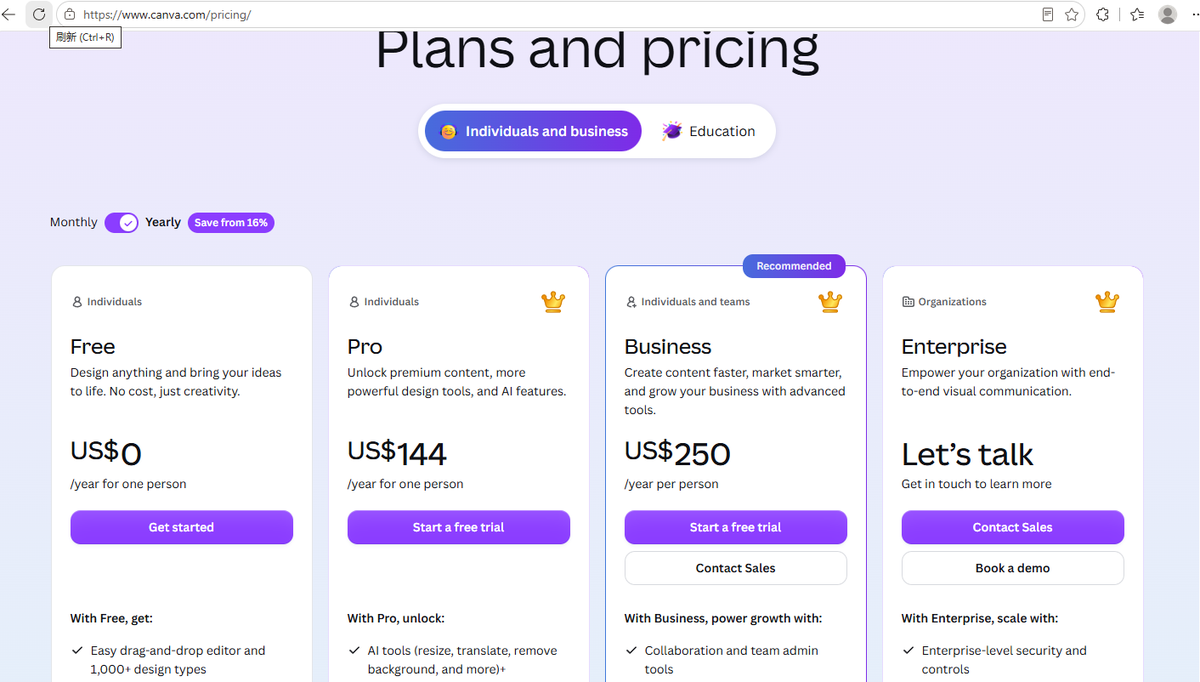
The two price lists we photographed (monthly vs yearly)
First, the pricing page with the toggle set to Yearly:
Then we flipped the switch to Monthly and the same cards changed:
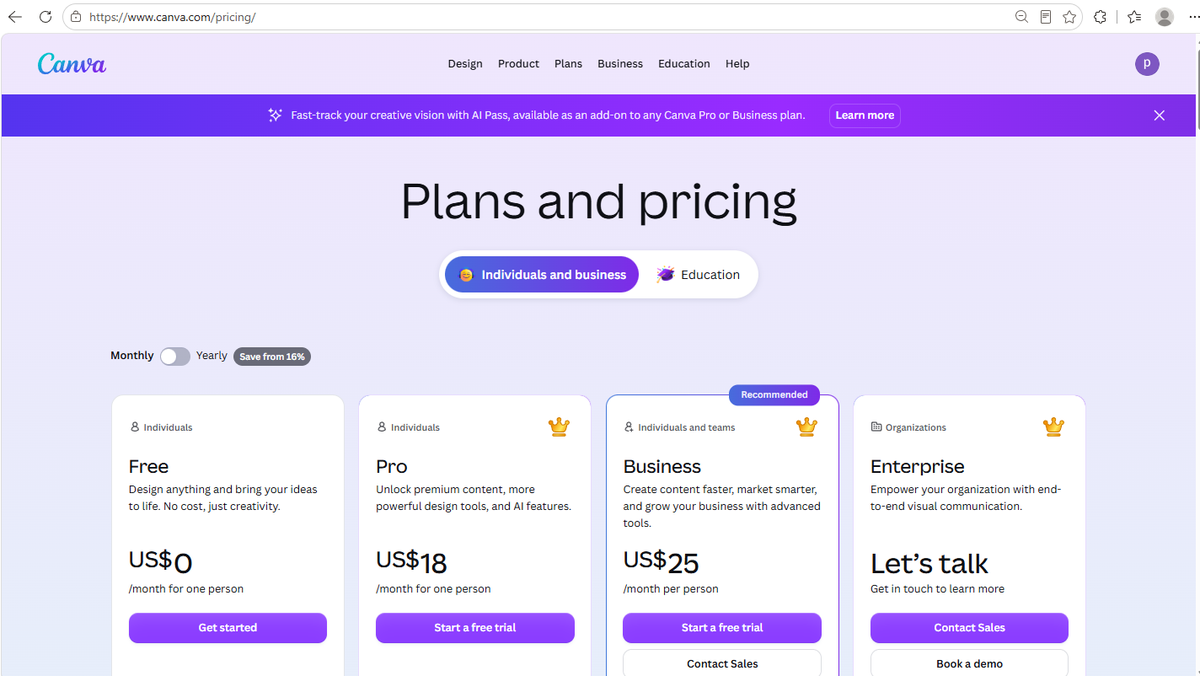
| Plan | Monthly billing | Yearly billing | Yearly ÷ 12 |
|---|---|---|---|
| Free | US$0 | US$0 | US$0 |
| Pro | US$18/mo | US$144/yr | US$12/mo |
| Business | US$25/mo | US$250/yr | ≈ US$20.83/mo |
| Enterprise | "Let's talk" (custom quote) | — | |
The math Canva's "Save from 16%" badge doesn't spell out
On the pricing page, Canva shows a badge that says "Save from 16%" next to the yearly option. That's technically true — but it's the worst-case saving, and the interesting number is the other one:
- Pro: monthly billing costs US$18 × 12 = US$216/year. Yearly billing is US$144. That's a saving of US$72 — exactly 33%, double what the badge suggests.
- Business: US$25 × 12 = US$300 vs US$250 yearly = US$50 saved, about 16.7%. This is the "16%" the badge is based on.
And here's the satisfying part: when we later reached the checkout screen, Canva's own summary said "Best value · Save US$72" for the yearly Pro plan — officially confirming the exact figure we calculated. Most price articles just repeat the badge; do the division and the yearly Pro plan is a much better deal than "save 16%" makes it sound.
We went to the checkout page (and closed it without paying)
This is the part almost nobody screenshots. Clicking "Start a free trial" on the Pro card opens a checkout dialog. Here's what it showed — before we entered any payment details:
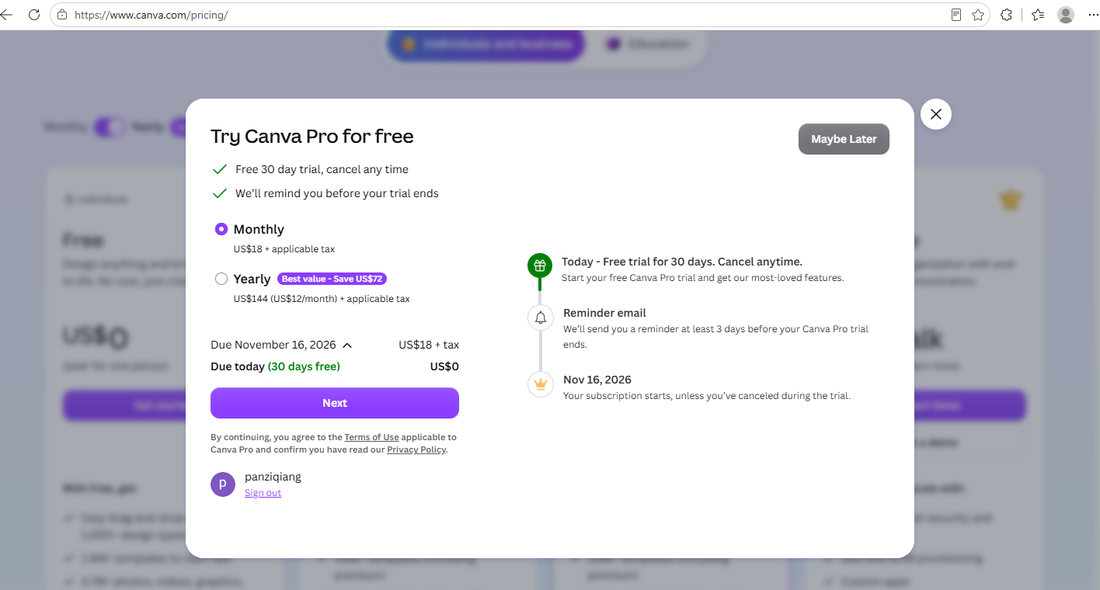
What the screen told us, line by line:
- "Free 30 day trial, cancel any time" and a promise to remind you at least 3 days before the trial ends.
- Due today: US$0 (marked "30 days free").
- Due November 16, 2026: US$18 + applicable tax — the monthly option was pre-selected, so the first real charge would be the monthly price, on the date shown.
- The yearly option was listed right above it at US$144 (US$12/month) + applicable tax, tagged "Best value · Save US$72".
Two honest takeaways. First: the trial itself charges nothing today, and Canva shows the exact date your subscription starts — that's genuinely transparent. Second: "+ applicable tax" means the sticker price is not the final price. Depending on your country, sales tax or VAT gets added on top, so your card will likely be charged more than US$18. No price article should quote Canva prices without that asterisk.
We closed the dialog at this point and paid nothing. If you try this yourself, the same screen is reachable without entering a card — just don't click the final confirmation button if you don't want the trial.
What Pro actually unlocks (from Canva's own comparison table)
We scrolled through Canva's full "Compare plans" table so you don't have to. The numbers that stood out:
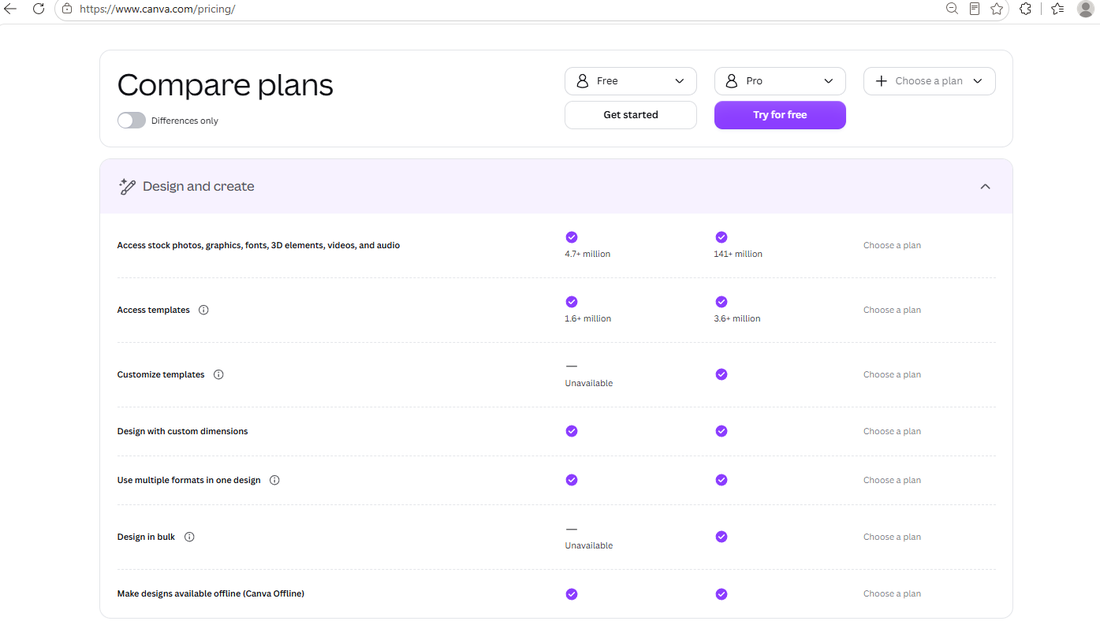
- Stock photos: 4.7 million on Free vs 141 million on Pro — a 30× difference that most "is Pro worth it" posts never mention.
- Templates: ~1.6 million vs ~3.6 million.
- Storage: 5GB vs 100GB.
- Brand Kits: limited on Free vs more on Pro.
The AI quota table (this one surprised us)
Canva now meters its AI features, and the comparison table spells out exactly how:
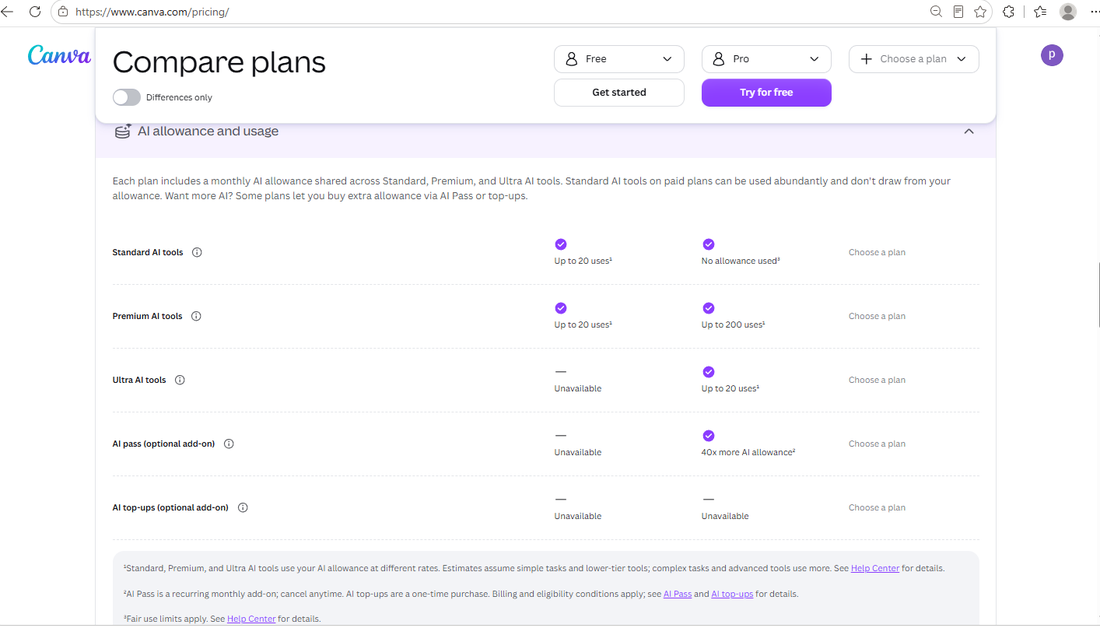
- Standard AI tools: 20 uses/month on Free; unlimited on Pro.
- Premium AI tools: 20 uses/month on Free; 200/month on Pro.
- Ultra AI tools: not available on Free; 20/month on Pro.
- An AI Pass add-on (shown as an optional paid extra on Pro/Business) multiplies those quotas — we saw it promoted at the top of the pricing page.
That "20 premium AI uses per month" is Canva Free's real free allowance — the same kind of metered free tier we documented in our 6-tool free AI image generator test, where Firefly gave 2 generations a day and NightCafe gave 20 over 14 days.
The row that confirms our Background Remover paywall test
In a previous article, we clicked Canva's Background Remover on a free account and got an upgrade screen. Canva's official comparison table agrees:
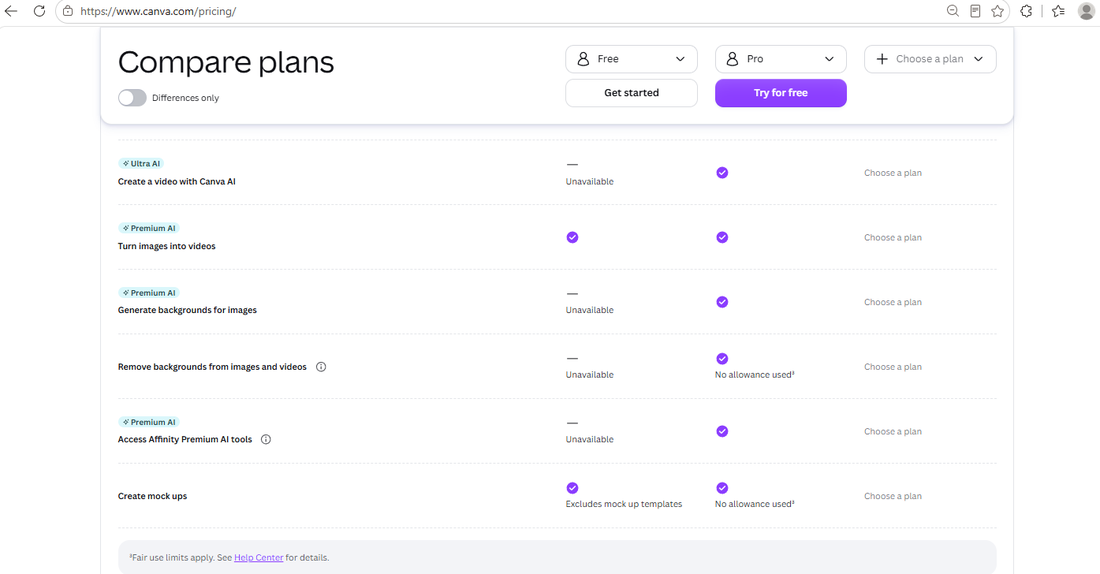
"Remove backgrounds from images and videos" — Unavailable on Free. Our paywall screenshot and Canva's own table say the same thing. If you need background removal without paying, our free Background Remover test found two alternatives that work at full resolution for $0.
Heads-up: your prices may look different from ours
When we first loaded the pricing page, our connection showed us Singapore-dollar pricing (Pro at roughly S$165/year) before we switched regions and saw the US-dollar list above. Same Canva, different currency, different numbers.
Practical meaning: the price you're quoted depends on your region, and it's always shown in your local currency with the same "+ applicable tax" caveat. We can only vouch for the numbers we photographed — if your screen shows something else, that's regional pricing, not a scam. For reference, this whole test was done in October 2026 on a free account; prices change, so treat our figures as a snapshot, not a guarantee.
The part of Canva that really is 100% free
Buried in Canva's Education section is the best deal on the whole pricing page:
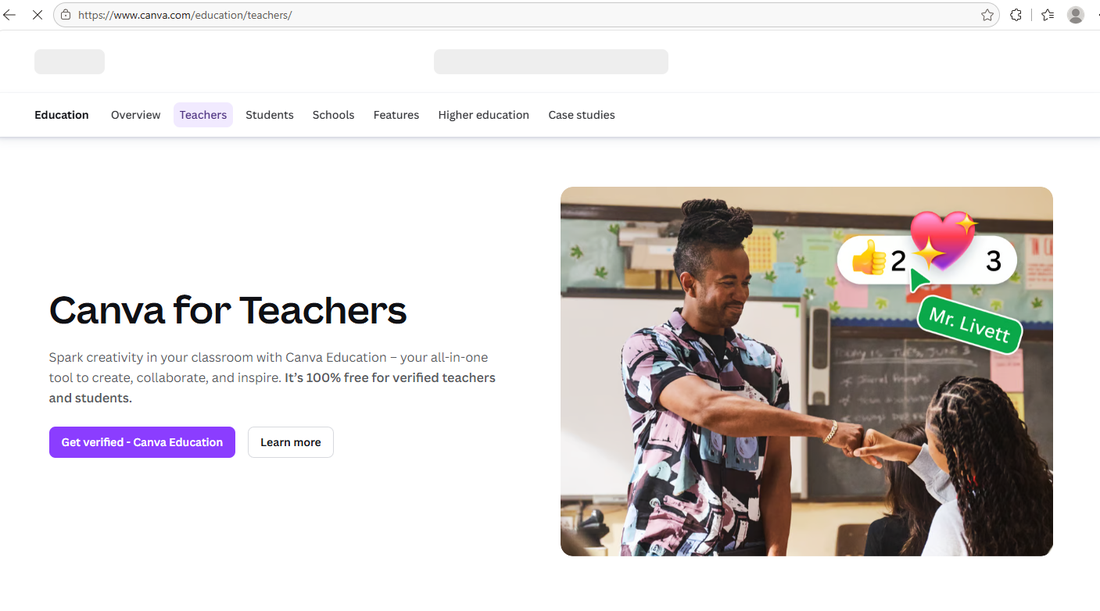
"It's 100% free for verified teachers and students." Not a trial — verified K-12 teachers and their students get Canva's premium-level features at no cost, permanently. You have to verify your teaching status, and it applies to education users specifically, but if that's you, the Pro price above is irrelevant. We didn't test the verification flow itself (we're not teachers), so we'll stop at what the page says.
So is Canva Pro worth the money?
That depends on what you hit on the free plan:
| If you keep hitting this on Free | Then |
|---|---|
| The Background Remover paywall | Try free alternatives first (we tested 3) — you may not need Pro at all |
| Premium AI limits (20 uses/month) | Pro's 200/month is the honest reason to upgrade |
| Stock library feels small | The 4.7M → 141M jump is real and immediate |
| You need transparent PNG exports | Check our export format guide first — some of this is doable free |
| You're a teacher or student | Don't pay — get verified for Education, it's free |
And if you do upgrade: the yearly plan saves US$72 on Pro — Canva's own checkout page says so. Just remember the trial converts to a paid subscription on the date it shows you, and set your own reminder too.
Frequently asked questions
How much is Canva Pro per month?
US$18/month on monthly billing. On yearly billing it's US$144/year, which works out to US$12/month. Both before tax — Canva adds "+ applicable tax" on the checkout screen.
How much is Canva Pro per year?
US$144/year before tax in our October 2026 test. That's US$72 less than paying US$18 monthly for twelve months — a 33% saving, per Canva's own checkout summary.
Is the Canva Pro free trial really free?
For the first 30 days, yes: our checkout screen showed US$0 due today. But the subscription auto-starts when the trial ends — our screen showed the first charge (US$18 + tax, monthly option) due on November 16, 2026, exactly 30 days later. Cancel before that date and you won't be charged; Canva also emails a reminder at least 3 days before.
Why do I see different Canva prices than these?
Canva shows regional pricing in your local currency — we were shown Singapore dollars before switching to US pricing. The plan names and structure stay the same; numbers don't. Also, prices change over time: ours is a snapshot from October 2026.
Is Canva Pro free for students?
For verified K-12 teachers and their students, yes — Canva's own page says it's "100% free for verified teachers and students." It requires verification, and it's specifically the Education offering, not a Pro trial. Individual adult learners outside that program still see the standard prices.
Do the prices include tax?
No. Every price on the checkout screen carried "+ applicable tax." Depending on your country, expect the final charge to be a bit higher than the sticker price.
Wrapping up
Here's the whole picture from one free account, one screen at a time: Pro is US$18/month or US$144/year, the yearly plan saves US$72 (33%, confirmed by Canva's own checkout), the 30-day trial starts charging on a clearly displayed date, tax comes on top everywhere, your region changes the currency, and teachers-students get the premium tier genuinely free. That's more than most price pages will ever tell you — because we read the fine print so you don't have to.
If you're weighing Free against Pro in detail, our Canva Free vs Pro comparison covers what each tier actually unlocks, and our Background Remover test shows how to get one of Pro's best features for free. To see the paywall from the free side — including the moment Canva blocks a download over one Pro element — read our Canva flyer end-to-end test.
This guide is one of our 18 free-account Canva tests — crown counts, measured exports, print prices and paywalls, all in one place.