DeepSeek 429 Too Many Requests: Why Creating Another API Key Won't Fix It
If DeepSeek returns a 429 error, creating another API key is unlikely to help. DeepSeek documents its concurrency limits at the account level, so requests made with different keys still count toward the same account limit. The rate-limit documentation lists a limit of 2,500 concurrent requests for deepseek-flash and 500 for deepseek-v4-pro. This guide explains what those limits mean, how long-running requests affect them, and what to check before changing your client.
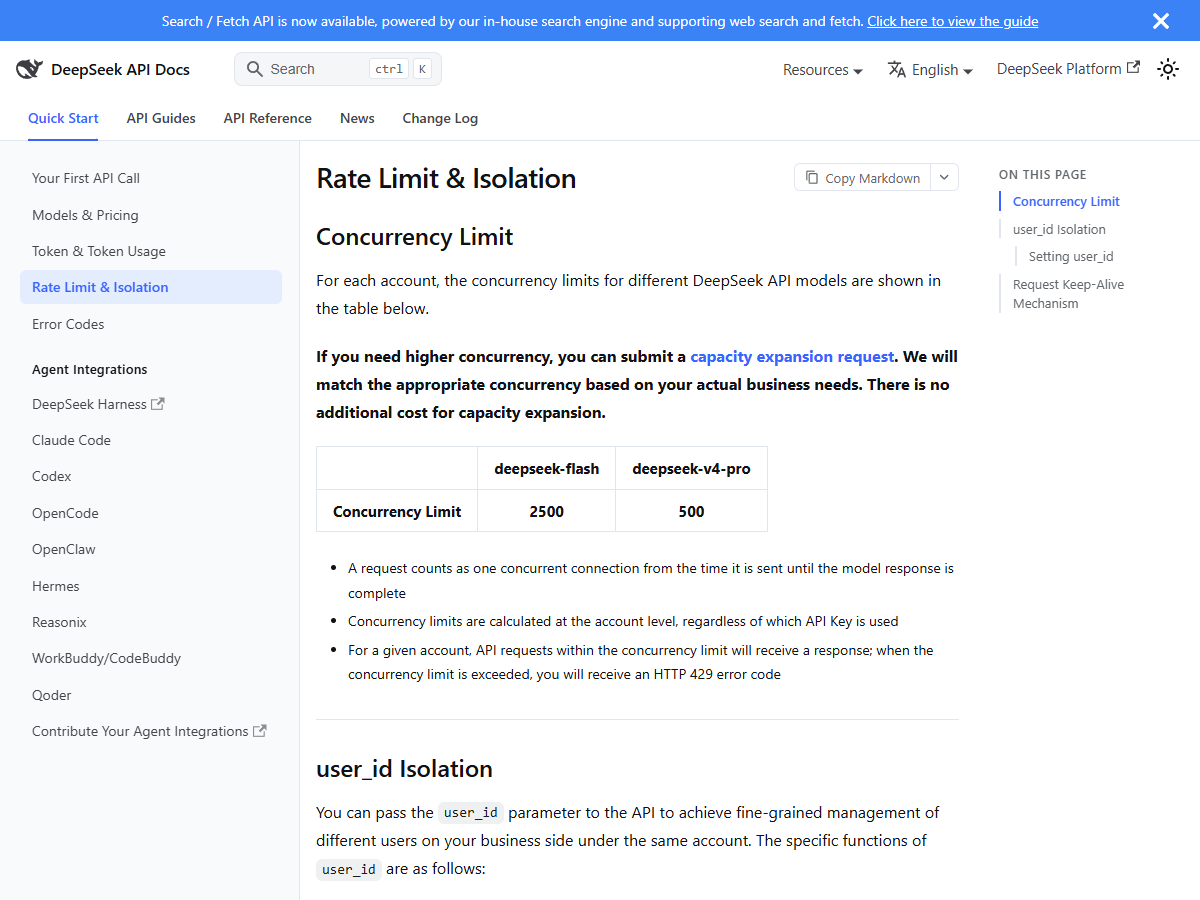
A 429 from DeepSeek means you hit a rate limit, and the rate-limit page lists one limit, concurrency: 2,500 simultaneous requests on deepseek-flash and 500 on deepseek-v4-pro, counted per account, not per key. A request occupies one slot from the moment it is sent until the model finishes responding, so one slow 60-second call holds a slot for the whole minute. Raising the cap is free: DeepSeek takes capacity expansion requests at no additional cost. There is no published requests-per-minute number, so pacing your client against an RPM figure you found on a blog is pacing against something that does not exist.
What 429 means in DeepSeek's own words
The official error table gives 429 one row:
Cause: You are sending requests too quickly, or have exceeded a concurrency or QPS limit.
Solution: Please pace your requests reasonably. For model rate limits, see Rate Limit & Isolation.
Two things hide in that sentence. First, the cause has two halves — sending too quickly or exceeding concurrency — so a client that fires one request per hour can still earn a 429 if 2,500 other requests on the same account are already in flight. Second, the fix points to a separate page, and that page is where every useful number lives.
The only numbers DeepSeek publishes
Most API providers publish a tier table: requests per minute, tokens per minute, upgrade to raise it. DeepSeek publishes none of that. The complete published limit is one row:
| Model | Concurrency limit |
|---|---|
deepseek-flash | 2,500 simultaneous requests |
deepseek-v4-pro | 500 simultaneous requests |
Three counting rules sit under that table, and they decide whether your client is safe:
- A request occupies a slot from send to finished response. Not from first token to last — from the moment the HTTP connection opens. A call that queues on the server for 40 seconds before answering has held its slot the entire time.
- Concurrency is counted on the account. Keys are just door handles; the meter is behind the door.
- Requests within the limit get served; crossing it returns 429. The documentation describes a cap and an error, not a grace band or a slow-down mode.
If you genuinely need more than 2,500 concurrent calls on flash, the fix is a capacity expansion request, and DeepSeek states there is no additional cost for it — you ask, they match concurrency to your business need. That is unusual in this industry, where headroom is normally a subscription.
Why the second API key changes nothing
This is the mistake we most want to save you from. When a 429 appears, the instinct is to spread load across keys: one key per worker, round-robin between them. DeepSeek's docs close that door in one line: concurrency limits are calculated at the account level, regardless of which API Key is used.
So key rotation against a 429 does exactly nothing. The ten keys you created each still draw from the same 2,500-slot pool.
There is one nuance, and it only matters after a capacity expansion. Once your account has raised quotas, DeepSeek applies per-user_id limits as well as the account total: 2,500 for flash and 500 for v4-pro per user_id. The user_id parameter is a string you attach to each request (max 512 bytes of UTF-8, and they ask you to stick to ASCII letters, digits, underscores and hyphens). For accounts on standard quotas, every user_id you send is combined into the single account-level count — the parameter does not buy you separate lanes until expansion has happened. If a single user_id crosses its own cap, only that user's requests get 429, which is how a busy account can throw the error for one customer while everyone else sails through.
429 against 402 and 503
Three status codes get mixed up in every DeepSeek thread, and they have three different fixes. We keep the comparison from our 402 guide here, because reading the code before touching anything is what saves the afternoon:
| Code | What failed | Who owns the problem | What not to do |
|---|---|---|---|
| 429 Rate Limit Reached | You crossed concurrency or sent too fast | You — pace or queue requests | Do not top up; there is no quota to refill |
| 402 Insufficient Balance | The account wallet is empty | You — check balance, then top up | Do not regenerate keys or slow down; neither helps |
| 503 Server Overloaded | DeepSeek's side is saturated | DeepSeek — retry after a wait | Do not rewrite your client around it |
The 429/503 pair is the one people misread. A 429 is your traffic pattern meeting a published limit. A 503 is DeepSeek's servers under load — the docs' own solution is “retry your request after a brief wait.” Same symptom (your call failed), different owner, and backing off harder does not fix a 503 any faster than waiting does.
One request can hold a slot for ten minutes
The rate-limit page has a section most readers skip, and it changes how you count your own concurrency. After you send a request, the connection stays open until the response is complete, even when the server has nothing to say yet. During that silence DeepSeek sends keep-alive filler: empty lines for non-streaming calls, or : keep-alive comment lines inside the SSE stream for streaming ones.
Two consequences:
- Every hung request is a held slot. A stuck call that never starts inference keeps its concurrency slot open for up to 10 minutes, after which the server closes the connection. If your dashboard says you should be at 3 concurrent requests but you keep hitting 429 at 2, the likely explanation is requests that have not finished — including ones your client has already abandoned but never cancelled.
- If you parse raw HTTP yourself, handle the filler. The empty lines and
: keep-alivecomments are legal, but a strict JSON reader that expects a clean body will choke on them. DeepSeek calls this out explicitly: these contents “do not affect the parsing of the JSON body” only if your parser skips blank lines and comment lines. Most SDKs already do. Hand-rolled clients sometimes do not.
What to actually do when 429 shows up
In order, cheapest first:
- Count in-flight requests, not requests per minute. Before your client sends a call, it should know how many are still open. A semaphore sized well under 2,500 (flash) or 500 (v4-pro) removes the surprise. You cannot pace against an RPM number because DeepSeek publishes none.
- Retry with backoff, and keep the slot budget in mind. Exponential backoff (wait 1s, 2s, 4s...) is standard practice across APIs generally — DeepSeek's own error table only says to pace your requests, so treat the schedule as engineering judgement, not documented policy. What matters more is that a retried request is a new request: make sure the old one is actually cancelled, or you are stacking held slots.
- Ask for capacity expansion if you are genuinely at the cap. The request is free, per the docs, and DeepSeek matches the number to your business need rather than selling a tier.
- Check whether the traffic is really yours. The limit is account-wide. A colleague's batch job, a shared test environment, or a second service pulling from the same account all drink from the same 2,500 slots. If 429s arrive while your own dashboard shows a handful of requests, look for traffic on the account you are not counting.
Frequently asked questions
- Does a DeepSeek 429 mean I ran out of money?
- No. Running out of balance returns 402, not 429. A 429 is a speed problem: you exceeded concurrency or sent requests too quickly. Topping up does nothing for a 429, and there is no monthly quota on the DeepSeek API to refill.
- What is DeepSeek's requests-per-minute limit?
- DeepSeek does not publish an RPM or TPM figure. The only published limit is concurrency: 2,500 simultaneous requests for deepseek-flash and 500 for deepseek-v4-pro, counted at the account level. Pages quoting an RPM number for DeepSeek are quoting something the official docs do not say.
- Does raising the concurrency limit cost money?
- No. DeepSeek's documentation says you can submit a capacity expansion request and “there is no additional cost for capacity expansion” - the new limit is matched to your actual business need.
- Why do I get 429 even though I send very few requests?
- Two common reasons. The limit counts connections from send until the response completes, so slow or hung requests hold slots - up to 10 minutes if inference never starts. And the count is account-wide, so any other traffic using the same account draws from the same pool.
Sources and what we could not test
| Claim | Where it came from | Date checked |
|---|---|---|
| 429 wording: “exceeded a concurrency or QPS limit” | DeepSeek API docs · Error Codes | 3 Nov 2026 |
| Concurrency caps 2,500 (flash) / 500 (v4-pro), per account; capacity expansion free | DeepSeek API docs · Rate Limit & Isolation | 3 Nov 2026 |
| Keep-alive filler lines; connection closed if inference not started within 10 minutes | DeepSeek API docs · Rate Limit & Isolation | 3 Nov 2026 |
| SERP competition level (front-page median 946 words, Bing index) | our own SERP probe, 2026-11-03 | 3 Nov 2026 |
We could not reproduce a 429 live: that takes a funded account pushing concurrent traffic up against the cap, and we run no funded DeepSeek account. Everything above is read from DeepSeek's published documentation, and the backoff schedule in section six is general engineering practice, not something DeepSeek prescribes.