How to Subscribe to Grok: Every Upgrade Path in the App, the Fine Print, and the 24-Hour Cancel Rule
Before subscribing to Grok, check more than the monthly price. The plans page says subscriptions renew automatically, prices exclude applicable taxes, and cancellation notice must be given at least 24 hours before renewal. We checked the four upgrade entry points in a free account and recorded the wording shown in the app.
The Grok app offers upgrades from four places: the account menu (Upgrade plan), a banner in the model picker (“Get 50% off Premium”), the limit card that appears at zero quota (“Upgrade for higher limits — now 50% off”), and the plans page itself. Current plans: Plus $8/mo, Premium $15 first month then $30, Super $50 then $100, Ultra $100 then $200. The footer of that plans page is the part worth reading before paying: prices exclude tax, subscriptions auto-renew, cancellation requires notice at least 24 hours before renewal, and third-party models in Cursor are not included.
The four places the app asks for money
On our free account we found four distinct upgrade entry points. Knowing them matters because they do not all show the same thing:
- The account menu. Clicking the account avatar opens Dashboard / Settings / Help / Upgrade plan / Sign Out. Upgrade plan leads to the plans page. The menu itself shows no plan name — a free account is not labeled as one.
- The model picker banner. The bottom of the model menu carries “Get 50% off Premium — Unlock extended capabilities — Claim offer”. This one shows a Premium promotion rather than the plans overview.
- The limit card. When the free 30-message quota hits zero, the app inserts a card into the chat: “Upgrade for higher limits — now 50% off / Or wait 23 hours 27 minutes before the limit is gone” with a Claim offer button. Again it is Premium’s discount being advertised. (We measured the limit itself in our free tier article.)
- The plans page. The fullest view: all four plans side by side with strikethrough first-month prices, and the fine print in the footer.
The account menu and plans page provide access to the plan options. The model-picker banner and the quota-limit card instead display a Premium promotion.
The plans page and its prices
The plans page lists four subscriptions. These are the figures it showed us on 5 November 2026:
| Plan | First month | Then | Page label |
|---|---|---|---|
| Plus | $8 | $8/mo | “Our introductory plan” |
| Premium | $15 | $30/mo | “Most popular” — 4x usage vs Plus |
| Super | $50 | $100/mo | 15x usage; 1080p video; peak priority |
| Ultra | $100 | $200/mo | 50x usage; strongest models; earliest access |
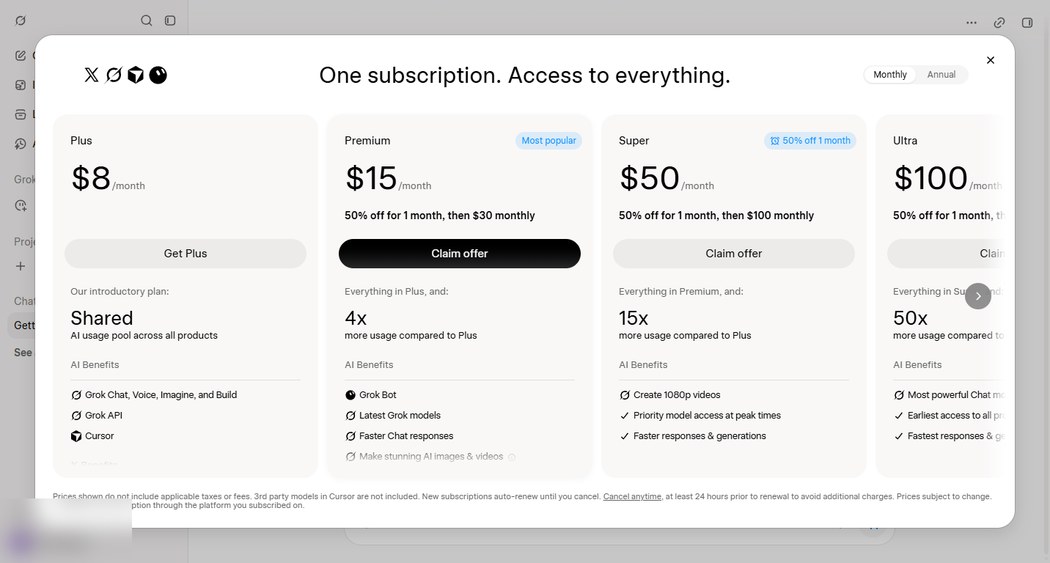
What the page does not show anywhere in the purchase flow we walked: a free trial. The first-month discounts are reduced prices, not free months. The public pricing page also lists a Teams plan ($30/user) that the in-app flow did not present.
What each plan includes, per the plans page
Price is half the decision; the other half is what the row actually says. These are the plans page’s own feature descriptions, kept close to the original wording:
| Plan | The page’s own feature list |
|---|---|
| Plus | Grok Chat, Voice, Imagine and Build; a shared usage pool; Grok API access; Cursor; X perks |
| Premium | The latest models; a cloud agent; fewer ads on X; 4x the Plus usage pool |
| Super | 1080p video generation; priority during peak hours; 15x usage |
| Ultra | The strongest models; earliest access to new capabilities; 50x usage |
Notice what is not in any row: a message count. Every tier is described by ratio (4x/15x/50x against Plus) and by features, never by an absolute number of messages or images. That is why we keep quoting the ratios — they are the only comparable numbers the page gives — and why we will not convert them into “about N messages” for you. Any page that does is estimating, and the estimate will not survive xAI’s next quota shuffle.
The Plus row also carries a word that changes how you should read all four tiers: “shared”. Chat, image generation, agent runs and Build are described as drawing on one shared pool. That suggests different activities may draw on the same allowance, but we did not subscribe and therefore could not measure how each feature uses it — the pool structure itself is the page’s own description.
The fine print, quoted
Before subscribing, read the footer of the plans page. It states, in its own words:
Prices exclude applicable taxes.
Subscriptions automatically renew.
You may cancel at any time, but notice must be given at least 24 hours before the renewal date.
Third-party models in Cursor are not included.
Each line has a practical meaning:
- “Exclude applicable taxes” — the $30, $100 and $200 price tags are not what the card is charged. Budget for the difference.
- “Automatically renew” — there is no lapse-by-default; not cancelling is the renewal decision.
- “At least 24 hours before the renewal date” — the stated deadline. Cancelling only 23 hours beforehand would miss it, so do not leave cancellation until the last day. The page does not explain the exact billing outcome if the deadline is missed.
- “Third-party models in Cursor are not included” — Plus advertises Cursor among its perks; this line narrows that to xAI’s own models. If you subscribe mainly to use Grok inside Cursor against other providers’ models, this carve-out applies to you.
Cancelling: what the official text supports
Everything above is what the pages say; here is what they do not say. The plans page gives no cancel-flow screenshots, no refund policy, and no statement of what happens to remaining usage after cancellation. The public pricing page’s FAQ adds only that plan allowances refresh weekly (“one heavy day never wipes out your whole month”).
The page confirms the 24-hour notice requirement, but it does not explain refunds, access after cancellation or the steps in the cancellation flow. We have not tested those details. The footer says cancellation is possible “at any time” subject to the 24-hour notice; if we ever subscribe for a teardown, this page gets the walked-through cancel flow with screenshots.
The weekly-refresh wording vs the 24-hour meter we measured
One contradiction worth knowing before you pay. The pricing page’s FAQ describes paid allowances as refreshing weekly. Our free account’s chat quota, measured the same day from the app’s own rate-limits endpoint, ran on a 24-hour rolling window (windowSizeSeconds: 86400). The most likely reading is that paid plans draw from a weekly pool while free chat sits on a daily rolling meter — but that is an inference, not a confirmation, and we present both numbers with their sources rather than picking one.
What we could not test
We deliberately kept this page to what a free account can see. We did not subscribe, so we cannot show: the checkout screen and payment methods, whether Apple/Google in-app billing applies on mobile apps versus web, the actual cancellation flow, or what the renewal reminder (if any) looks like. The prices above are also a single-day snapshot; first-month promos in particular change without notice.
Frequently asked questions
- How do I cancel a Grok subscription?
- Per the plans page footer we recorded on 5 November 2026: you may cancel at any time, but notice must be given at least 24 hours before the renewal date, because subscriptions auto-renew. We did not subscribe, so we cannot show the cancel screens - but the 24-hour rule itself is the page's own wording, and a cancellation inside that window would miss the stated deadline.
- Does Grok automatically renew?
- Yes. The plans page footer states subscriptions automatically renew. There is no expire-by-default option mentioned anywhere in the purchase flow we walked.
- Do Grok's prices include tax?
- No. The plans page footer says prices exclude applicable taxes, so the card charge will be higher than the $8/$30/$100/$200 list prices by whatever tax applies to you.
- Does Grok have a free trial?
- Not that we could see. The upgrade paths offer a discounted first month (Premium $15 instead of $30, Super $50 instead of $100, Ultra $100 instead of $200) - a reduced price, not a free period. The free tier itself needs no card: 30 chat requests per rolling 24 hours, which we measured separately.
- Can I use my Grok subscription inside Cursor?
- The Plus plan lists Cursor as a perk, while the footer excludes third-party models in Cursor. The page does not provide enough detail to explain every Cursor usage scenario, so check the current plan terms before subscribing for this feature.
Sources and what we could not test
| Claim | Where it came from | Date checked |
|---|---|---|
| Four plans, first-month promos, 4x/15x/50x usage labels | in-app plans page (screenshot above) | 5 Nov 2026 |
| Footer fine print: tax excluded, auto-renew, 24h cancellation notice, Cursor carve-out | in-app plans page footer, quoted above | 5 Nov 2026 |
| Model picker banner 'Get 50% off Premium'; limit card 'Upgrade for higher limits - now 50% off' | our free account, model menu and zero-quota card | 5 Nov 2026 |
| Account menu items (Dashboard/Settings/Help/Upgrade plan/Sign Out); no plan label shown | our free account menu | 5 Nov 2026 |
| FAQ weekly-refresh wording; Teams plan $30/user on public page | x.ai/pricing | 5 Nov 2026 |
We did not subscribe and never saw the checkout: payment methods, mobile in-app billing vs web billing, and the actual cancellation flow are all unverified. Whether cancelling mid-cycle keeps access until the period ends, and whether any refund is offered, is not stated on any page we read. First-month promo prices are a 5 November 2026 snapshot.