NotebookLM on a Free Account, Tested in 2026: It's Called Gemini Notebook Now — and the Free Quota Changed Too
Every tutorial on the internet still calls this tool NotebookLM and sends you to notebooklm.google.com. We opened it this week: Google redirects that address to a different domain, the product now calls itself Gemini Notebook, and the quota system works nothing like the numbers every guide still quotes. So we ran the full test — two sources, three questions, and four of the Studio outputs, including the famous two-host podcast and the newer video overview.
Short answer: Yes, it's free — and yes, it changed. Typing notebooklm.google.com now redirects to notebook.google.com, where the product introduces itself as Gemini Notebook; the words "NotebookLM" appear nowhere on the page. The free tier still works without a card, and it produced a 26-minute, two-host podcast, a 1½-minute animated video that correctly diagrammed our exact test data, a mind map, and a five-chapter interactive report — all from just two sources. Every answer arrives with clickable citation chips back to the exact source passage. The quota is the big surprise: the widely-quoted limits ("50 chats a day, 3 audio overviews a day") are outdated. The welcome screen says limits now refresh every 5 hours, not daily — and after three generations (one report, one mind map, one video) the usage page showed 73% of the current window used, with a separate weekly limit at 4%. The upgrade Google pushes is called AI Plus ("double the usage") — not Pro, as most guides say. It handled our Chinese PDF as fluently as English, in Chinese when asked.
How we ran the test
We used a plain free Google account with no payment method attached, opened the old notebooklm.google.com address, and followed where it led. For sources we deliberately mixed formats: one live website URL (our own Canva book-cover test, which contains precise numbers like 1410 × 2250 and KDP's 1600 × 2560) and one Chinese-language resume PDF. Mixed sources are the normal case for students and researchers, and they let us check two things at once — whether the tool grounds its answers in the actual text, and whether it copes with two languages. We asked three questions (two in English, one in Chinese), then generated four Studio outputs: an Interactive report, a mind map, a video overview, and a Deep Dive audio overview. The screenshot language is English throughout, which we forced with the ?hl=en URL parameter — the product follows your Google account language otherwise.
First, the name on the door changed
Typing the old address, notebooklm.google.com, lands you somewhere else: Google now redirects it to notebook.google.com. The first thing that greets you is a welcome screen for "Gemini Notebook" — no NotebookLM anywhere — along with three changes Google highlights itself: limits now refresh every 5 hours instead of once every 24, each feature got its own independent quota you can spend as you choose, and anything that won't fit can be pushed to a background queue instead of refused.
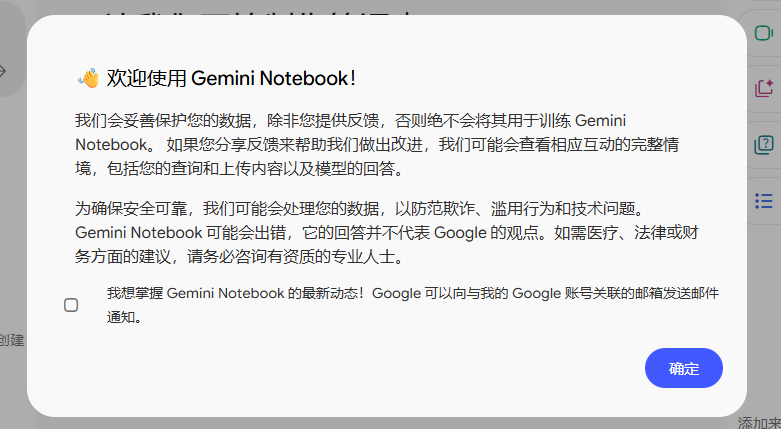
Why does the rename matter for a free-tier test? Because the numbers most articles quote were written for the old daily-quota system. If the measurement window changed, the numbers changed with it — as we confirmed later, with a usage meter that looked nothing like "50 chats a day."
What you can feed it
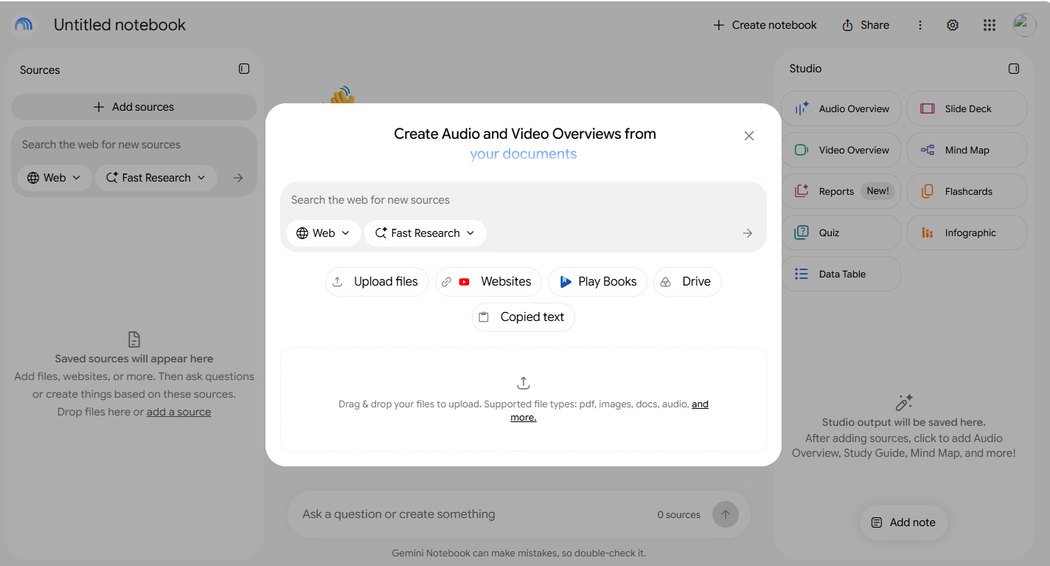
The source panel accepts uploaded files ("pdf, images, docs, audio, and more" per its own label), websites, YouTube links, Play Books, Google Drive files, and copied text. Play Books as a source type is one almost nobody mentions. There's also a built-in web search ("Search the web for new sources") and a "Fast Research" mode, so you can assemble a notebook without leaving the page.
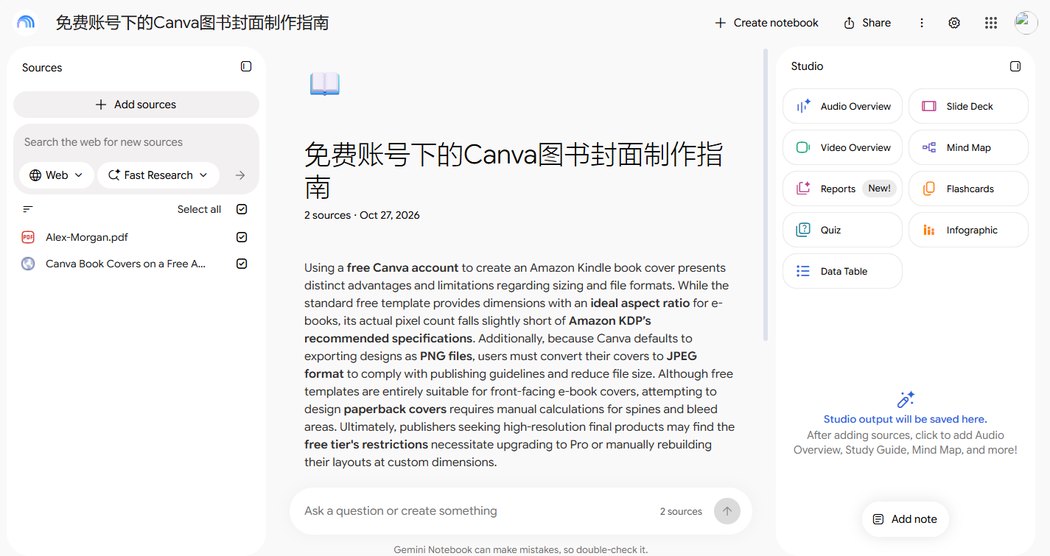
We fed it exactly two sources: our Canva book-cover article by URL, and a Chinese resume PDF. Within seconds of adding them, Gemini Notebook had written its own summary of both — and the summary was accurate, including the KDP pixel numbers and the format contradiction our article documents. When your source material gets understood correctly this quickly, every later answer starts from solid ground.
The answers come with receipts
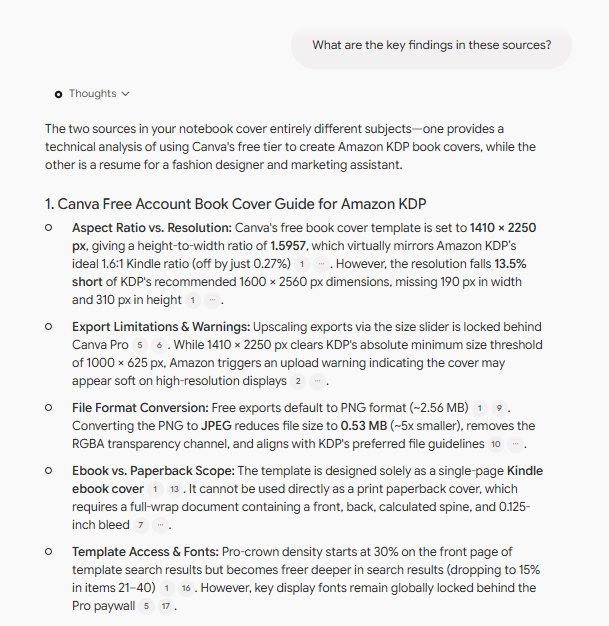
This is the feature that separates NotebookLM (sorry — Gemini Notebook) from chatting with a general chatbot: every claim in an answer carries a numbered chip you can click to see the exact passage it came from. Our first question — "What are the key findings in these sources?" — returned a structured breakdown where 1410 × 2250, 0.27%, 13.5%, 2.56 MB and 0.53 MB all appeared exactly as we'd measured them, each with citation chips attached.
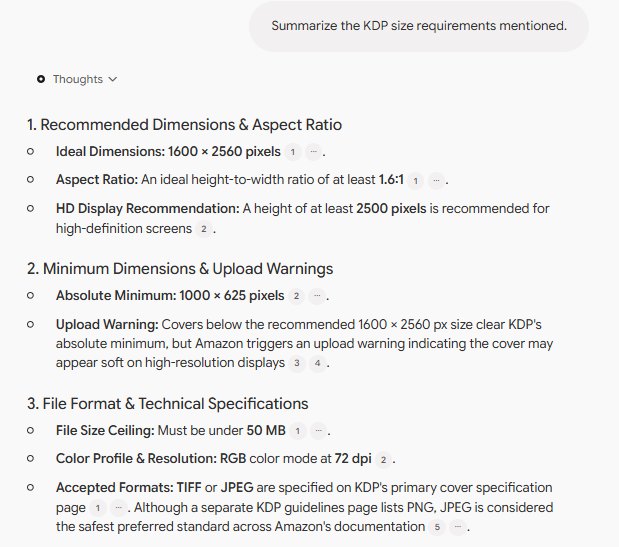
The second question went after the detail we knew was tricky: "Summarize the KDP size requirements mentioned." Our article documents that Amazon's own help pages contradict each other on accepted file formats. The answer reproduced that contradiction faithfully — "TIFF or JPEG are specified on KDP's primary cover specification page… a separate KDP guidelines page lists PNG" — with citations to both passages. It didn't smooth the contradiction over, and it didn't invent a resolution. That is exactly what a source-grounded tool should do.
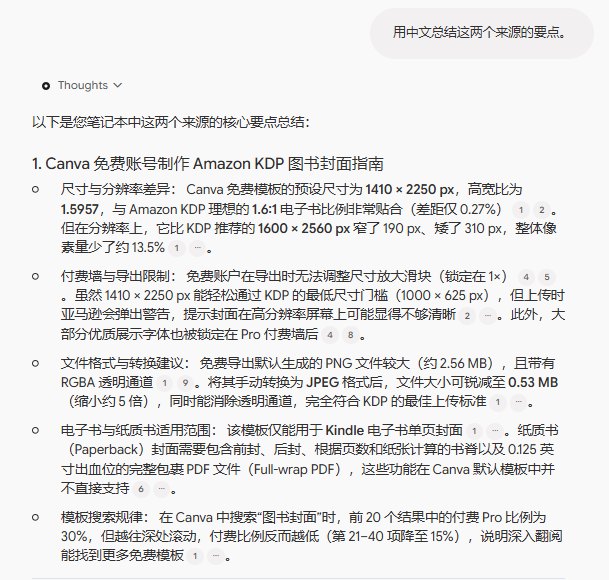
Then the language test, asked in Chinese: "用中文总结这两个来源的要点" (summarize the key points of these two sources in Chinese). It answered entirely in Chinese, fluently, across both the English article and the Chinese resume — and every figure survived the translation: 1410 × 2250, 0.27%, the 5× file-size reduction, the 15% crown rate at depth. Citation chips stayed in place.
Studio: nine outputs on a free account
The Studio panel lists nine outputs: Audio Overview, Slide Deck, Video Overview, Mind Map, Reports (tagged "New!"), Flashcards, Quiz, Infographic, and Data Table. Most guides cover one or two of these. We tested four.
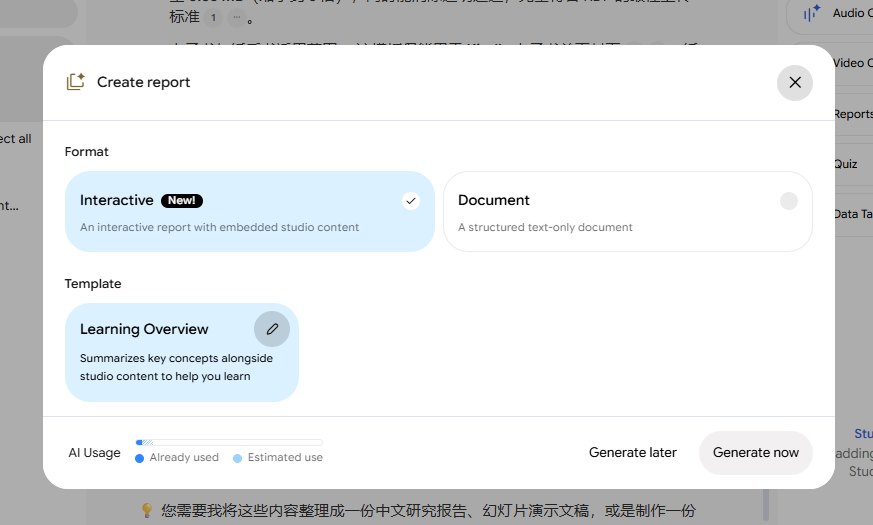
Reports first. The dialog offers two formats — Interactive ("an interactive report with embedded studio content", tagged New!) and plain Document — plus templates, with "Learning Overview" as the default. At the bottom sits something we wish every AI product had: an AI Usage bar showing what this generation will cost you before you spend it, split into "Already used" and "Estimated use."
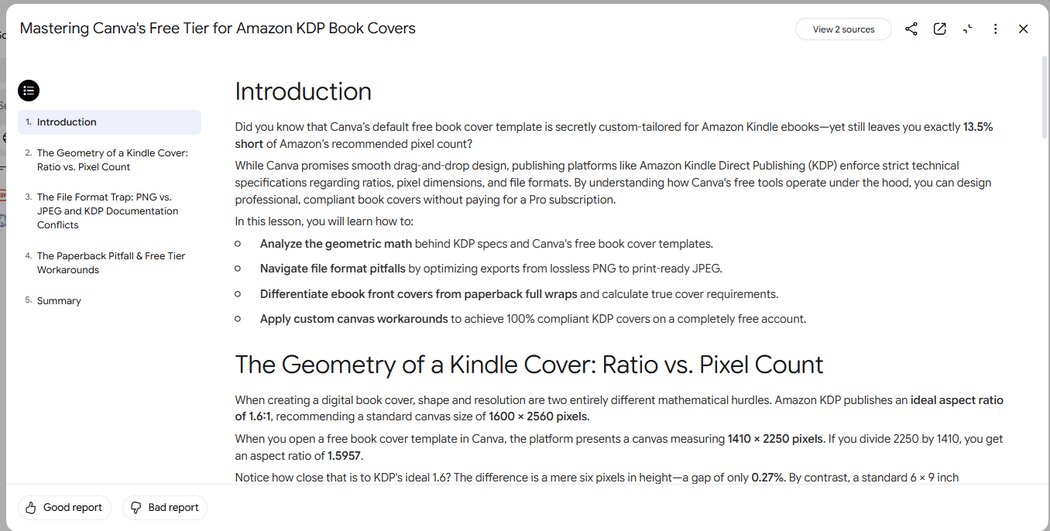
The generated report ran five chapters with a sidebar table of contents — from "The Geometry of a Kindle Cover" through "The Paperback Pitfall & Free Tier Workarounds" — and the numbers inside were all ours and all correct: 1.6:1, 1600 × 2560, 1410 × 2250, the 0.27% gap. Below it: "Good report / Bad report" feedback buttons.
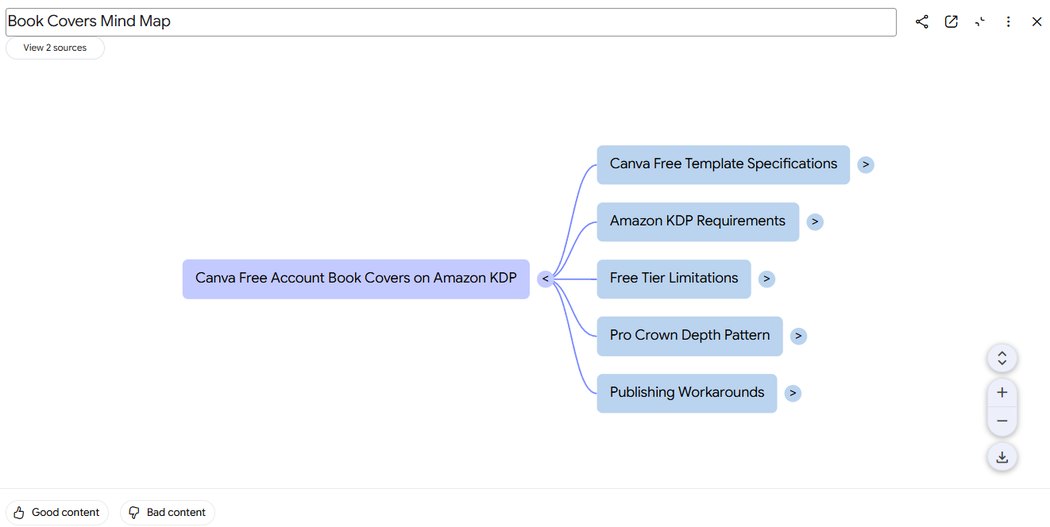
Mind Map took the same sources and produced a clickable tree: "Canva Free Account Book Covers on Amazon KDP" branching into Canva Free Template Specifications, Amazon KDP Requirements, Free Tier Limitations, Pro Crown Depth Pattern, and Publishing Workarounds. You pick the language and which sources to include before generating.
It made us a video (and the video is good)
Video Overview is the newest output, and it's the one that surprised us. We chose the "Short" format in English, and ninety seconds later had a vertical animated explainer about — of all things — our own test data: a dashed frame labeled "KDP ideal 1600 × 2560" with a smaller "Canva Cover 1410 × 2250 px" card inside it, complete with a padlock icon for the Pro-locked size slider and handwritten-style captions reading "1600 by 2560 pixels." Nothing in the diagram was wrong. Here is the actual video it generated, downloaded from the product:
Before generating, the dialog asks what the video should focus on — it suggested "How to create Kindle covers," "The pixel gap for KDP," and "Why free Canva covers work," drawn from our sources. That focus picker is why the output feels targeted rather than generic.
And a two-host podcast, 26 minutes long
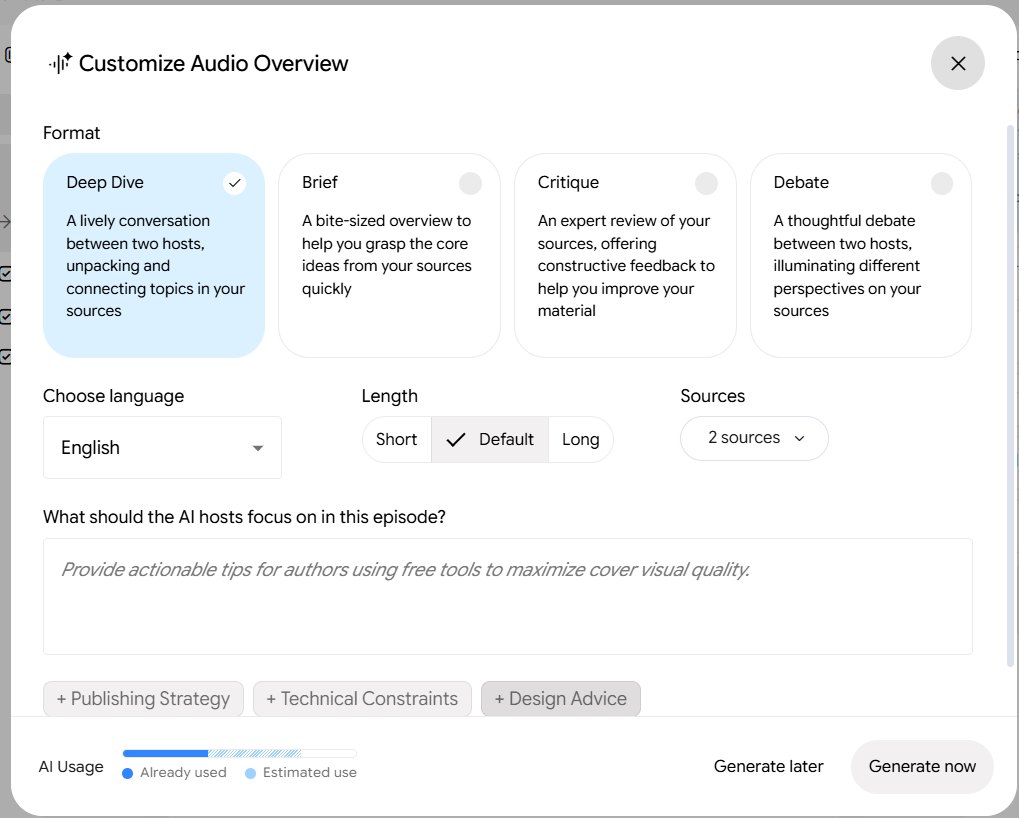
The famous one. Audio Overview offers four formats: Deep Dive (the classic — "a lively conversation between two hosts"), Brief, Critique ("an expert review of your sources"), and Debate ("a thoughtful debate between two hosts"). Length comes in Short, Default, or Long, with the same language and source pickers. We ran Deep Dive on Default, in English.
The result: a 26-minute, 34-second conversation between two AI hosts discussing our book-cover research — natural, interrupting each other, laughing at the size-slider lock, and getting the numbers right throughout. The original download weighed 51.3 MB (256 kbps AAC); we've compressed it to 12.7 MB for the web below. This is the actual audio, unedited:
One practical note the tutorials skip: these files are big because they're long. If you generate Deep Dives regularly, check the download size before doing it on mobile data.
The free quota, as it actually works today
Now the part every old article gets wrong. The numbers that circulate — 50 chats a day, 3 audio overviews a day, 50 sources per notebook — come from the old daily-quota era. The system we found works in two rolling windows, and it is much more aggressive than "generous."
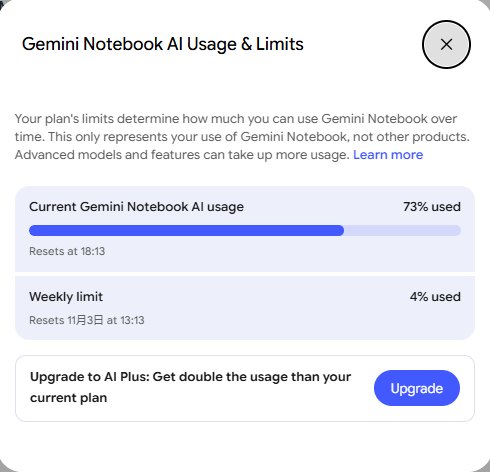
After exactly three generations — one interactive report, one mind map, one 90-second video — the usage page showed 73% of the current window used, resetting at 18:13, five hours after we started. A separate weekly limit sat at just 4%, resetting November 3. The video was the obvious heavyweight; audio generation, which we ran next inside the remaining 27%, went through fine. And the upgrade Google dangles isn't called Pro: it's AI Plus, pitched as "double the usage."
| What guides still say | What we measured (Oct 27, 2026) |
|---|---|
| Name: NotebookLM, at notebooklm.google.com | Redirects to notebook.google.com; product calls itself Gemini Notebook |
| Limits reset daily | Welcome screen: limits refresh every 5 hours; usage page showed the reset time live |
| "50 chats a day, 3 audio overviews a day" | No such numbers shown anywhere; a usage meter tracks % of a 5-hour window plus a weekly limit |
| Free tier is "generous" | 3 generations = 73% of the window. A Deep Dive podcast and a video in the same afternoon is not the free plan's normal diet |
| Upgrade to "Pro" | Upgrade offer reads AI Plus — "double the usage" |
| Background tasks refused at the cap | Welcome screen: over-quota jobs can go to a background queue ("Generate later" is a real option in every dialog) |
One caveat for fairness: the per-source and per-notebook caps (50 sources, 500,000 words) come from third-party pages, not from anything Google showed us in this session — we only added two sources, so we couldn't verify them. The quota behavior above, we measured directly.
Wrapping up
Two things are true at once in late 2026. The tool underneath is genuinely excellent — source-grounded answers with clickable receipts, nine output formats, a podcast and now a video, all free, all from a resume PDF and one web page. And the layer above it has quietly shifted under everyone's feet: new name, new domain, new quota math that bites faster than the old numbers suggested. Most of what you've read about "NotebookLM" was accurate for a product Google no longer ships. The research engine is the same; the fuel gauge is different. If you learn one thing from this test, make it this: spend the free window on one Deep Dive and one report, not on regenerating things you didn't like — the 5-hour clock is real, and now you've seen it at 73%.
Frequently asked questions
Is NotebookLM still free?
Yes. Everything we tested — the citations, the interactive report, the mind map, the 90-second video, and the 26-minute Deep Dive podcast — was produced on a free Google account with no payment method attached. Google now pushes an "AI Plus" upgrade for double the usage, but we never saw a paywall inside the product itself during this test.
Why does notebooklm.google.com take me to a different site?
Google renamed the product to Gemini Notebook and moved it to notebook.google.com. The old address still works — it redirects — but the product page carries the new name only. Third-party pages have reported the rename happened mid-2026; most tutorials haven't caught up.
What are the real free limits now?
The old "50 chats a day, 3 audio overviews a day" numbers are outdated. The current system uses a rolling window that refreshes every 5 hours plus a separate weekly limit. In our test, three generations (a report, a mind map, and a 90-second video) consumed 73% of the current window. Each dialog shows an AI Usage bar with the estimated cost before you generate.
Can NotebookLM work with Chinese documents?
Yes. Our notebook mixed an English web page with a Chinese-language PDF, and it summarized both in fluent Chinese when asked — with all figures (1410 × 2250, 0.27%, 5× file-size reduction) surviving the translation correctly, and citation chips still in place.
What is a Deep Dive audio overview?
It's the format that made the tool famous: two AI hosts have a natural, conversational discussion about your sources. Ours ran 26 minutes 34 seconds for two documents. There are three other formats — Brief, Critique, and Debate — plus Short/Default/Long length control.
Can I trust what it tells me?
It's the most trustworthy AI we've tested for working from your own documents, because every claim carries a clickable citation chip to the exact source passage — and when our sources contained a genuine contradiction (Amazon's own pages disagreeing on file formats), it reported the contradiction instead of inventing a resolution. It's grounded, not infallible: the page itself says "Gemini Notebook can make mistakes, so double-check it."
Testing design tools too? Start with our 18 free-account Canva tests — crown counts, measured exports, print prices and paywalls, all in one place.