Is Canva Pro Worth It? We Paid and Retested 9 of 18 Walls
Most "is Canva Pro worth it" articles are written by someone reading a pricing page. We subscribed, kept the receipt, and then went back through every paywall from our own 18-wall list to see which ones actually open. Nine of them opened and stayed open. Nine of them could not be tested at all, because the plan we could buy does not contain those features. We report both numbers rather than the flattering one.
Short answer: Yes, if you need SVG files, transparent PNGs, exports larger than 1×, or AI tools in volume — all nine of those walls came down on a paid account and none came back. No, if you only make social posts and slides: every file we exported on a free account came out clean, so those walls were never in your way. And one thing worth knowing before you pay: the cheapest Pro we could buy is a different product, and it cannot post to Instagram or Facebook at any price.
Best for: someone exporting print files or vector logos, or doing several resizes a week. Skip if: you are paying to "unlock Instagram scheduling" — that is a different wall and on the build we bought it is not a wall at all, it is an absence.
The awkward part: we could not pay the price you see
Here is what happened when we tried to buy Pro the normal way on 30 October 2026. The canva.com pricing page offered Pro at US$18/month, a 30-day free trial, and PayPal as a payment method. We went through the checkout flow and the billing-country dropdown would not take our location. China was not in the list. Card and PayPal were accepted; our country was not.
That is not a bug in the checkout, and no amount of retrying fixes a market a company has chosen not to bill in. So the only way to actually test a paid Canva account from here was to subscribe to Canva 可画 on canva.cn — the separate Chinese product — and pay ¥15 for the first month with WeChat Pay. Which we did.
So this article has a limitation, and we would rather put it in the second paragraph than in a footnote:
| canva.com | canva.cn (可画) | |
|---|---|---|
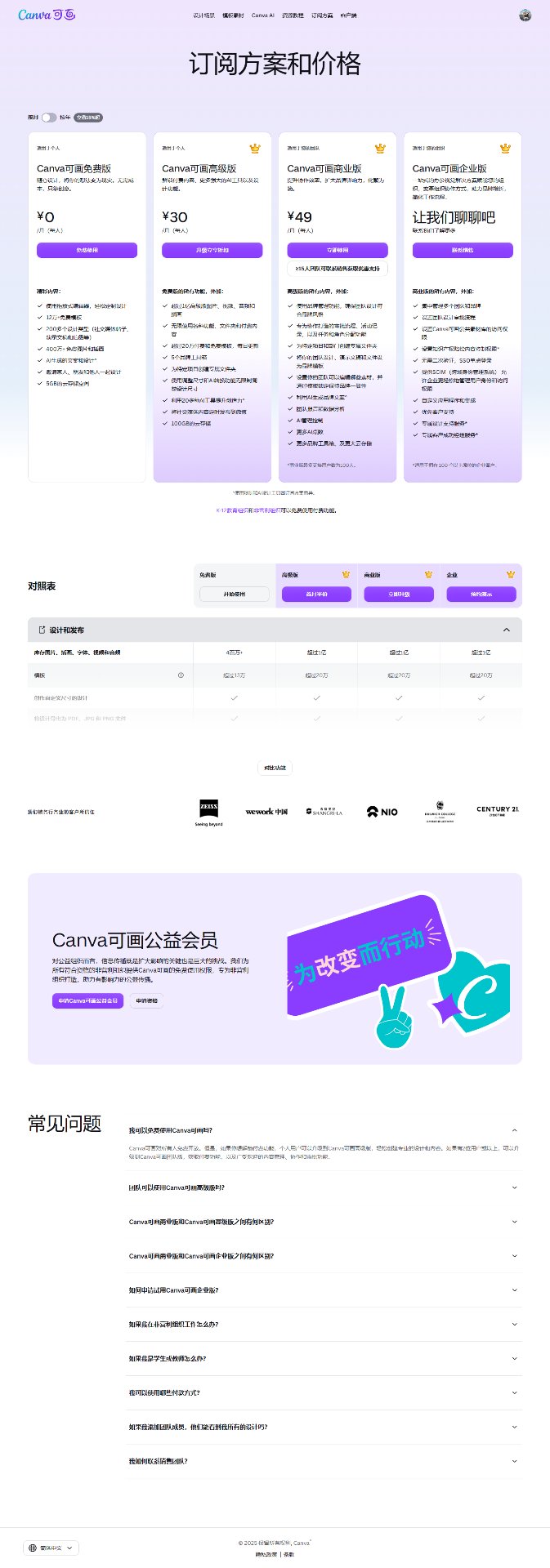
| Price we saw | US$18/mo, US$144/yr; Business US$25/mo | ¥15 first month, then ¥30/mo; ¥188/yr |
| Payment taken | Card, PayPal | WeChat Pay, Alipay |
| Billing country | China not in the list | Not applicable |
| Accounts, templates | Separate system | Separate system, nothing carries over |
| Interface | English | Chinese |
Two consequences, stated plainly. First, the retest below was run on the Chinese build, which shares the editor lineage and the paywall logic but is not the identical software. Second, we only retested the walls that exist in both builds. That is where the "9 of 18" comes from, and the nine missing ones are listed in full further down rather than quietly dropped.
What the nine walls looked like when they came down
In October we ran a free account through every paywall we could find and published the list: 18 walls across the download panel, the AI tools panel and the one-click shortcuts. We did not take them from a help page — we clicked the greyed buttons and photographed the upgrade dialogs. That list is the baseline.
Then we ran the same actions on the paid account. Every row below is something we personally re-clicked on 1 November 2026.
| What you try to do | Free account | Paid account |
|---|---|---|
| Export an SVG vector file | Crowned in the format list | Works. Exported a 10.6 MB SVG |
| Export a PNG with transparent background | Toggle locked | Works. Checkbox now ticks |
| Export larger than 1× | Size slider crowned | Works. Slider to 3.125× |
| Export above 2000 px | Crowned next to size | Works. 1264 px → 3950 × 3950 |
| Remove a background in one click | Upgrade screen, US$18/mo | Works. Clean cutout, white background |
| Use the AI eraser | Crowned in photo tools | Works, with a caveat — see below |
| Extract a subject / AI cutout | Crowned, same panel | Works. No upgrade prompt at all |
| Apply one-click resize | Custom size works; apply hits trial button | Works. Two modes offered |
| Use a premium font | Fonts marked with crown | Works. Applies and batch-replaces |
Nine walls, nine openings, no partial unlocks. Two of these deserve their own paragraph because the numbers surprised us.
3.125× is the real limit, not "unlimited"
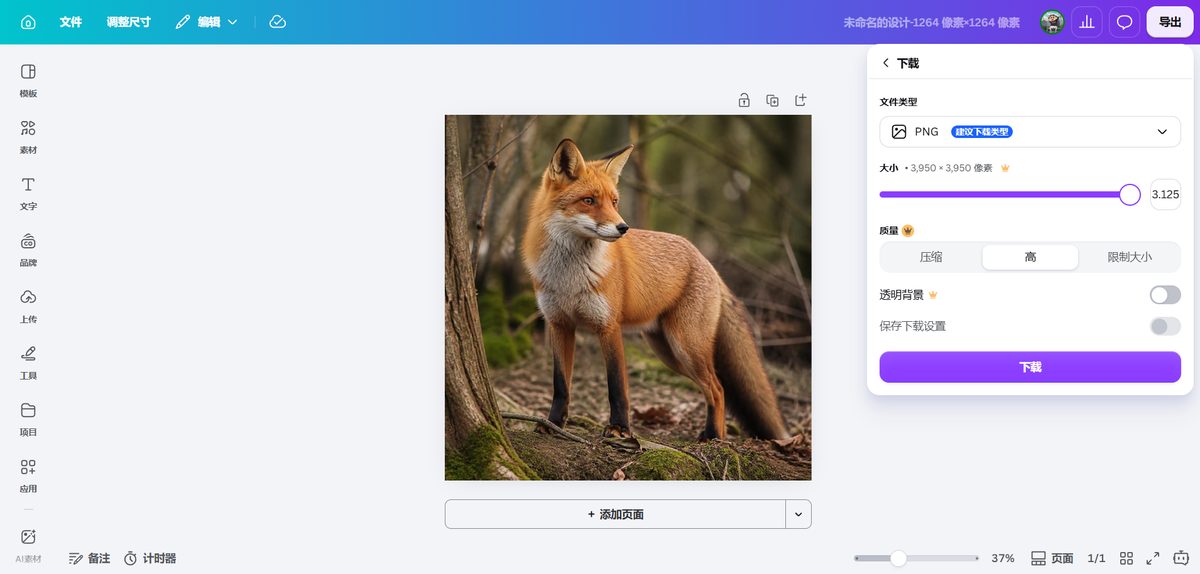
On a free account the slider is pinned at 1×. On a paid account it goes to 3.125× and stops. Nobody advertises that ceiling, and it matters: if you are exporting for anything bigger than a poster, 3.125× is not a print solution, it is a delay of the problem. We would have guessed "unlimited"; the slider says otherwise.
The AI eraser is good, and that is the risk
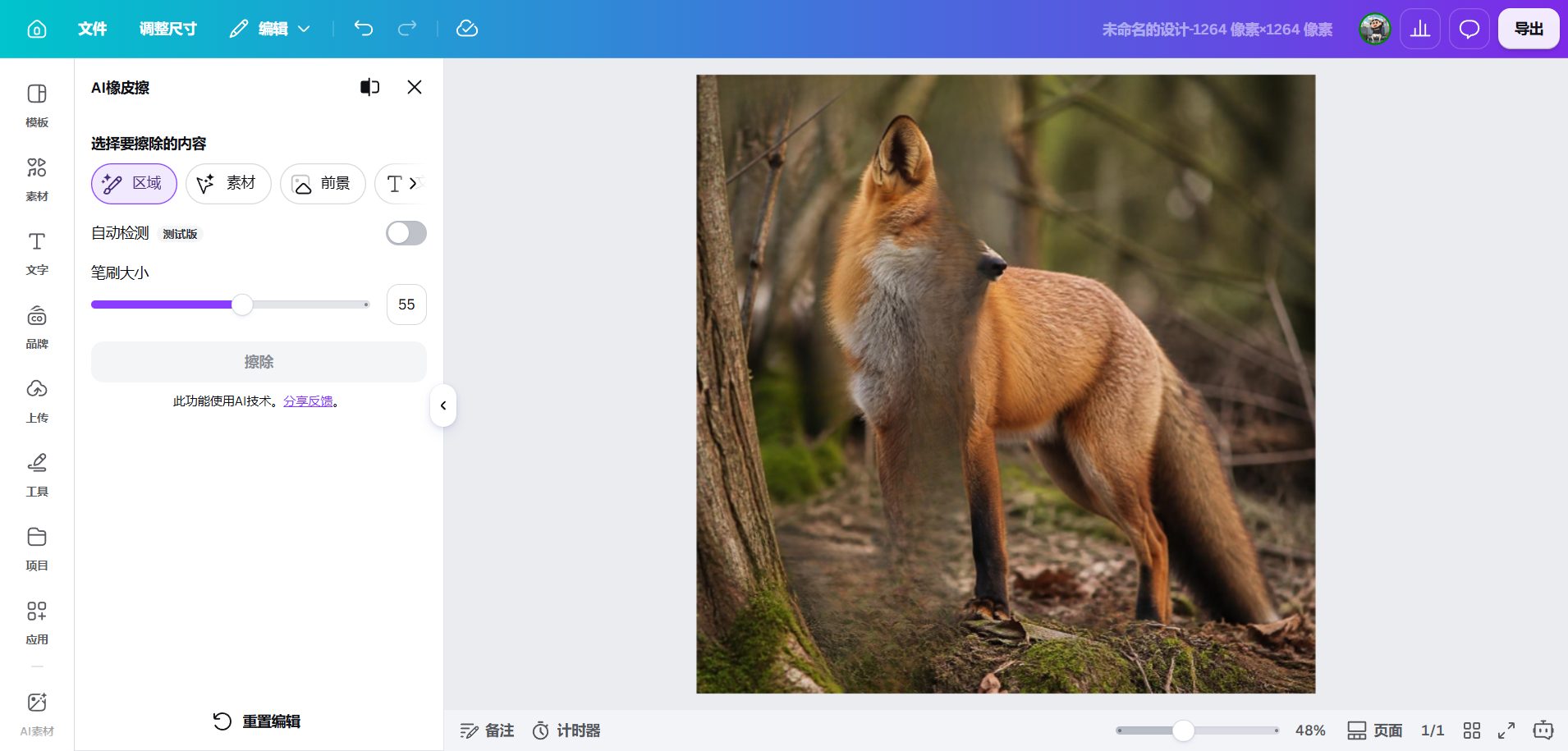
It works in three selection modes (region, element, foreground) with a brush from 1 to 100. You paint a purple selection, hit erase, and the AI fills the gap. The fill quality was genuinely hard to fault — moss and leaf litter redrawn as matching texture. But that is exactly the trap: it does not delete, it invents. If you needed a specific object removed and the background left alone, the tool will make a confident guess instead. That is a paid feature you can be disappointed by, which is worth saying before someone buys it for that.
The nine walls we could not test, and why
This is the part other reviews leave out, so here it is as a list. These nine items from our 18-wall baseline have no counterpart in the build we bought, so we could not pay our way past them and will not pretend we did:
- CMYK colour profile export — print colour management is not exposed in the Chinese download panel at all.
- The PNG quality setting — same panel, no such control.
- Text capture from an image (OCR) — feature absent.
- AI background replacement — absent.
- Exceeding the monthly AI allowance — we used the tools but never hit the ceiling, so we have no number.
- Resizing a finished design to US Letter — US paper sizes are not in this product's preset list.
- Uploading your own font — no upload control in the font panel.
- Posting straight to Instagram — replaced by something worse, below.
- Scheduling in Content Planner — product does not include it.
An honest scoreboard, then: 9 tested, 9 opened, 9 untestable. If you are on canva.com, the nine in this list are the ones you would need a separate test for, and we have not run it.
The wall money cannot buy: publishing
This was the discovery of the test, and it has nothing to do with paywalls. On the paid account we opened the full publish menu and counted what was there.
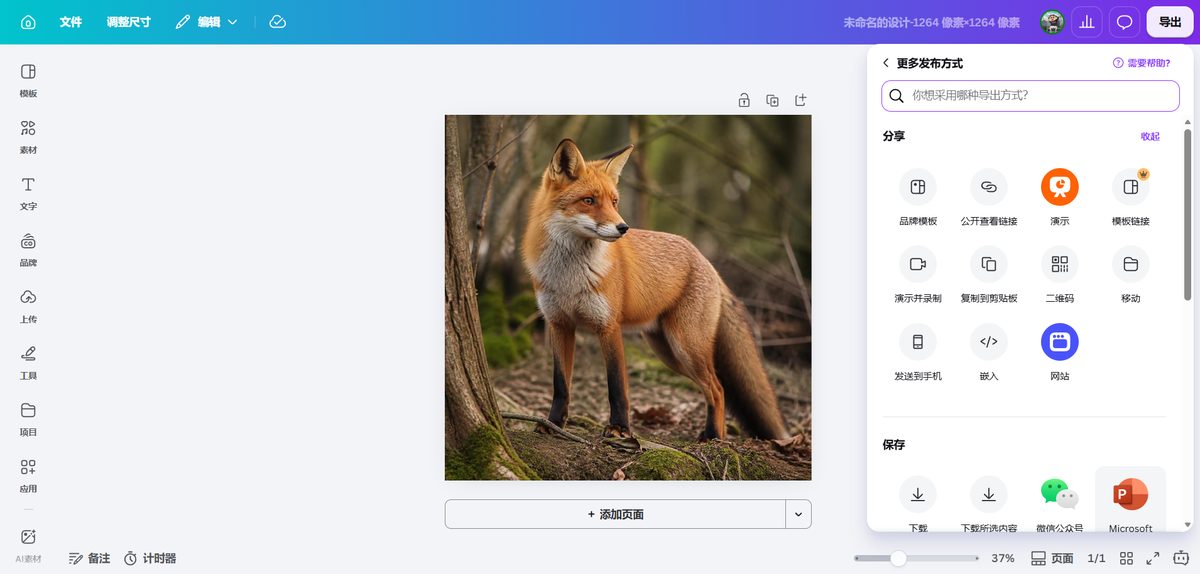
The social options are Douyin, Xiaohongshu and QQ Zones. Messaging is email, iMessage, WeChat and QQ. Saving offers download, WeChat Official Account and PowerPoint. There is no Instagram, no Facebook, no X, no LinkedIn, no Pinterest, no TikTok, no YouTube. Not locked behind a crown — simply not there.
This matters for two kinds of reader, and they should hear it differently.
If you are outside China and tempted by the price: you are not buying a cheap Canva. You are buying a Canva for the Chinese market, which is why it costs a tenth as much and why its AI writer runs on Qwen and answers in Chinese. The editor is the same lineage; the distribution is another country's internet.
If you are inside China and doing export work: the price is real and the export features are real. Just do not expect to schedule anything to Instagram, because scheduling is not the product's weak point — its market is.
We had assumed the paywall list would tell us what money buys. It told us what money cannot buy, which is a market.
Something nobody mentions: the crown does not disappear
We expected the crown icons to vanish once we paid. They do not. Premium fonts still carry a crown next to the name, and the transparent-background checkbox still sits beside one. What changes is what happens when you click: on the free account the crown opened a trial wall; on the paid account the same crown just executes.
It reads as a badge of ownership rather than a lock, but if you are scanning the interface for "what can I not use", the icons will mislead you after you have paid. We have not seen this written down anywhere else, and it caused us a confusing minute.
What Pro still does not do
Three things survived the payment, and they are why a lot of people cancel after one month.
1. Printing is a separate bill. Pro removes export walls, not the cost of paper. In our print quotes a single brochure came to US$15.40 and a flyer US$9.50, against US$0.36 and US$0.20 each at a thousand copies. A subscription changes none of that.
2. AI volume is limited, and the limit is invisible. The free account ran out after our second AI deck of the month. The paid account gives you a usage meter — "0% used this month, resets on 30 November" — which is a real improvement, since the free plan gives you no meter and just stops. But the meter is a percentage: we never found a published number of generations, and we did not hit the ceiling during the test, so we have no figure to give you. What we can say is that the ceiling exists and you will now be able to watch yourself approach it.
3. Templates are still other people's work. In the eight categories we counted, the crowned share of the first 20 results ran from 5% (presentations) to 40–50% (invoices). Paying unlocks the crowned ones; it does not make yours unique. The next subscriber gets the same template.
The arithmetic, with real numbers from both price pages
canva.com: US$18/month, or US$144/year. The yearly plan is US$12/month, a 33% saving — larger than the 16% the page badge claims. If you stay a year, pay yearly. If you are testing, pay monthly, because a yearly plan you forget costs twelve months instead of one.
canva.cn: ¥15 for the first month, then ¥30/month, or ¥188/year (about ¥15.70/month). Business is ¥49/month or ¥499/year. The promotional month is the cheapest way to try it and the most expensive way to forget about it, because renewal is automatic.
One more thing worth passing on, because it applies on both sites. 可画 showed us three different prices for the same plan in three places: the upgrade pop-up listed ¥36/month, the checkout stated renewal at ¥30/month, and the pricing page offered ¥188/year. The "save 55%" badge works out to about 48% against the site's own ¥30 rate. We are not alleging anything — subscription pricing is full of promo math. But it is the same pattern as the international "16%" badge hiding a real 33%. In both countries, in both directions, the badge percentage and the real saving are different numbers. Do the division yourself before you commit to a year.
Decide in one minute
Stay on free if: you post to social and make slides. Twelve out of twelve files we exported on a free account — PNG, JPG, PDF, PPTX, MP4, GIF — came out clean and watermark-free. You only need a different size occasionally (typing a custom size is free; the one-click version is what is walled). You are happy picking from the uncrowned 60–95% of template results.
Pay for at least one month if: you need SVG for a logo or icon set — it is the one common format that stayed fully behind the crown. You need transparent PNGs or exports above 1×. You need print-ready colour (this one we could not verify on the paid plan we bought, so treat it as the weakest row in our own table). You resize one design into several formats weekly. You produce AI-heavy work in bursts.
How to cancel, and where the switch actually is
We subscribed on 30 October 2026 and paid ¥15 by WeChat Pay. The Canva billing page states the terms as numbers — renewal 1 December 2026, ¥30/month, auto-renewal on — and has no cancel button anywhere on it. The switch is inside WeChat:
WeChat → Me → Services → Wallet → Payment Settings → Auto-renewal → Canva可画高级版 → 关闭扣费服务 (Turn off the deduction service)
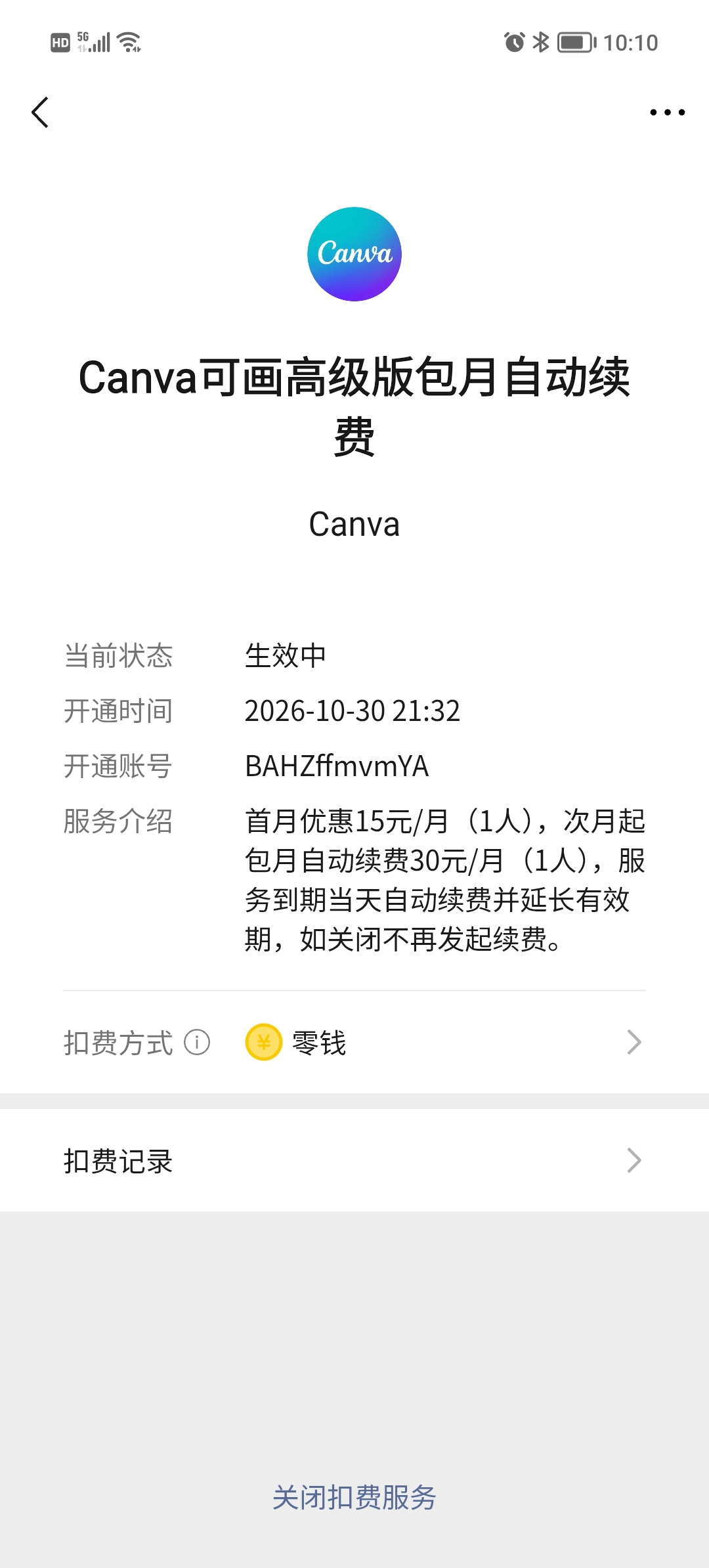
Turning it off does not shorten what you paid for: access continues to 1 December. That is the same rule the international product applies, and the reason we tell people to cancel the day they subscribe, not the day before renewal — you lose nothing, and you cannot lose track of it.
If you have already been charged and want the money back, that is a different process with its own rules, written up in our Canva refund policy breakdown.
What we did not verify
- One month, one account, three days. No renewal cycle observed, no long-term use.
- The Chinese build, not the international one. Nine of the eighteen walls were untestable because of this, listed above. Feature parity is likely, not proven; template libraries are definitely not identical.
- Desktop web only. No iOS or Android app testing.
- Pro, not Business. US$25/month on canva.com, untested; the US$7 gap is unexplored here.
- No CMYK test. The control does not exist in the build we bought, so we have no paid-account evidence for the one wall we call the strongest reason to pay. That inconsistency is in our table on purpose.
- No published AI allowance number. We saw a percentage meter, never the ceiling.
- One payment route. We did not test virtual cards or any workaround for the missing billing country, and we do not recommend them: they breach the terms you agreed to.
FAQ
Is Canva Pro worth it?
Yes if you need SVG, transparent PNGs, exports above 1× or AI tools in volume — all nine of those walls came down in our test and none came back. No if you only post to social or make slides: free exports were clean in all twelve files we measured.
Does Canva Pro remove the watermark?
There was no watermark to remove. Twelve out of twelve free exports came out clean. The crown blocks formats and settings, not watermarks. This is the most repeated mistake in the niche.
Can I buy it for one month and cancel?
Yes. Subscribe monthly, then switch off auto-renewal the same day. Access continues until the paid period ends. On a WeChat-billed subscription the switch is in WeChat, not on Canva's billing page.
Why is it so much cheaper in China?
Because it is a different product, not a discount. Separate accounts, separate templates, Chinese interface, yuan billing. And separate publishing: Douyin, Xiaohongshu, WeChat — no Instagram or Facebook at any price.
Is the yearly plan actually cheaper?
On canva.com, yes: US$144/year is US$12/month, a 33% saving over US$18 and more than the 16% the badge claims. On canva.cn, ¥188/year is about ¥15.70/month against ¥30.
What is the difference between Pro and Business?
US$7/month at list price, and we did not buy Business, so we will not guess what it buys you. On canva.cn, Business is ¥49/month or ¥499/year.
Read next
- All 18 Canva walls, with the screenshots — the baseline this article retests
- How much is Canva Pro? — both price screens and the 16% badge unpacked
- Canva Free vs Pro: what actually changes
- Canva refund policy: what the terms actually say
- Free cheat sheet: Free vs Pro on one page