Canva Free Plan Limits 2026: The 18 Paywalls We Hit, Measured
Every "Canva free vs Pro" list on the internet copies Canva's own comparison table. This page is the opposite: a running record of what a free account actually stops you from doing, built from 18 projects we built and exported ourselves — a book cover, a brochure, an invoice, a poster, a YouTube thumbnail, a logo, a résumé and more. Each wall below is numbered, dated and photographed, and every file size in the last table was read off our own disk. If you need to know whether a specific thing costs money before you commit, find it here.
Short answer: 18 things are Pro-only, and they cluster in three places — the download panel (SVG, transparent PNG, upscaling past 1×, the quality setting, anything over 2000 px, CMYK), the AI tools (background remover, eraser, cutout, text capture, background replacement, plus a monthly allowance that ran out on our second AI deck), and the "one-click" shortcuts (Magic Resize, resize to US Letter, premium fonts, uploading your own font). Everything else we tried was free: PNG, JPG, PDF, PPTX, MP4 and GIF exports, all 12 measured files, no watermark on any of them. On a free account we exported a compliant 1280×720 thumbnail at 1.17 MB, a 1410×2250 book cover at 2.56 MB and an 8-slide deck as PPTX at 23.2 MB. Pro is US$18/month or US$144/year (= US$12/month) on the screen our account showed.
How this page was built
This is not a review written from Canva's help centre. Between September and October 2026 we started 18 separate projects on the same free Canva account and pushed each one until it stopped, then recorded what stopped it:
- The account: one free Canva account, signed in normally, no payment details entered at any point and no trial started — so nothing here depends on a trial that has since expired.
- What we recorded: the exact screen shown, the file we got out, its pixel dimensions, and its size in kilobytes or megabytes as reported by the operating system.
- What we did not record: response speed, AI token counts, or anything we could not see with our own eyes. Where a number was unavailable we say so instead of estimating.
- One caveat: template shelves and default AI allowances change. The crown counts below are a snapshot from our October 2026 session, and we date every row so you can tell how old it is.
The 18 Pro walls, in the order you'll hit them
This is the core table. "Where we confirmed it" links to the full test with screenshots for that specific wall.
| # | What you try to do | What a free account does | Confirmed in |
|---|---|---|---|
| 1 | Export an SVG (vector) file | Crowned in the file-type list; forcing it opens the paywall | Export formats |
| 2 | Export a PNG with a transparent background | The toggle is locked inside the Download panel | Export formats · Logo |
| 3 | Export larger than 1× (upscale a thumbnail) | The size slider is crowned; dragging toward 2× triggers the wall | YouTube thumbnail |
| 4 | Change the PNG quality setting | Crowned in the same panel | YouTube thumbnail |
| 5 | Export an image larger than 2000 px | Crown icon next to the size option | Logo |
| 6 | Export with a CMYK colour profile | Crowned — and we confirmed it separately in four categories: brochure, poster, invitation, invoice | Brochure · Poster |
| 7 | Remove a background in one click | Upgrade screen, Pro shown at US$18/mo | Background remover |
| 8 | Use the AI eraser | Crowned in the photo tools panel | Free vs Pro |
| 9 | Extract a subject / AI cutout | Crowned, same panel | Free vs Pro |
| 10 | Capture text from an image | Crowned, same panel | Free vs Pro |
| 11 | Replace a background with AI | Crowned, same panel | Free vs Pro |
| 12 | Exceed the monthly AI allowance | Wall after our 2nd AI deck generation of the month; counter resets on the 1st | AI presentation |
| 13 | Apply one-click Magic Resize | Typing a custom size works; applying it ends at the trial button | Resize image |
| 14 | Resize a finished design to US Letter | The size is listed, but the action button is a Pro trial offer | Résumé |
| 15 | Use a premium font | Crowned — Aprilime, Archetype Aubette and Avenir were all marked | Invitation |
| 16 | Upload your own font | "Upload a font" carries the crown | Invitation |
| 17 | Post straight to Instagram from Canva | Click leads to a Business paywall | Instagram post |
| 18 | Schedule a post in Content Planner | Same paywall as #17 | Instagram post |
Two things worth noticing about that list. First, eleven of the eighteen live in two panels — the Download dialog and the photo tools panel — so a beginner meets most of them in the last thirty seconds of a project, after the work is done. Second, none of them is a watermark. See the watermark section below, because this is where most other guides get it backwards.
Export formats: what's free, what isn't
Seven formats appear in the Download panel. Six are free.
| Format | Plain English | Free? |
|---|---|---|
| JPG | The universal photo format — phones, websites, email | ✅ Free |
| PNG | Sharper than JPG for text and flat colour; Canva's default | ✅ Free (no transparency) |
| Two presets hide in here: Print and Electronics | ✅ Free (RGB only) | |
| SVG | Vector — scales to any size without blurring | ⛔ Pro |
| MP4 video | Turns an animated design into a video file | ✅ Free |
| GIF | Short looping animation, no sound | ✅ Free |
| PPTX | Opens your design in PowerPoint with real text boxes | ✅ Free |
The PDF preset choice matters and almost nobody explains it: Print adds crop marks and bleed for a print shop, Electronics keeps the file small for someone reading on screen. Both were free for us, both in RGB. The only PDF wall is CMYK, which is a Pro colour profile rather than a PDF feature — worth knowing if your local printer demands CMYK, because that is the single most common reason a free user is told they need Pro.
Twelve exports, weighed on disk
This is the table other guides don't have, because it requires actually finishing the projects. Every number is the file size our computer reported, not an estimate.
| Project | Format | Size on disk | Pixels / pages |
|---|---|---|---|
| Simple flat design (7-format test) | PNG | 12.3 KB | — |
| Same design, same export | JPG | 23.3 KB | — |
| Same design, same export | 15.3 KB | — | |
| First-ever design | PNG / JPG | 52.7 KB / 65.3 KB | 1080 × 1080 |
| Logo, white background | PNG | 192 KB | 2000 × 2000 |
| YouTube thumbnail | PNG / JPG | 1.17 MB / 66 KB | 1280 × 720 |
| Instagram post | PNG | 2.76 MB | Template size |
| Invitation (5 × 7 in) | PNG / PDF Print | 878 KB / 1.1 MB | Exact 5.00 × 7.00 in |
| Poster, print-ready | PDF Print | 10.1 MB | Crop marks included |
| 8-slide AI deck | PPTX | 23.2 MB | 8 slides, 62 media files |
| Same 8-slide deck | 28 MB | 20 × 11.25 in pages | |
| Kindle book cover | PNG | 2.56 MB | 1410 × 2250 (ratio 1.5957) |
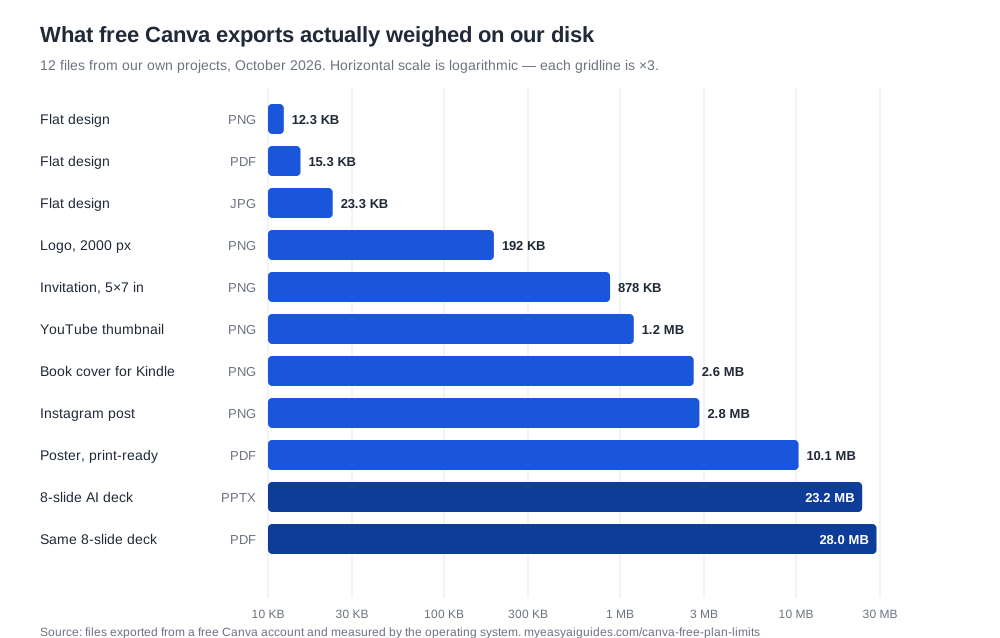
Two conclusions fall out of those numbers. JPG is roughly half the size of PNG on a flat design and 18× smaller on a photographic one — our thumbnail was 1.17 MB as PNG and 66 KB as the same design in JPG, which matters because YouTube rejects thumbnails over 2 MB. And the deck exports are the heavyweight outliers: a 28 MB PDF from eight slides is entirely normal on the free plan, and none of the size limits people worry about ever came up.
Crown density by template category
Canva's free/Pro mix is not uniform across the template library, and no other guide counts it. We searched nine categories, took the first 20 results in each, and counted how many wore the crown.
| Template search | Crowned in first 20 | Density | What else we noticed |
|---|---|---|---|
| Presentation | 1 | 5% | 19 of 20 usable — the cleanest shelf we counted |
| Invitation | 2 | 10% | Clean first page, then it bites — see the depth table |
| Logo | ≈2–3 | ≈12% | Counted as "Pro or Paid" together |
| Brochure | 3 | 15% | Crowns deepen the further you scroll |
| Poster | 3 | 15% | 17 of 20 crown-free |
| Instagram post | 4 | 20% | 16 of 20 crown-free |
| Book cover | 6 | 30% | The only shelf that gets freer as you scroll — thins to 15%, then 25% |
| YouTube thumbnail | 7 | 35% | Held flat at 35% through result 40 — no bait shelf |
| Invoice | 8–10 | 40–50% | Two separate counts, same range |
The "bait shelf" pattern is the one worth understanding. Invitations looked like the cleanest category we had seen — 2 crowns in the first 20, a 10% density — and then results 21 to 30 carried 6 crowns, a 60% density. In other words, the free templates are stacked at the top, and the Pro ones start exactly where you scroll past the obvious choices. The same shelf held 43% at results 40–70 and 35% at 80–100, so the trap is at the top of the scroll, not the bottom.
| Depth in invitation results | Crowns | Density |
|---|---|---|
| Results 1–20 | 2 | 10% |
| Results 21–30 | 6 | 60% |
| Results 40–70 | 13 of 30 | 43% |
| Results 80–100 | 7 of 20 | 35% |
Practical upshot: if you pick a template from the first screen or two of results, you have a 80–95% chance of landing on a free one. If you fall in love with a crowned template at result 25, you will not be told until you hit Download.
The watermark question, settled
Plenty of guides say free Canva downloads come with a watermark. In 12 exports across six formats we never saw one. What actually happens is different and more annoying:
- Designs with premium elements cannot be exported at all. Canva blocks the download rather than degrading it — you get the upgrade screen, not a stamped file.
- Premium elements do not pop up when you add them. In our flyer test, a crowned element placed silently on the canvas. The wall had moved to the Download button.
- Pure-free designs export clean, at full resolution, every time — 12 out of 12.
That distinction matters when you are following an older tutorial: if someone tells you to just put up with a watermark, they are describing a Canva that no longer exists.
What is genuinely, completely free
Because the rest of this page is a wall list, here is the honest other side. All of the following worked with zero prompts, zero crowns and zero dollars:
- Browsing and using crown-free templates in every category we tried, and a price filter is gone but you don't need it if you stay near the top.
- Text editing — every font size, weight, colour and alignment control we used.
- Uploading your own photos, including auto-crop into a frame.
- Custom-size canvases at any dimensions, and dragging, scaling, cropping and Smart Crop.
- Copy-pasting a whole design into a new size — the manual version of Magic Resize, content stays editable.
- Exporting to PNG, JPG, PDF (both presets), PPTX, MP4 and GIF.
- The AI chat assistant, AI outline generation, and one full AI deck generation per month — ours produced a complete 8-slide deck with photos and editable text.
That is a working design tool with no time limit and no watermark. The paid plan buys convenience and colour accuracy more than it buys access.
What Pro actually costs
From our own pricing screen, not a blog post:
| Plan | Monthly billing | Yearly billing | Yearly ÷ 12 |
|---|---|---|---|
| Free | US$0 | US$0 | US$0 |
| Pro | US$18/mo | US$144/yr | US$12/mo |
| Business | US$25/mo | US$250/yr | ≈ US$20.83/mo |
| Enterprise | Custom quote | ||
One warning about these numbers: a second account of ours was quoted in HK$ — HK$120/month for Pro and HK$170 for Business, roughly US$15 and US$22 — so Canva prices by region. Treat US$18 / US$144 as the shape of the deal, not a promise, and check your own checkout page. Full breakdown in how much Canva Pro costs.
Printing is a separate bill, on every plan
Canva will print and ship your design — free plan or not, you pay per order. These are the quotes our own account received in October 2026:
| Product | Cheapest single unit we were quoted | Cheapest per unit at volume | Fulfilled by |
|---|---|---|---|
| Brochure | US$15.40 for 1 | US$0.36 each at 1,000 | Canva |
| Flyer (8.5 × 11 in) | US$9.50 for 1 — no minimum in the US store (the Singapore store we first quoted forced a 25-copy minimum) | US$0.20 each at 1,000 (87% off the list ladder) | Canva |
| Invitation (5 × 7 in) | US$12.94 for 1 | US$0.36 each at 1,000; envelopes +US$8 | Canva |
| Poster | US$17.60 (12 × 16 in) | US$61.99 for 36 × 48 in — bigger, not cheaper | VistaPrint |
| Invoice sheet ("Letterheads") | US$50 for 50 sheets | US$1.00 per sheet | Canva |
The volume ladders are steep and worth planning around: our brochure quote fell from US$15.40 for one copy to US$0.36 at a thousand, an 86% discount, and the flyer ladder is steeper still — US$9.50 for a single copy down to US$0.20 each at 1,000 (25 for $21.50, 100 for $65, 250 for $115, 500 for $150). One finding no other guide mentions: the print shop itself changes by country. Quoted from a Singapore network, flyers came only in A4 with a 25-copy minimum; from a US network, the same product is 8.5 × 11 in and sells single copies. Treat the structure as the durable finding and your own quote screen as the number. But Canva discloses who actually prints only inside the order panel — posters say "By VistaPrint", invitations say "By Canva" — which changes nothing about the price and everything about who you complain to.
Two things that are not paywalls, just missing
Being accurate means separating "costs money" from "doesn't exist", because they lead to different workarounds:
- Invoices do not auto-calculate totals on any plan. You type the numbers, and you add line items by copying a text box and aligning it by hand. Pro does not fix this. If you invoice weekly, Canva is the wrong tool and a spreadsheet is the right one.
- Template content cannot be used as a trademark on any plan. Canva's own content licence forbids it, so "buy Pro to trademark your logo" is not a thing — you would need an original design.
How to use this page
- Before you start: check the export table for the format you need. If your plan ends in a print shop, find out first whether they accept RGB — that single answer decides whether you need Pro at all.
- If you hit a wall mid-project: the 18-row table tells you which of our detail pages has the free workaround. Background removal, resizing and transparency all have one.
- If you are deciding on Pro: the honest reason to pay is colour accuracy (CMYK), the AI volume, and speed — not access.
Cite this page
My Easy AI Guides, "Canva Free Plan Limits 2026: The 18 Paywalls We Hit, Measured" — tested October 2026 on a free Canva account.
myeasyaiguides.com/canva-free-plan-limits · last updated October 28, 2026
FAQ
How many features are locked on a free Canva account?
Exactly 18 in our testing: six export and file controls, six AI items including the monthly allowance, four editing and resizing controls, and two posting features. The full numbered list is the first table on this page.
Can you export a transparent PNG on free Canva?
No. The toggle is locked in the Download panel, and our 2000 × 2000 logo came out at 192 KB on a solid background. The free workaround is to set your canvas background to match wherever the image will sit — which works fine for a white website, and not at all for a product photo.
What is the free Canva AI allowance?
Canva's plan comparison lists 20 AI uses per month on Free against 200 on Pro, resetting on the 1st. In practice we hit the wall after our second AI deck generation of the month, so the heavier actions appear to draw more than one unit. We didn't run enough AI tasks to publish a per-action cost, and we won't guess at one.
Is one-click Magic Resize free?
No, but the manual route is. Type a custom size (free, any dimensions), copy-paste the design in, and drag the elements — our 1080 × 1080 export matched the canvas to the pixel. What you cannot do free is the automatic re-flow, which is what you are really paying for at volume.
Do free Canva downloads have a watermark?
Not in any of our 12 measured exports across six formats. Canva blocks premium-content exports outright at the download button instead of stamping a watermark on them. Designs built only from free elements exported clean every time.