Canva for Education: Who Actually Gets the Free Teacher Upgrade — We Walked the Verification Flow
Every tutorial repeats the same sentence: "teachers get Canva Pro for free." Almost none of them show what happens when you actually click Get verified — what the form demands, where it blocks you, or how many people it quietly excludes. We walked the whole flow on a real free account to find the exact walls.
Short answer: Canva Education is genuinely free — Canva's own FAQ promises "100% free, with no paywalls or nasty surprises" — but it is strictly for K-12 (primary and secondary) educators and accredited institutions, and the eligibility page explicitly excludes 13 groups, including college and university students, their lecturers, parents, private tutors, and public librarians. In our test, the Get verified form demanded a school location and school name before anything else, and without a school email the only path is uploading documents (a teaching license for US, UK, Canada, Australia, NZ, Japan and South Korea educators; more for everyone else), which Canva reviews within 48 hours. Access lasts while you stay eligible — and Canva re-verifies every 3 years, a detail almost no tutorial mentions.
How we ran the test
On October 28, 2026, we opened canva.com/education and the eligibility guidelines on a desktop browser, signed in to a standard free Canva account (no education affiliation), and clicked Get verified. We screenshotted every screen of the application flow. We deliberately did not fabricate a school name or upload any document, and we did not submit the application — this article is about where the walls are, not about getting past them dishonestly. Every claim below comes from Canva's own pages or our own screenshots, taken from a US network.
The promise: "100% free" — for a specific classroom
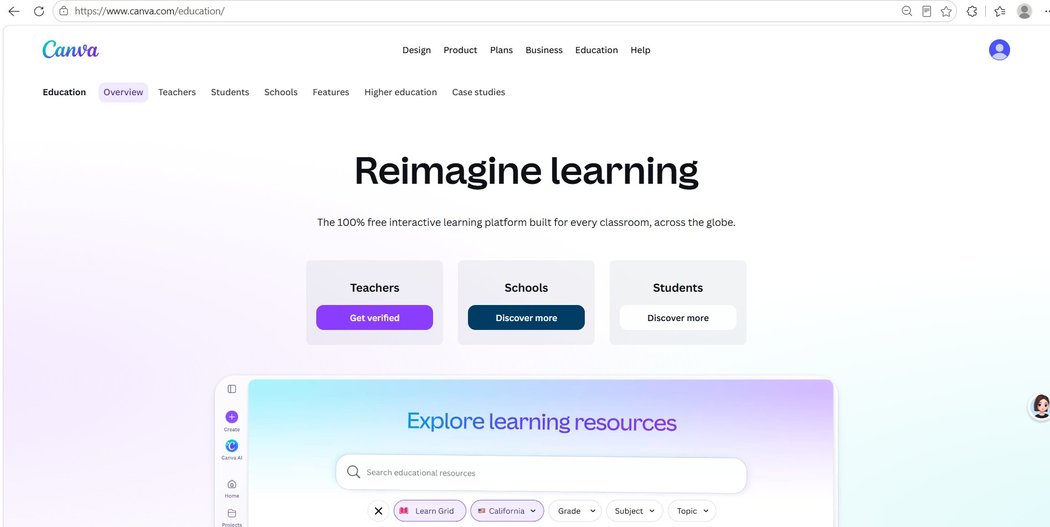
Canva's education landing page leads with "Reimagine learning — the 100% free interactive learning platform built for every classroom, across the globe." The teachers' card carries the only Get verified button; schools and students get "Discover more" links.
The FAQ backs the promise up in unusually blunt language:
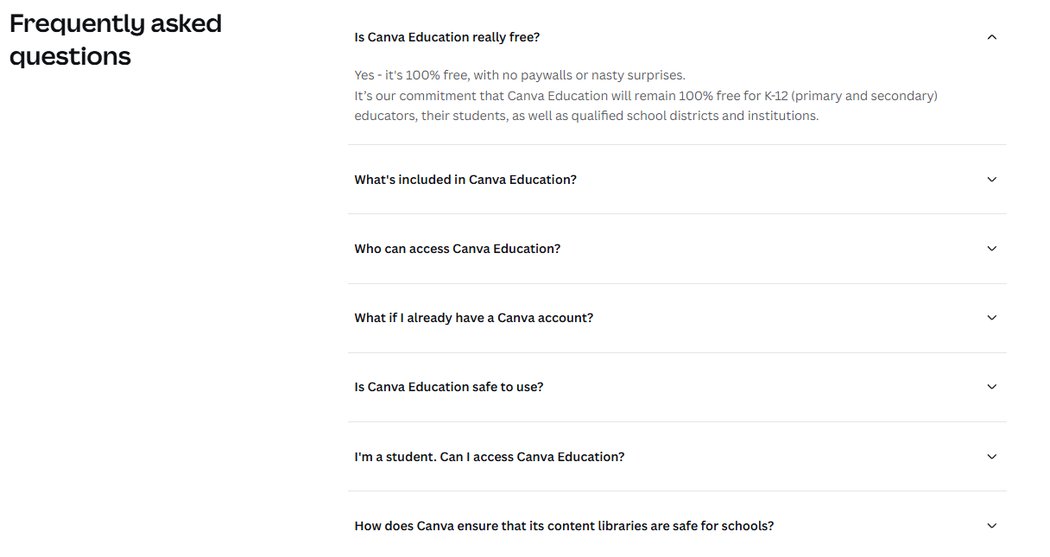
Both statements are true. What the landing page doesn't say is how narrow "eligible" turns out to be.
Who actually qualifies: 6 roles, 4 kinds of organization
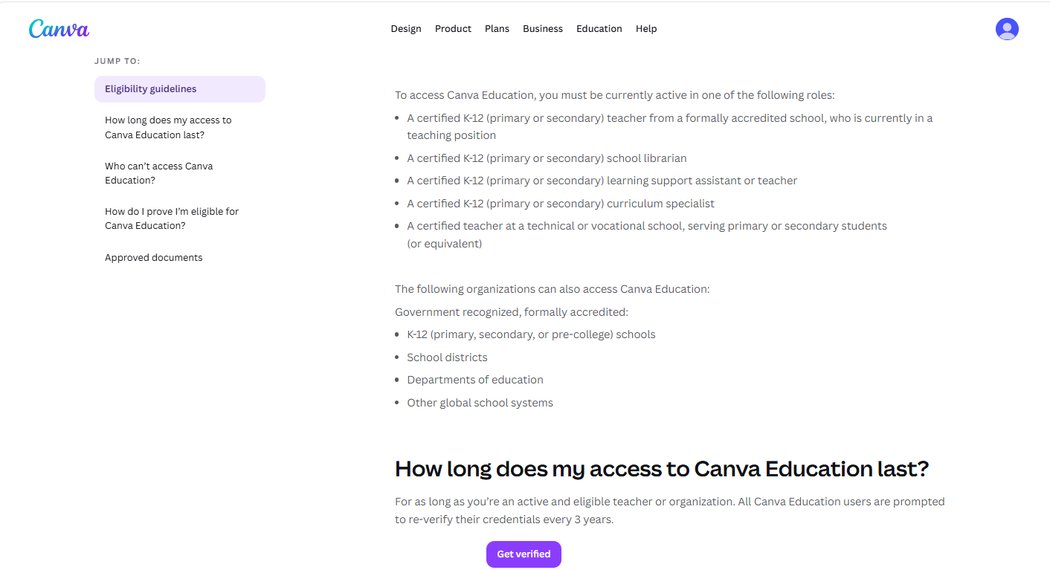
Canva's eligibility guidelines state that Canva Education is "currently available for K-12 (primary or secondary) teachers and institutions. It is not currently available for higher education teachers and institutions (colleges and universities)." That K-12 boundary is the whole story. To access it, you must be currently active in one of these roles:
| # | Eligible role (Canva's own wording, shortened) |
|---|---|
| 1 | A certified K-12 teacher from a formally accredited school, currently in a teaching position |
| 2 | A certified K-12 school librarian |
| 3 | A certified K-12 learning support assistant or teacher |
| 4 | A certified K-12 curriculum specialist |
| 5 | A certified teacher at a technical or vocational school, serving primary or secondary students (or equivalent) |
| 6 | Organizations: government-recognized, formally accredited K-12 schools, school districts, departments of education, and other global school systems |
Who can't: 13 groups Canva names explicitly
This is the section most "Canva Pro for free" tutorials skip. Canva's page lists the excluded groups in plain text — and several of them are exactly the people searching for free premium features:
| # | Not eligible | What Canva points them to |
|---|---|---|
| 1 | Certified K-12 teachers not currently in teaching positions | — |
| 2 | Public librarians (e.g. city or county) | — |
| 3 | Preschool or daycare assistants | — |
| 4 | Homeschool educators not licensed or employed with a K-12 institution | — |
| 5 | Private, volunteer, or online tutors | — |
| 6 | Colleges, universities, and other higher education institutions, including lecturers and staff | Canva for Campus (paid) |
| 7 | College and university students | Canva for Campus (paid) |
| 8 | Continuing/further education institutions | — |
| 9 | Adult education institutions | — |
| 10 | Organizations providing extracurricular activities outside of school | — |
| 11 | Non-profits not delivering teaching directly | Canva for Nonprofits (separate program) |
| 12 | Early-stage start-ups with an educational focus | — |
| 13 | Parents of children who are in K-12 education | — |
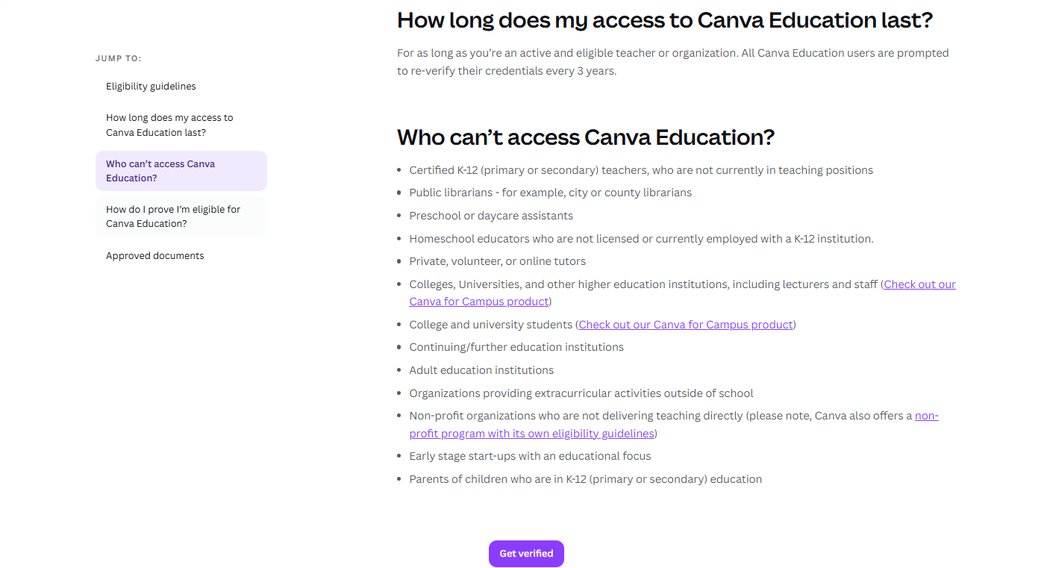
Notice who is missing from the eligible list and present in the excluded one: parents of school-age kids, tutors, public librarians, and every college student. If you found this article by searching for a free Canva Pro workaround, there is a good chance you're on this list.
The verification flow, screen by screen
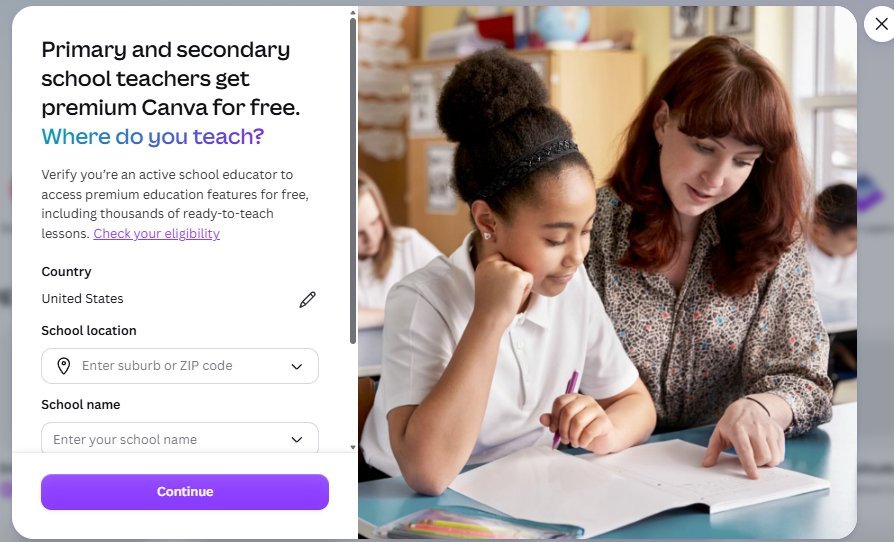
Clicking Get verified opens a modal titled "Primary and secondary school teachers get premium Canva for free. Where do you teach?" — the K-12 framing is baked into the very first screen. Our country was auto-detected as United States; the form asks for a School location (suburb or ZIP code) and a School name before anything else. There is no "just let me look around" entry point.
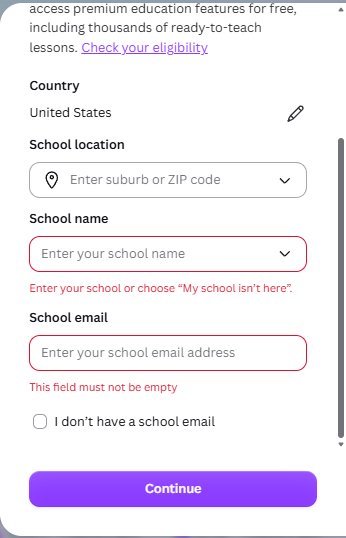
Clicking Continue with the fields empty produces two errors that say the quiet part out loud: "Enter your school or choose 'My school isn't here'" and, for the email field, "This field must not be empty." The form does offer one escape hatch — a checkbox labeled "I don't have a school email."
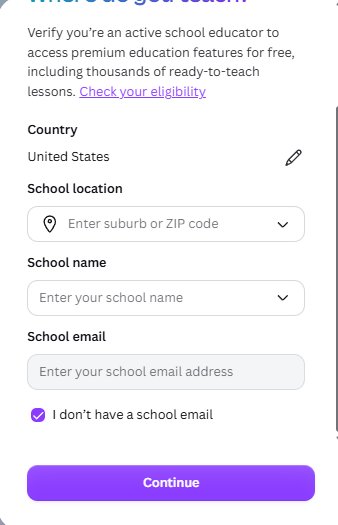
So what does the checkbox actually do? In our test: almost nothing. Checking it simply greys out and disables the school email field. No popup, no alternate path, no explanation. The school location and school name remain mandatory, and the verification burden quietly moves to the document route described on Canva's help pages. The wall doesn't move — you just stop being asked for the one credential you don't have.
One more honest observation: the School location dropdown shows "No options available" until you type a suburb or ZIP — so there is no browsing your way to a school either. The form is built to match you against a real, accredited institution from the first keystroke.
Proving you're eligible: the document route
Canva's verification help page describes the two tracks clearly:
- Sign up with a verified educational email domain → access right away.
- Everyone else → upload a photo or scan of an approved document, reviewed within 48 hours.
The approved documents are a teaching license or certification, a document showing employment at a school, a school ID showing teaching status, or proof of the organization's accredited K-12 status. And there's a regional shortcut worth knowing:
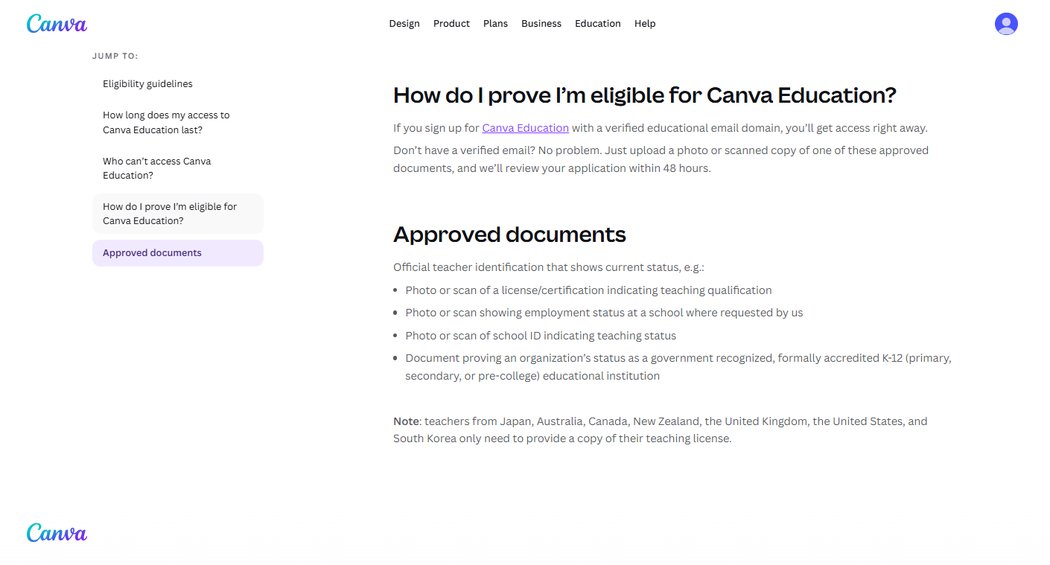
Teachers in Japan, Australia, Canada, New Zealand, the UK, the US, and South Korea only need a copy of their teaching license. Educators in other countries may be asked for more. Canva emails the result; while you wait, you stay on the free plan.
Three details almost no tutorial mentions
These came straight out of the pages we screenshotted, and each one changes the practical picture:
- Access is conditional, forever. Canva's own words: access lasts "for as long as you're an active and eligible teacher or organization. All Canva Education users are prompted to re-verify their credentials every 3 years." Education is a status, not a one-time gift.
- The review is fast — 48 hours on the current verification page. (Canva's older help pages in some regions still say 3–5 working days; the number on the live page we captured is 48 hours.)
- Students can't self-serve at all. Even eligible K-12 students get access only if their teacher invites them from a Canva Education account — there is no student application path.
What Education includes — measured against the free plan we tested
Canva's FAQ says Education includes "most of Canva's premium features" plus teacher-specific extras: LMS integrations, class management, thousands of education templates, and enterprise-grade security for districts. We could not verify the inside of an Education account — we never got past verification, on purpose — so treat the Education column below as Canva's claim, while the free column is what we measured across 18 free-account projects:
| Wall | Free plan — what we tested | Education — Canva's claim |
|---|---|---|
| Crowned (Pro-only) templates | Lock at download; 5–50% of shelves crowned in 9 categories — our counts | Most premium features included |
| Background remover | Pro-only — tested | Included ("most premium features") |
| Premium elements | Attach silently, block at the download button — tested | Included |
| Magic Resize | Pro-only — tested | Included |
| Classroom extras | Don't exist on free | LMS integrations, class management, education templates |
If you hold a qualifying role, that's a genuinely large unlock — and unlike Pro, it costs nothing. If you don't, our Canva free plan limits page catalogues all 18 walls we measured, so you know exactly what you're working around.
If you don't qualify: four honest paths
- Stay free, know the walls. Most people searching for this don't need every premium feature — they need two or three specific ones. Our measured limits table tells you which walls actually block your workflow.
- Pay for Pro — but check the price screen first. We documented what the pricing page actually shows, including what the cards say, in our Pro price guide.
- Non-profit? If your organization delivers teaching directly, Canva runs a separate Nonprofits program with its own eligibility guidelines (linked from the same exclusion list).
- In higher education? Canva points colleges, universities, and their students to Canva for Campus — a paid product, not a free upgrade.
One thing we'd advise against: fabricating school details to squeeze through the form. Beyond being dishonest, the document review and the 3-year re-verification mean a false application eventually meets a human — and Canva's terms, not ours, decide what happens to the account and everything built in it.