Canva AI Made Us a Full 8-Slide Presentation for Free — Then Told Us the Monthly Limit Was Already Gone
Canva now has a ChatGPT-style AI assistant built in. On a free account, it wrote our outline, generated a complete slide deck with photos and editable text, and handed us the files — including PowerPoint format, which older guides still call a Pro feature. Then it mentioned, almost apologetically, that our free monthly AI allowance was spent and wouldn't reset until November 1. Here's exactly what happened, with screenshots.
Short answer: Yes — on a free account, Canva's built-in AI wrote the outline and generated a complete 8-slide deck about starting a candle business, with photos, editable text and no watermark, in a single pass. The catch arrives afterwards: our second AI task of the month hit "You've reached your plan's monthly AI limit. It resets on Nov 01." Canva's own upgrade page prices Canva Business at $25/month (after a trial) as "20x more AI usage than Canva Free", with Pro at $18/month — which tells you how small the free allowance is by design. Two more findings from the same test: only 1 of the first 20 "presentation" results carried the Pro crown, the cleanest search page of the eight categories we've counted, and PPTX export is free (8 real slides, 62 embedded media files, genuine editable text) while SVG is the crowned format. Every number below has a screenshot behind it.
First, the template shelf: only 1 crown in the first 20
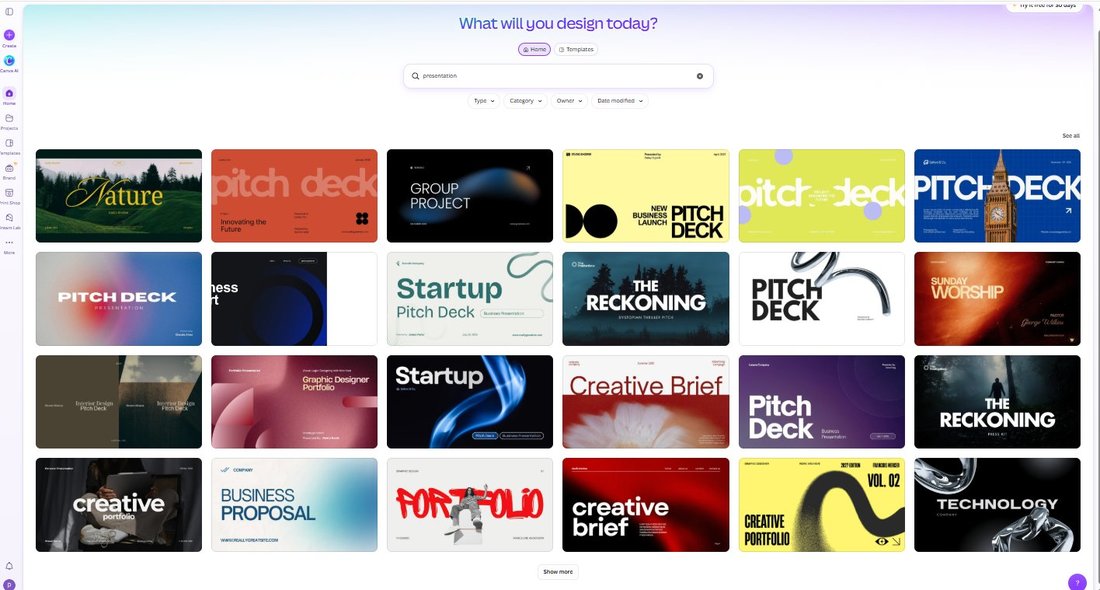
Before touching the AI, we did what we do before every Canva test: searched presentation and counted Pro crowns in the first 20 results.
One. That's the cleanest first page of any Canva category we've measured — invitations came in at 2/20, brochures and posters at 3/20, Instagram posts at 4/20, YouTube thumbnails at 7/20, invoices at 8–10/20. The front rows here are almost all business skeletons (pitch decks, proposals, portfolios): templates that expect you to type your own content, so there's little value in locking them.
Canva quietly became a chatbot
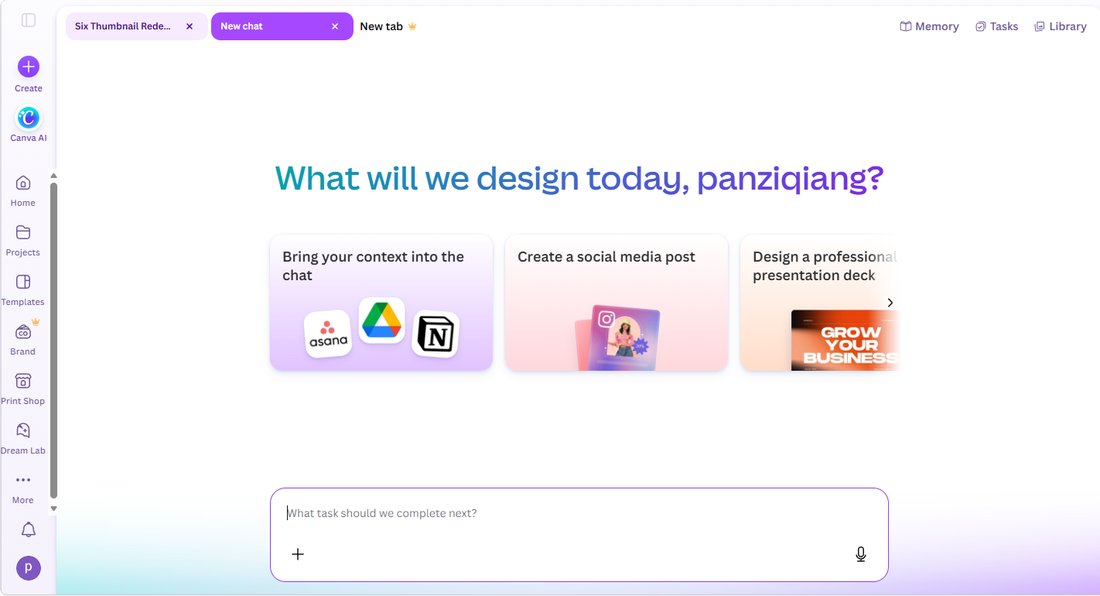
The bigger discovery wasn't in the template gallery. In the left sidebar there's now a Canva AI item that opens a full conversational assistant: a greeting addressed to us by name, suggestion chips like "Create a social media post" and "Design a professional presentation deck", a proper chat input, and top-level tabs for Memory, Tasks, and Library. It even keeps separate conversations, like any chatbot does.
Most articles about "making presentations with Canva AI" still describe a one-shot prompt box. What we tested is a step beyond that — and most people writing about it haven't noticed.
The request: 8 slides about a candle business
We asked for something concrete, tied to our other stress-tests:
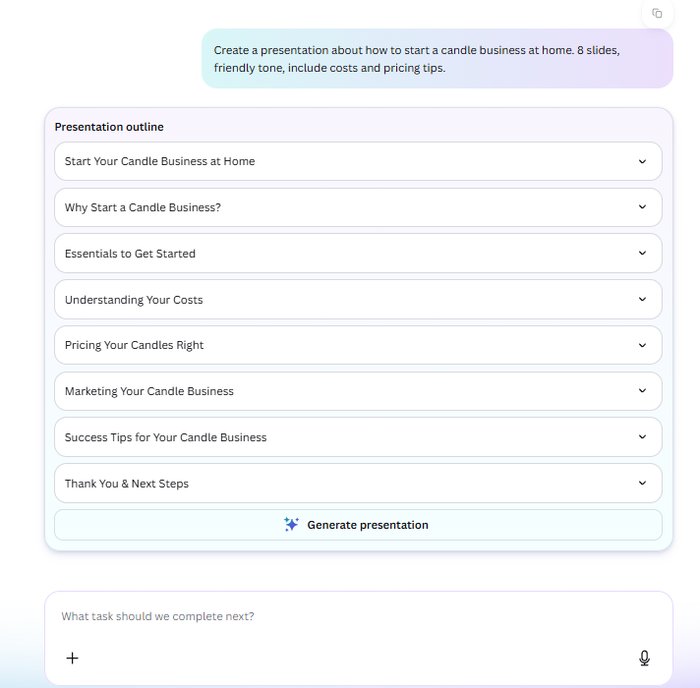
Create a presentation about how to start a candle business at home. 8 slides, friendly tone, include costs and pricing tips.
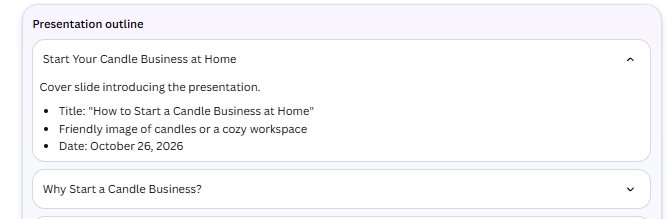
Canva AI didn't ask a single clarifying question — no "who's the audience?", no style picker. It went straight to work. Within seconds it produced a titled, 8-item outline with expandable per-slide notes (the cover slide's notes even specified "friendly image of candles or a cozy workspace" and stamped today's date, October 26, 2026, which it knew on its own).
The deck arrived complete — and so did the wall
We clicked Generate presentation. Canva AI assembled all 8 slides as one ordered design: dark, consistent, candle photography on every page, headings and body text in place. Nothing was watermarked, nothing was left as a gray placeholder.
Then, alongside the finished deck, the chat posted a notice: "You've reached your plan's monthly AI limit. It resets on Nov 01." — plus a purple "Get more AI" button, and a reassurance: "But don't worry, we can still keep chatting." Chatting is free; making things is metered.
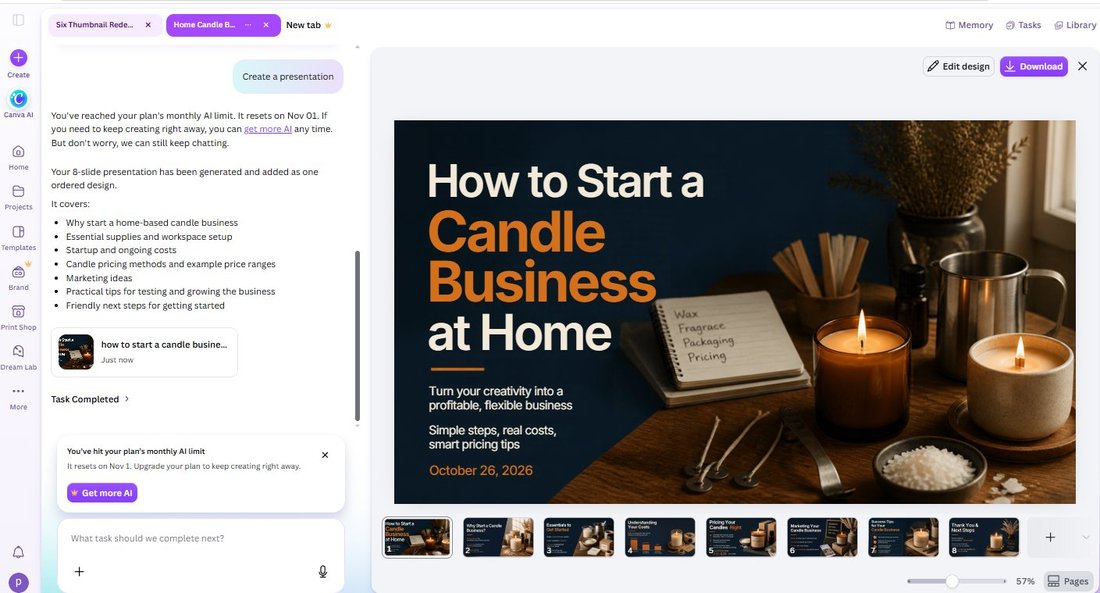
How little is that allowance? Our account had used Canva's AI exactly once earlier this month — a single background removal. This presentation was our second AI task of the month, and the wall went up. We can't tell you the exact free quota (Canva doesn't publish a number), but we can tell you what happened to us: two AI jobs, and the meter read empty.
What the free deck actually contains
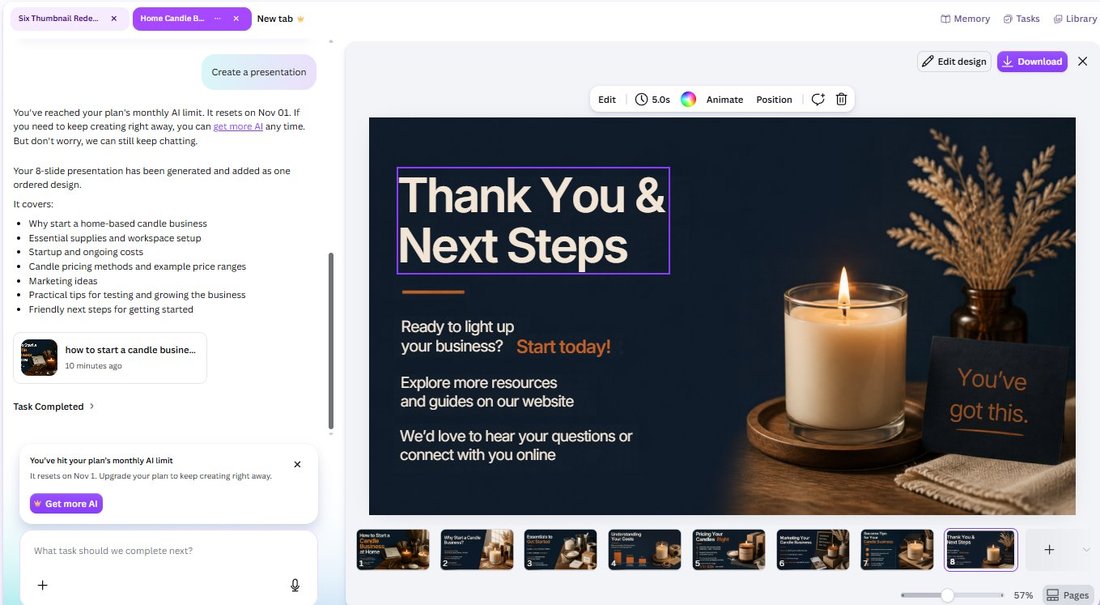
Despite the wall, everything delivered was genuinely usable. We clicked through the slides:
- Text is fully editable — selecting a headline raised the normal text toolbar, no Pro prompt.
- The photos are included — no crowns on the images across the pages we checked.
- 8 slides as promised — no missing pages, no "generate the rest with Pro".
The strategy is easy to read: Canva gives you the finished product first and meters the next one. You can edit, export, and use everything from this session. What you can't do is keep generating — and with a monthly reset, a free user gets a taste, not a workflow.
What "more AI" costs — by Canva's own numbers
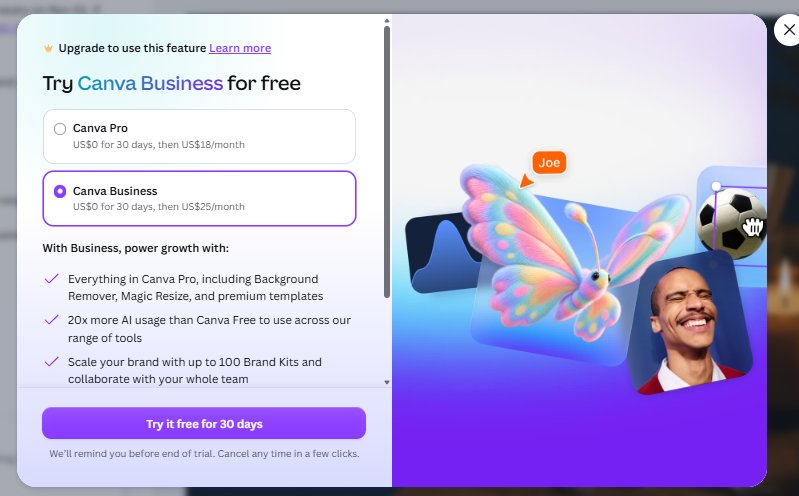
The "Get more AI" button opens the upgrade sheet, and it contains the most honest sentence in this whole test: Canva Business includes "20x more AI usage than Canva Free." If the paid tier is 20 times the free one, the free one is designed to run out — that's not a bug, it's the pricing model. The sheet lists Canva Pro at US$0 for 30 days, then US$18/month, and Canva Business at US$0 for 30 days, then US$25/month.
The export surprise: PPTX is free, SVG is not
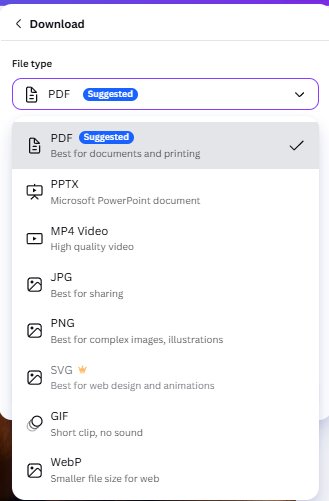
Then we took the deck to the Download panel and found the test's most useful myth-buster. The file-type list offers eight formats. SVG carries the Pro crown. PPTX — the Microsoft PowerPoint format that years of older tutorials describe as Pro-only — does not. And it's not just unlabeled: we selected it, clicked Download, and got the file.
We opened the .pptx to make sure it wasn't a hollow shell:
- 8 real slides, 62 embedded media files (22.5 MB of the 23.2 MB file)
- Real text runs, not baked images — slide 1 extracts as "How to Start a | Candle Business | at Home | Turn your creativity into a profitable, flexible business…", fully editable in PowerPoint
- The PDF export weighed in at 28 MB across 8 pages at 20 × 11.25 inches (standard 16:9), with machine-readable text on every page
So if an old article told you PowerPoint export needs Canva Pro, it's out of date. On our free account, in October 2026, PPTX exported free, twice-checked, no paywall.
Free vs. Pro in this test
| Feature | Free account? | What we saw |
|---|---|---|
| Presentation templates (first 20 results) | ✅ 19 of 20 | 1 crown — cleanest shelf we've measured |
| Canva AI chat assistant | ✅ Yes | Memory/Tasks/Library tabs, keeps conversations |
| AI outline generation | ✅ Yes | 8/8 slides planned, per-slide notes, knew the date |
| AI full deck generation | ✅ Once | Complete 8-slide deck, photos, editable text |
| Monthly AI allowance | ⛔ Tiny | Wall after our 2nd AI task of the month; resets Nov 1 |
| Editing the generated deck | ✅ Yes | Text toolbars, no Pro prompts, no crowns on images |
| PPTX (PowerPoint) export | ✅ Yes | 23.2 MB, 8 slides, 62 media files, real text runs |
| PDF export | ✅ Yes | 28 MB, 20×11.25 in pages, machine-readable text |
| SVG export | ⛔ Pro | Crowned in the file-type list |
| More AI usage | 💵 Paid | Pro $18/mo, Business $25/mo — "20x more AI usage" |
Our honest take
Canva AI is genuinely good at the job we gave it. The outline matched the request exactly, the deck needed zero placeholder-hunting, and the PowerPoint export means the free output isn't locked inside Canva — you can take the whole thing to Office, Google Slides, or LibreOffice and keep working. As a one free deck per month machine, it's excellent.
But that's the honest headline: one. Our second AI task of the month tripped a wall that doesn't reset for five more days, and Canva's own upgrade page confirms the free tier is a rounding error ("20x more AI usage" for $25/month). If you're a student with one presentation due, the free tier will genuinely carry you. If you make decks weekly, the free AI allowance is a demo, and you should price that in before building a habit around it.
One more practical note: the template shelf (1 crown in 20) and the AI assistant are two different doors. The templates are almost all free because they expect your content. The AI is free until it isn't, because generating content is the expensive part. Know which door you're walking through.
Frequently asked questions
Is Canva AI free to use?
The assistant itself is free — chatting, outlines, and editing cost nothing. But AI actions are metered against a monthly allowance on the free plan. In our October 2026 test, the wall appeared after our second AI task of the month (one background removal earlier, then one presentation generation), with a reset date of November 1. Canva doesn't publish the exact free quota.
Can Canva AI generate a full presentation on a free account?
Yes — once, in our test. We asked for an 8-slide presentation about starting a candle business, and Canva AI produced the outline and then the complete deck: 8 slides, consistent design, photos included, all text editable, no watermarks. The finished design remained fully usable even after the monthly AI limit notice appeared.
Does Canva's free plan include a monthly AI limit?
Yes. The free account showed "You've reached your plan's monthly AI limit. It resets on Nov 01." after our second AI task of the month. Canva's own upgrade page says Canva Business includes "20x more AI usage than Canva Free" ($25/month after a 30-day trial; Pro is $18/month), which tells you how small the free allowance is by design.
Can you export Canva presentations to PowerPoint for free?
Yes — and this contradicts many older tutorials. In our October 2026 test on a free account, PPTX appeared in the download list with no crown, downloaded successfully, and contained 8 real slides with 62 embedded media files and genuine editable text runs (not flattened images). SVG was the crowned, Pro-only format in the same list.
Are Canva presentation templates free?
The front of the shelf is. In our count, only 1 of the first 20 "presentation" search results carried the Pro crown — the cleanest first page of any Canva category we've measured. These top results are mostly business-style skeletons that expect you to add your own content, so there's little for Canva to lock.
Wrapping up
This is the seventh Canva category we've pulled apart on a free account, and the first time the interesting wall wasn't in the template gallery at all. The brochure fold-order trap, the invoice "table" that isn't a table, the locked Instagram buttons, the VistaPrint plot twist, the crowned invitation fonts, and the thumbnail size slider were all classic paywalls. Canva AI plays a subtler game: it hands you the whole finished deck first, then tells you the meter is empty. If you're weighing an upgrade for the AI allowance, read what Canva Pro actually costs first — and remember the export loophole we just verified: your free AI deck leaves as a real PowerPoint file. One deck, fully yours. Just know it's one.
This guide is one of our free-account Canva tests — crown counts, measured exports, paywalls and AI limits, all in one place.