Canva Brochure on a Free Account: Tri-Fold Templates, the Fold-Order Catch, and Real Printing Prices
Every "Canva brochure" tutorial will tell you the same three things: pick a template, edit it, download it. None of them will tell you how many templates are actually free, what happens to your fonts inside the exported print PDF, or what Canva's printing service really charges per copy. So we built a tri-fold brochure end to end on a free account — counted the crowns, swapped the photos, exported the PDF, dissected the file, and pulled the full price ladder from 1 copy to 1,000. Every claim below has a screenshot behind it.
Short answer: The free path works. We picked a no-crown tri-fold template, replaced the title and photos with our own uploads, and downloaded a print-ready PDF free — crop marks and bleed included. Three walls appeared exactly where you'd want to look: CMYK color output is Pro-only (free exports are RGB), SVG export is Pro-only, and the template gallery turns crown-heavy the deeper you scroll. The best surprises: Canva's own printing starts at a single copy for $15.40 — no 50-pack minimum — down to $0.36 per copy at 1,000, with free delivery. And the classic tri-fold trap — outside panels printed in a non-reading order — is real in the editor but quietly handled by Canva's print panel. More on that below, because it's the part nobody explains.
How we ran the test
- Free account only — no Pro trial, no payment details entered, crown templates browsed but never opened for editing
- One tri-fold brochure, start to finish — search, template pick, text edits, photo swap, PDF export, print pricing
- The downloaded PDF got dissected — we didn't just look at it; we inspected its internals to see what really happens to text and fonts
- Prices recorded from our account — shown in US dollars; your region may display a different currency
What "brochure" means in Canva: tri-fold by default
Search "brochure" in Canva and you land in the template gallery. Two things stand out immediately. First, the very first tile isn't a template at all — it's a blank starter labeled "Create a blank Brochure (Trifold)": Canva defines a brochure as a tri-fold by default, with a half-fold option appearing as a separate category. Second, the filter bar here is thinner than in other Canva categories — just Category, Style, and Language. The old price filter (free vs Pro) that used to exist in Canva's template search is gone, the same disappearance we documented in our Canva flyer test.
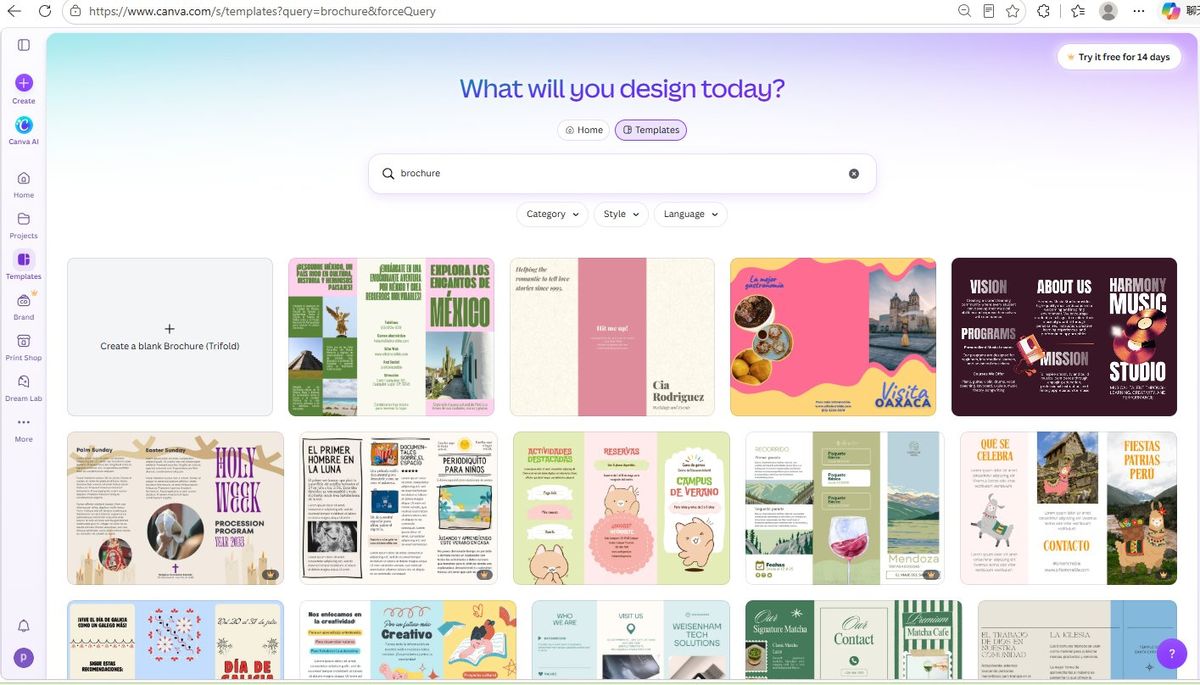
One more observation worth knowing before you browse: the top of the gallery is a multilingual mix — our first screenful featured Spanish-language templates front and center. Language is one of the three filters, so if you want English-only templates, set it there.
How many brochure templates are actually free?
We counted. Of the first 20 templates, 3 carried the Pro crown — 15%. That's genuinely workable: the top of the gallery gives free users real options, not just bait.
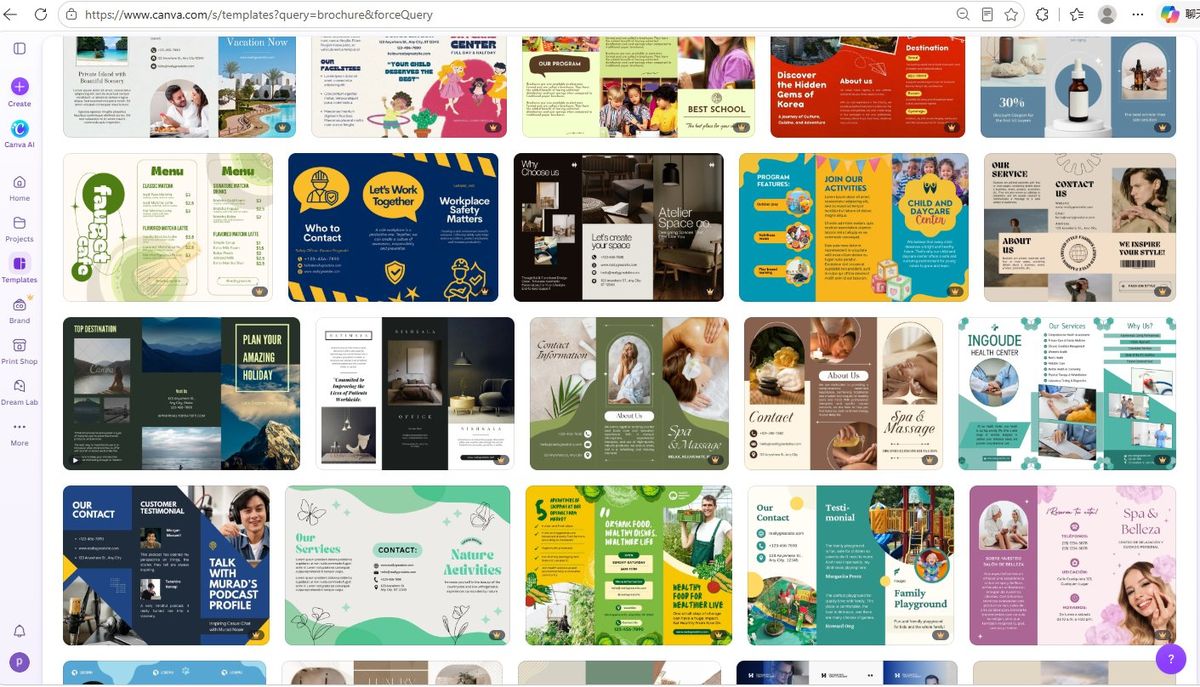
But the gallery is an infinite scroll with no bottom, and the mix shifts as you go. Deep into the loading feed, crowns were everywhere — row after row where nearly every tile was Pro. So the honest picture is: free templates cluster at the top; the deeper you scroll, the more Canva steers you toward Pro. If you're on the free plan, don't scroll for inspiration — pick from the first screens.
Building the brochure: what's free and what fought back
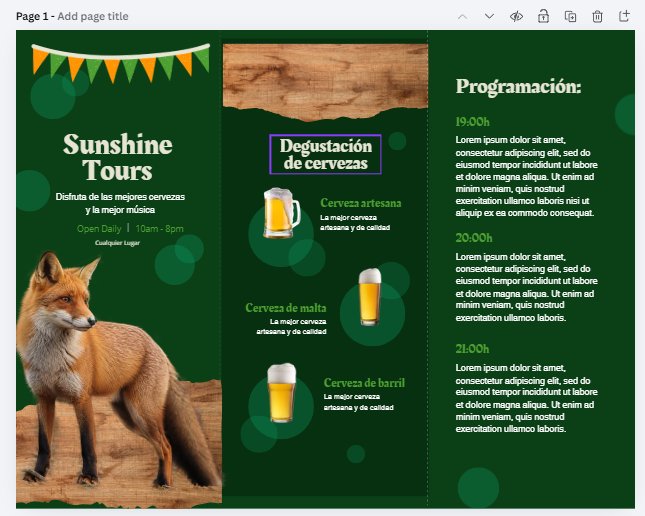
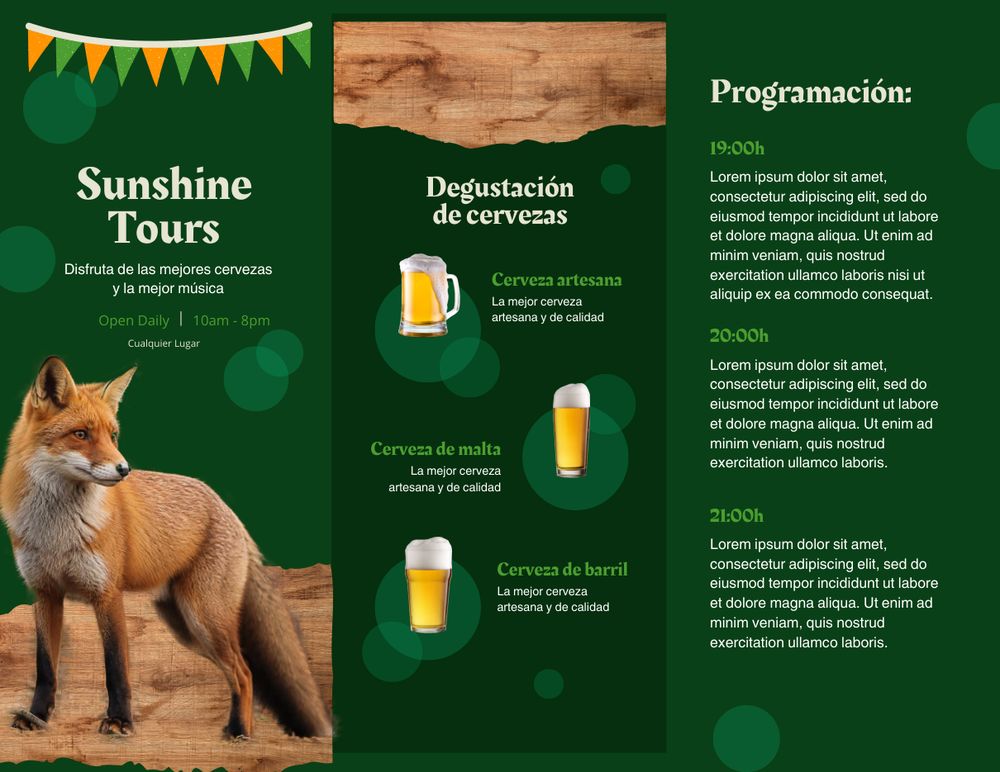
We picked a no-crown tri-fold template (a green event design) and made three kinds of edits a real user would:
- Title text — double-click, type over: effortless
- Small text — the date and location lines: just as easy
- Photos — uploaded our own image and dragged it over the template's photo: worked with no locks, on both pages
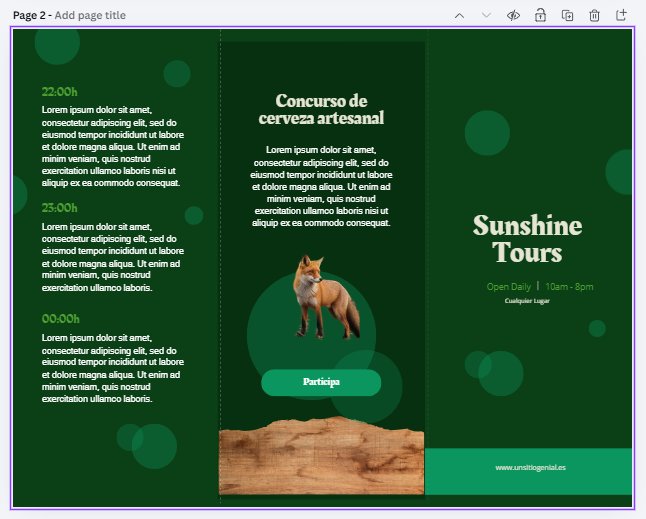
Two honest footnotes. One template we tried to open simply wouldn't load — the preview hung and we picked a different one; glitches happen even in Canva's core flow. And the moment you select any photo, the toolbar offers Background Remover with a crown on it — the upsell is woven into the editing tools themselves, consistent with what we found in our Canva background remover test.
The fold-order catch: the tri-fold trap Canva quietly defuses
Here's the part most brochure tutorials skip, and it bites people who print outside Canva. A tri-fold brochure has six panels: three on each side. The outside page is not in reading order. When the paper folds, the front cover lands on the right panel, the back cover in the middle, and the flap that folds inside on the left. Design your outside page left-to-right like a normal document and your printed brochure opens backwards.
How does Canva handle this? In the editor — not transparently at all. The template just shows Page 1 and Page 2, no labels, no hints about which page is the outside. Nothing in the template we tested explained the folding logic.
The answer only appears when you open the print panel. There, Canva asks you to "Select your pages to print" with two dropdowns: Outside 1 and Inside 2 — mapping Page 1 to the outside sheet and Page 2 to the inside, and taking care of the panel arrangement for you. Its own description confirms the structure: "Features six panels (three on each side) that fold inward… Delivered pre-folded."
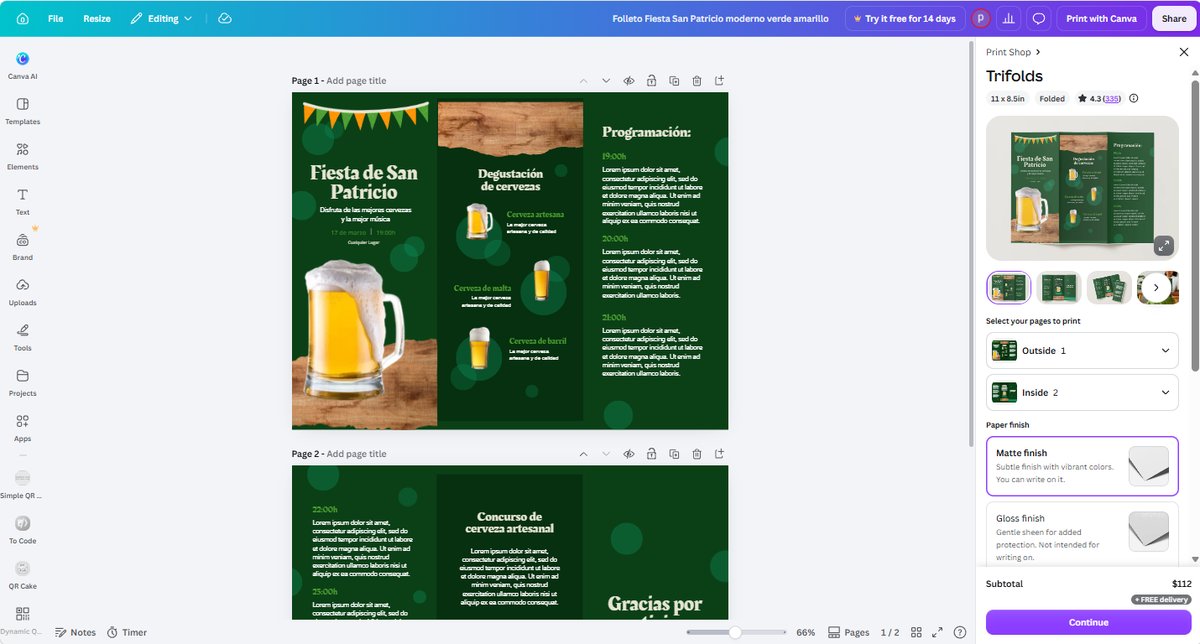
The takeaway: if you print through Canva, the trap is defused for you. If you download the PDF and take it to a local print shop — or your own printer — you are the one who has to know that the cover goes on the right panel of Page 1. No comparison table we've seen mentions this.
Exporting: the print PDF is free — one color wall included
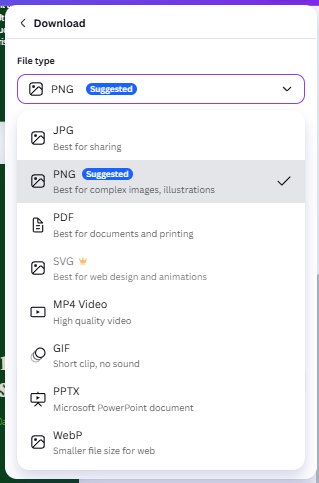
The download panel offers JPG, PNG, PDF, SVG, MP4, GIF, PPTX and WebP — with SVG carrying a crown (vector export is Pro-only). Inside the PDF options, Canva now splits presets into Digital and Print. We chose Print:
The advanced settings — crop marks and bleed, flatten PDF, include notes, reading order — were all available free:
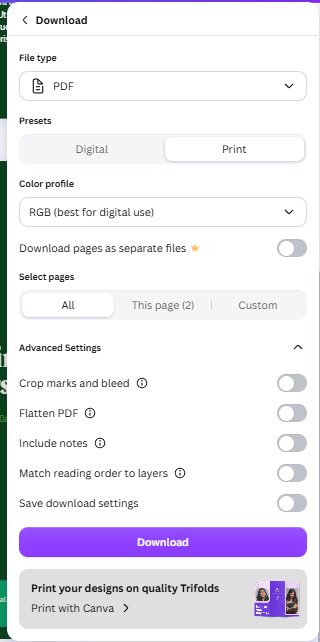
Then the wall: the color profile dropdown offers RGB (free) and CMYK — crowned, Pro-only. Professional print shops often ask for CMYK files. So the precise boundary is: the free plan gives you a genuine print-ready PDF with crop marks, but only in RGB color; CMYK is where Pro starts.
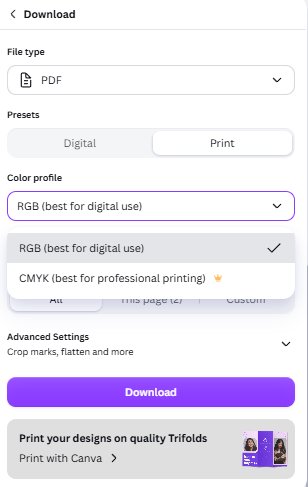
The download went through with no payment prompts: a two-page print PDF, 9.6 MB.
What's actually inside that PDF — we took it apart
Because we're the kind of site that dissects things: the exported PDF contains no font files at all. Canva draws every visible letter as vector outlines — shapes, not fonts. The practical consequences:
- Fonts cannot shift — the file looks identical at a print shop, on a client's laptop, anywhere, because there are no fonts to substitute
- Text isn't editable in the PDF — to change a word, you go back to Canva; the PDF is a final artifact
- Machines can still read it — a hidden text layer survives inside the file, and our text extraction pulled every phrase out cleanly (the same mechanism our Canva resume ATS test relied on)
We also rendered the PDF and compared it against the editor side by side — letterforms matched exactly. If your exported PDF "looks like the font changed," check your PDF viewer first; the file itself has no fonts to change.
What printing actually costs: the full price ladder
Canva's print panel (which appears right beside the template preview — you don't have to finish designing to see prices) offered three paper finishes: matte (writable), gloss, and uncoated. And the quantity ladder, which we pulled in full:
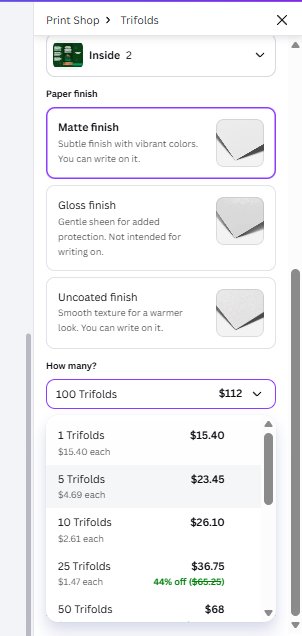
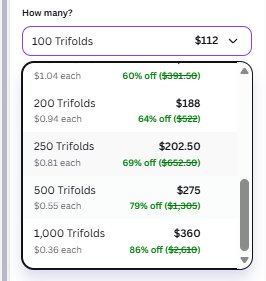
| Copies | Total (USD) | Per copy | Discount shown |
|---|---|---|---|
| 1 | $15.40 | $15.40 | — |
| 5 | $23.45 | $4.69 | — |
| 10 | $26.10 | $2.61 | — |
| 25 | $36.75 | $1.47 | 44% off |
| 50 | $68.00 | $1.36 | 48% off |
| 100 | $112.00 | $1.12 | 57% off |
| 150 | $156.00 | $1.04 | 60% off |
| 200 | $188.00 | $0.94 | 64% off |
| 250 | $202.50 | $0.81 | 69% off |
| 500 | $275.00 | $0.55 | 79% off |
| 1,000 | $360.00 | $0.36 | 86% off |
The surprise is the first row: you can order a single brochure — no 50-copy minimum like many print services. Free delivery was shown at checkout quantities, and Canva delivers the tri-folds pre-folded. For a small business testing a design, printing one real copy for $15.40 before committing to a batch is a genuinely useful option.
Free vs Pro: where the brochure walls actually are
| Step | Free plan | Pro only |
|---|---|---|
| Browsing templates | ✅ Top of gallery mostly free (3/20 crowned) | Crowned templates deepen the further you scroll |
| Editing text | ✅ Fully free | — |
| Swapping in your own photos | ✅ Fully free | — |
| Background remover on photos | — | 👑 Crowned in the toolbar |
| PDF Print export with crop marks | ✅ Free (RGB) | — |
| CMYK color output | — | 👑 Pro only |
| SVG vector export | — | 👑 Pro only |
| Canva printing | ✅ Pay per order, from 1 copy | — |
Which route should you take?
| If you… | Do this | Why |
|---|---|---|
| Want a brochure without paying Canva anything | Free template + your photos + PDF Print (RGB) | Everything we tested works free; pick from the gallery's first screens |
| Want Canva to print and fold it for you | Print with Canva, start at 1 copy ($15.40) | Outside/inside mapping handled for you; pre-folded delivery; free delivery shown |
| Have a local print shop that demands CMYK | Either pay for Pro, or ask if they accept RGB PDF | CMYK export is the one print wall on the free plan |
| Plan to hand the file to others for edits | Share the Canva link, not the PDF | The PDF's text is outlines — final artifact, not editable |
| Just need a quick one-off flyer instead | See our Canva flyer test | Single-sheet flow, different price ladder |
Frequently asked questions
Is Canva brochure free?
Yes, with limits we measured: on a free account we searched the brochure template gallery, picked a no-crown tri-fold template, replaced the title, small text and photos with our own uploads, and downloaded a print-ready PDF (9.6 MB, two pages) without paying anything. What costs money: templates with the crown, background remover, SVG export, and CMYK color output.
Can I download a print-ready PDF from Canva for free?
In our test, yes. The free download panel offers a PDF type with a Print preset, and advanced settings including crop marks and bleed, flatten PDF, and include notes were all available free. The one print-related feature locked behind Pro was CMYK color profile — free exports are RGB only. If your print shop insists on CMYK files, that's where the free path ends.
What is the tri-fold panel order problem?
On the outside page of a tri-fold brochure, the panels are not in left-to-right reading order: when folded, the cover ends up on the right panel, the back cover in the middle, and the panel that folds inside on the left. Canva's template editor only shows Page 1 and Page 2 with no outside/inside labels — but when you use Canva's own printing service, its panel asks you to choose Outside 1 and Inside 2 and handles the mapping for you. If you print elsewhere, you need to know this yourself.
Does Canva print brochures, and how much does it cost?
Yes. In our test (October 2026, US-dollar pricing), Canva printed tri-fold brochures starting from a single copy at $15.40, with a ladder of volume discounts: 10 for $26.10 ($2.61 each), 25 for $36.75, 50 for $68, 100 for $112 ($1.12 each), 200 for $188, 500 for $275, and 1,000 for $360 ($0.36 each) — with free delivery shown at checkout. Three paper finishes were offered: matte, gloss, and uncoated.
Are Canva brochure templates free to use?
Mixed, and the mix shifts as you scroll. In our count, 3 of the first 20 brochure templates were Pro (crowned), so free ones dominate the top of the gallery. But the gallery loads infinitely, and the deeper we scrolled, the more crowned templates appeared — deep in the list, crowns were everywhere. Free templates cluster at the top; the further down, the more Canva steers you toward Pro.
Why does the text in my exported Canva PDF look different?
In our exported print PDF, Canva draws all visible text as vector outlines — there are no font files inside the document at all. That means the fonts cannot change on another computer or at a print shop, but it also means you can't select and edit text in the PDF. We rendered our PDF side by side with the editor and the letterforms matched exactly; if yours looks different, check your PDF viewer's rendering rather than the file itself. A hidden text layer also survived, so machines (and ATS software) can still read the content.
Wrapping up
We took one keyword — Canva brochure — from a template search to a dissected print PDF and a full printing price ladder, all on a free account. The free path is real: editing is frictionless, the print PDF exports free with crop marks, and the invisible tri-fold trap gets defused if you print through Canva. The walls are precisely placed: CMYK and SVG for Pro, crowns thickening as you scroll the gallery. If you're comparison-shopping Canva's print products, read our Canva flyer walkthrough for the single-sheet flow, our Canva invoice template test for the business-document side (its "table" isn't a table), our Canva resume test for what happens to PDF text on paper sizes, and our Canva QR code test if you want a scannable link inside this brochure. And for what the crown unlocks across the board, see Canva Free vs Pro and what Canva Pro actually costs. One rule, every article: screenshots or it didn't happen.
Tested October 2026 on a free Canva account, web version, no payment details entered and nothing purchased. Template availability, filters and print pricing can change without notice; prices shown are in our account's currency and will differ by region. We've applied the same free-account method to free AI image generators and free AI voice tools.
This guide is one of our 18 free-account Canva tests — crown counts, measured exports, print prices and paywalls, all in one place.