Canva Poster Maker on a Free Account: Four Print Sizes, a VistaPlot Twist, and an Export That Measures True
"Canva poster maker" content across the web is a wall of template galleries — nobody publishes the two things a person actually needs before ordering: what printing really costs, and whether the size you design is the size you get. So we ran the full flow on a free account: searched, counted crowns, edited a template, opened the print panel, and — the part nobody does — measured the exported PDF against the template's claims. Along the way we found out who actually prints Canva's posters. It isn't Canva. Every claim below has a screenshot behind it.
Short answer: Making the poster is free — 3 of the first 20 templates carried the Pro crown, and we edited text and swapped the main photo without a single prompt. Printing a poster runs $17.60 to $61.99 for one copy depending on size, all with free delivery — and the order is fulfilled "By VistaPrint," not by Canva itself. Canva also sells frames and mounted versions. And the export measured exactly as promised: our 18×24-inch template downloaded as a PDF measuring precisely 18.0×24.0 inches. After our invoice test caught Canva mislabeling sizes, this time the numbers matched to the point.
How we ran the test
- Free account only — no trial, no payment details; the print panel was explored for prices and closed without ordering
- Real search, real template — "poster," first 20 results counted, a crown-free template edited with our own photo
- Full print panel mapped — every size tier, frame option, and paper type captured with prices
- File-level verification — the exported PDF's page dimensions measured programmatically, not eyeballed
Step 1: The search — 3 crowns in 20, the lightest yet
Searching "poster" brings up a preview layer with Show more underneath. We counted the first 20 results: 3 carried the Pro crown — 15%.
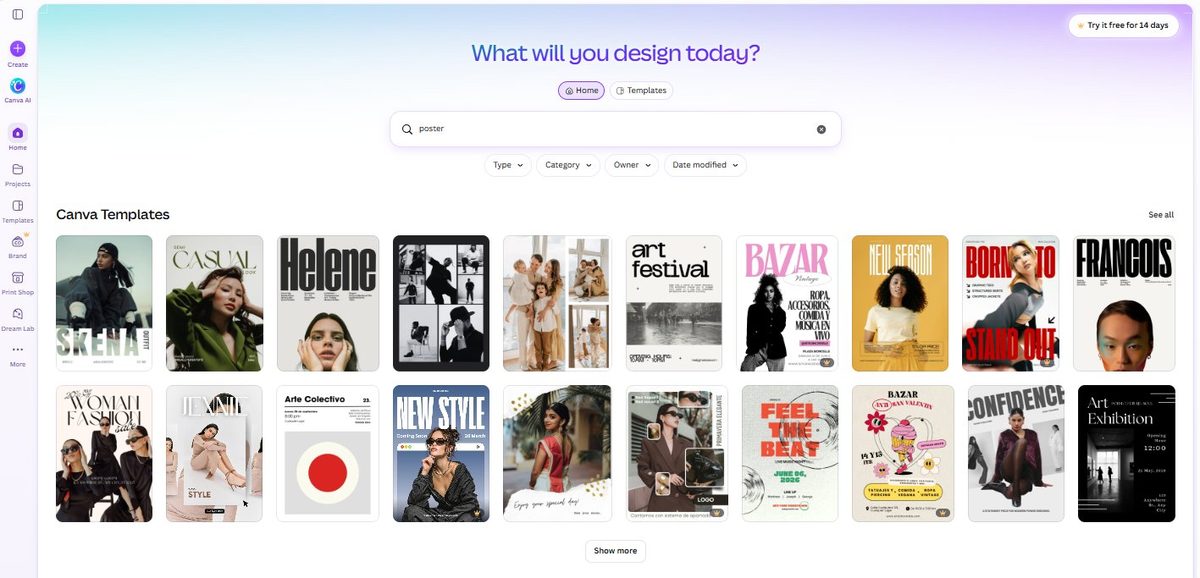
That completes our five-category crown survey, and the pattern is now solid: brochures 3/20 (15%), posters 3/20 (15%), Instagram posts 4/20 (20%), invoices 8–10/20 (40–50%). Decorative and print categories are lightly paywalled; business categories are heavily paywalled. And as always, the gallery scrolls forever — the crowns thicken the deeper you go.
Step 2: Editing — free, frictionless, fox included
We picked the "Simple Typography Personal Art Exhibition Poster" (no crown, by Roksolana Fursa) and edited it like a real user: changed the giant headline to SUMMER EXHIBIT, and replaced the portrait photo with our own uploaded fox picture.
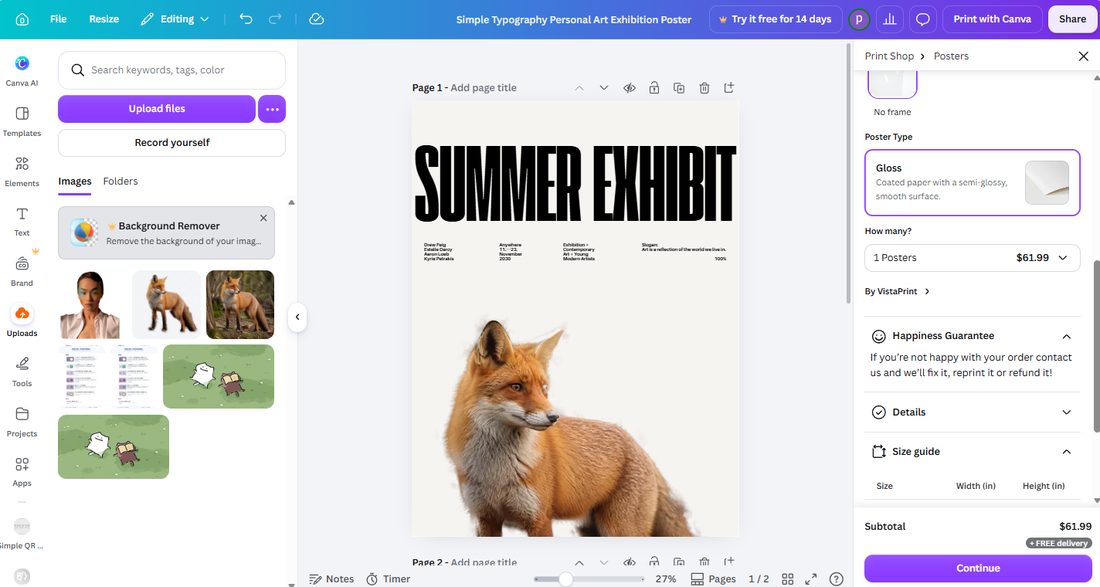
One thing to know up front: the template's stated size was Poster (3:4, Portrait) • 18 × 24 in — US inches, not A-series. Keep that number in mind; it becomes the punchline later.
Step 3: The print panel — four sizes, one twist
Canva's poster print panel is the most elaborate of any category we've tested. Before even reaching prices, you choose:
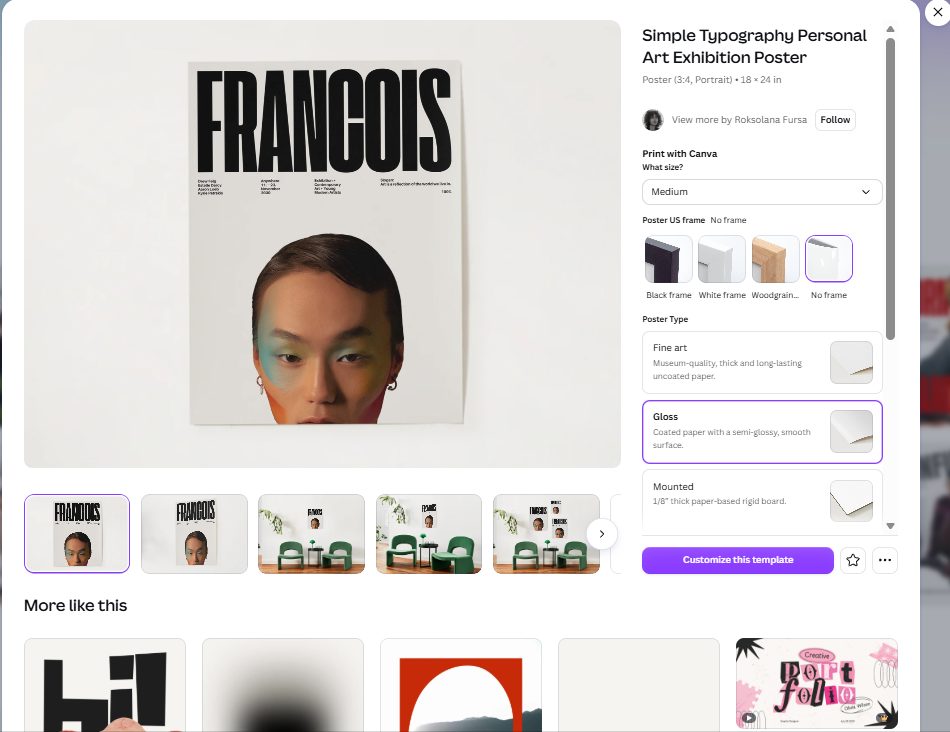
Four frame options (black, white, woodgrain, or no frame) and three material types: Fine art ("museum-quality, thick and long-lasting uncoated paper"), Gloss ("coated paper with a semi-glossy surface"), and Mounted ("1/8-inch thick paper-based rigid board" — a poster glued to a stiff backing). Canva isn't just printing your poster; it's selling you the framing job too.
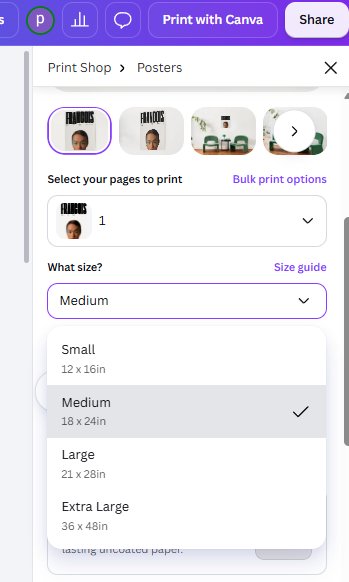
Then the price ladder. We opened the size dropdown and clicked through all four tiers (Gloss, no frame, one copy):
| Size | Dimensions | 1 poster, Gloss, no frame |
|---|---|---|
| Small | 12 × 16 in | $17.60 |
| Medium | 18 × 24 in | $19.80 |
| Large | 21 × 28 in | $31.90 |
| Extra Large | 36 × 48 in | $61.99 |
Every tier included free delivery. Canva also backs orders with a "Happiness Guarantee" — if you're not happy, they'll reprint or refund. Volume discounts exist beyond one copy (the quantity dropdown showed per-unit pricing dropping), though the one-copy prices above are what a cautious first-timer would pay.
And here's the twist we didn't expect:
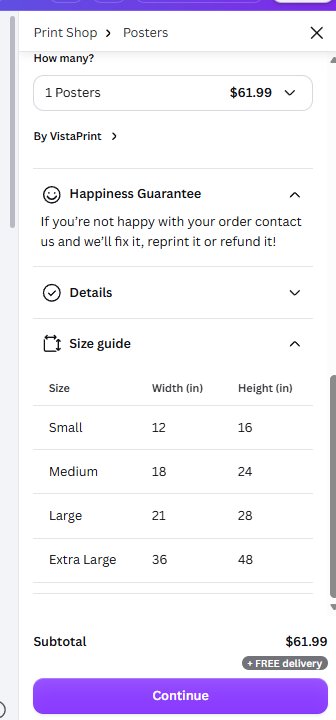
"By VistaPrint." The posters aren't printed by Canva at all — orders are routed to VistaPrint, the giant commercial printer. It's disclosed only inside the print panel, never on the template pages or marketing. Is that bad? Not necessarily — VistaPrint is a competent printer, and the Happiness Guarantee reads standard. But "Print with Canva" implies Canva's hand on the tiller, and for a household name built on design trust, the fulfillment fine print deserves to be quoted in full. Notably, our brochure and invoice tests showed Canva-branded fulfillment; poster printing is the first category where we caught a third party doing the work.
Step 4: The export — and the size check, measured
We exported our poster as PDF Print and measured the file:
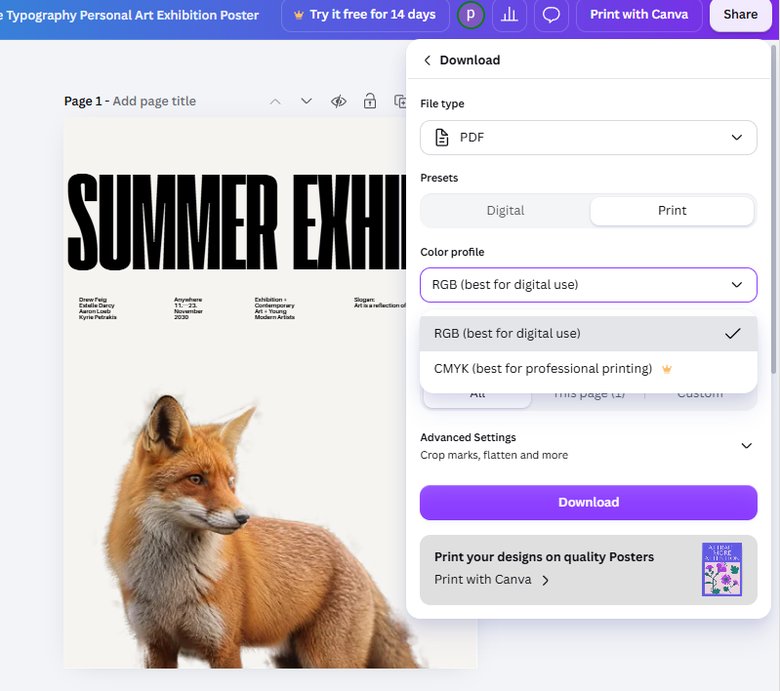
The result: 10.1 MB PDF, two pages, measuring exactly 1296 × 1728 points — precisely 18.0 × 24.0 inches. The template said 18×24. The print panel's Medium tier said 18×24. The exported file measured 18×24. On sizes, Canva's poster pipeline is honest end to end.
That's worth pausing on, because our invoice template test caught the opposite: a template titled "A4" that exported as US Letter. Canva's size labeling isn't systematically wrong or right — it's accurate sometimes and not others, and the only way to know is to measure the file you actually exported. Hence this site.
And the CMYK crown count now stands at three: brochures, invoices, and now posters — free accounts export print PDFs in RGB only. For home printers and Canva's own fulfillment, RGB is fine (they convert it). If you're taking the file to a professional print shop that demands CMYK, that's the Pro wall.
What's free vs what's Pro — the honest boundary
| Feature | Free plan? | Our evidence |
|---|---|---|
| Using crown-free poster templates | ✅ Yes | 17 of first 20 results crown-free |
| Editing text & swapping photos | ✅ Yes | Headline and main photo replaced, zero prompts |
| Downloading print-ready PDF (RGB) | ✅ Yes | 10.1 MB, crop marks and advanced settings free |
| CMYK color profile | ⛔ Pro | Crown on the option — third category in a row |
| Poster printing | 💵 Paid, all plans | $17.60–$61.99 for one, free delivery |
| Who fulfills poster orders | — | VistaPrint, disclosed in-panel as "By VistaPrint" |
Our honest take
The poster economics are different from business print. Our tri-fold brochure test showed canny volume pricing — 1,000 copies at $0.36 each — because brochures are marketing spend. Posters are décor: a single Medium at $19.80, or an Extra Large at $61.99, priced per piece with no dramatic volume cliff in sight at low quantities. You're paying for a print-and-frame service, not a print run.
The VistaPrint discovery doesn't change what you get, but it changes what you know: if you already have a VistaPrint account or local shop you trust, the same PDF we exported (18×24 inches, free, crop marks included) works anywhere. Canva's value is the design and the convenience — not exclusivity over the printing.
And measure your exports. It costs thirty seconds and, in our experience across two categories, it's the only way to know which Canva you're getting — the one that labels sizes true, or the one that ships you a surprise. The outsourcing story has a sequel, too: our invitation test found the print panel saying "By Canva" — so posters go to VistaPrint while invitations are printed in-house, and the panel is the only place you can tell.
Wrapping up
This is the fifth Canva category we've pulled apart on a free account, and each one has yielded something the template galleries don't: the brochure fold-order trap, the invoice "table" that isn't a table, the Resize paywall with its free side door, the locked Instagram publishing buttons — and now the VistaPrint plot twist. If you're weighing Pro for the CMYK unlock, read what Canva Pro actually costs first. Five categories, one rule: screenshots or it didn't happen.
This guide is one of our 18 free-account Canva tests — crown counts, measured exports, print prices and paywalls, all in one place.