Canva Invitations on a Free Account: 2 Locked Templates, Crowned Fonts, and a Print Ladder From $12.94 to $0.36 a Card
Every "Canva invitation" guide on the web is a template gallery. None of them answer the two questions that actually matter before you commit: what can a free account really do, and what does printing cost per card. So we ran it — counted the Pro crowns across 100 search results, edited a free template, hit the font paywall hiding inside it, exported and measured the PDF, and pulled the entire print ladder from 1 invitation to 1,000. We also found out who actually prints Canva's invitations — and after our poster test caught Canva outsourcing to VistaPrint, this one surprised us: it says "By Canva." Every claim below has a screenshot behind it.
Short answer: Editing and exporting are genuinely free — only 2 of the first 20 "invitation" search results carried the Pro crown, the cleanest first page of the six categories we've measured, and we changed names, date and venue without a single upgrade prompt. The catch is one level deeper: many of the fonts that make an invitation look like an invitation are Pro, and even uploading your own font is a Pro feature. Printing runs from $12.94 for a single card down to $0.36 per card at 1,000, envelopes add $8, delivery is free — and the order is fulfilled "By Canva," not by VistaPrint. Our exported PDF measured exactly 5.00 × 7.00 inches, matching the template's claim to the point.
How we ran the test
- Free account only — no trial, no payment details; the print panel was explored for prices and closed without ordering
- Real search, real template — "invitation," 100 results surveyed, a crown-free cocktail-party template edited with real event details
- Same measurements as always — crown density, export checks, and the full print price ladder
- Context — this is the fifth Canva print category we've tested, after brochures, invoices, posters and the Resize paywall
Step 1: The cleanest first page we've ever measured
Our running crown-density census across Canva categories: tri-fold brochures 3/20, posters 3/20, Instagram posts 4/20, invoices 8–10/20. We predicted invitations — a wedding-adjacent category — would be the worst of all. We were wrong, in an interesting way:
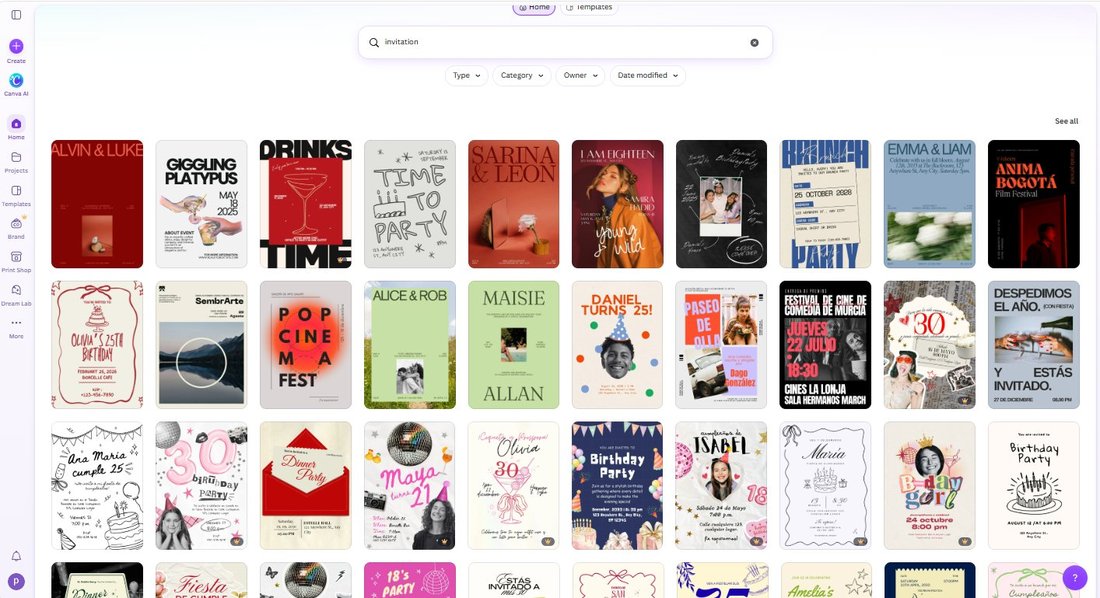
Only 2 of the first 20 results were Pro. The reason is visible in the screenshot: the "invitation" search skews toward party and birthday invitations — lightweight templates built from free fonts and shapes. (Weddings have their own, pricier corner of Canva.) But don't stop scrolling, because the free shelf is one page deep:
| Depth in search results | Pro crowns | Density |
|---|---|---|
| 1–20 | 2 | 10% — cleanest first page we've measured |
| 21–30 | 6 | 60% |
| 40–70 | 13 of 30 | 43% |
| 80–100 | 7 of 20 | 35% |
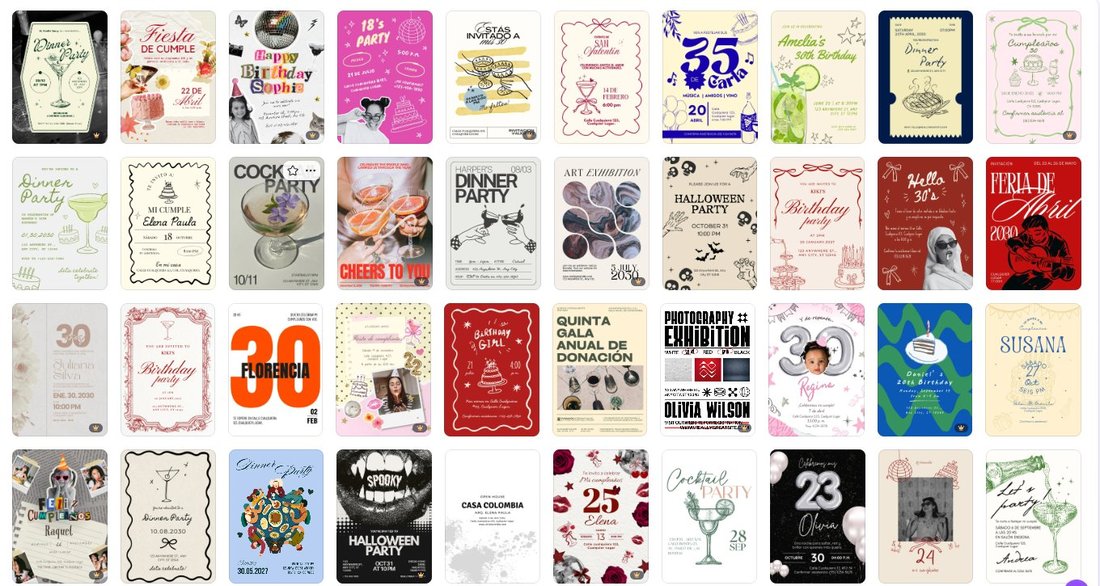
Across every category so far the pattern was "the deeper you scroll, the more crowns." Invitations add a sharper version: the free shelf is exactly one screen deep, then the paywall starts at 60%. If you're picking a template, the first 20 results are the place to shop — deliberately.
Step 2: Editing is free — and then you meet the fonts
We picked a crown-free template ("Black and Gray Minimalist Cocktail Party Invitation") and made it ours: renamed the event to Emma & James, set the date to Saturday, June 13, 2026 · 4:00 PM, changed the venue line, and kept the built-in cocktail illustration. Every edit went through without a single upgrade prompt.
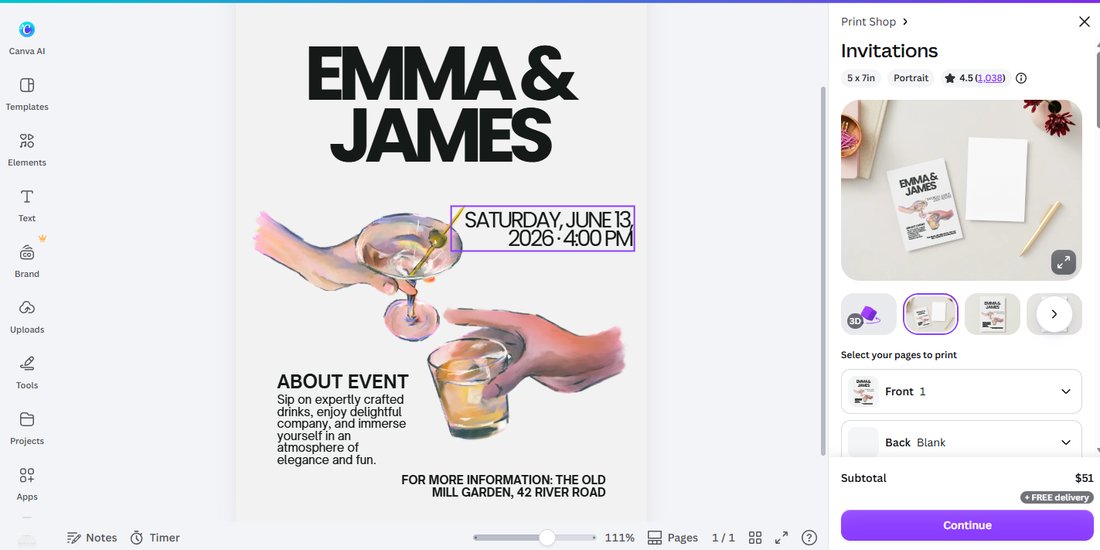
Even the little details are free here: the print panel later showed this template carries a 4.5-star rating from 1,238 users — Canva shows template reviews where you'd never see them, inside the print menu.
Then we opened the font picker and found the real paywall. Scroll the font list and the crowns start: Aprilime, Archetype Aubette, Avenir and their friends are all Pro — precisely the elegant script and serif styles an invitation lives on:
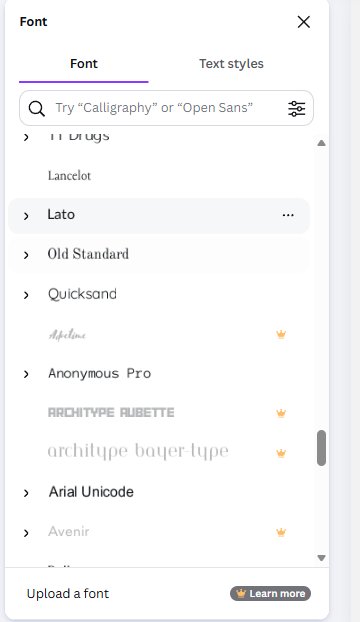
And the line at the bottom of that panel is the most honest sentence in this whole test: "Upload a font 👑 Learn more" — even bringing your own font file is a Pro feature. The template costs nothing; making it look like the Pinterest version costs Pro.
Step 3: The export — measured, not believed
We exported two ways. The PNG came out at 878 KB (900,022 bytes). The PDF Print preset — the one you'd send to a print shop — downloaded at 1.1 MB, one page, and here's the fourth consecutive sighting of our favorite running gag:
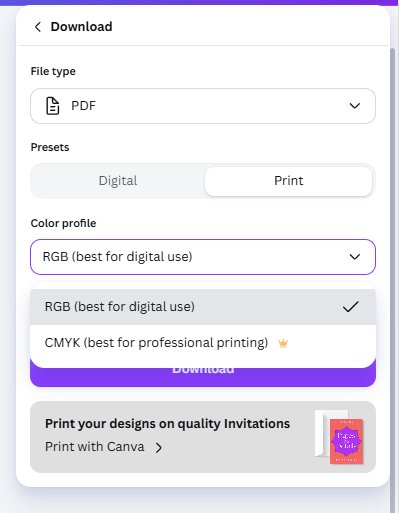
RGB is free, CMYK wears the crown — brochures, invoices, posters, now invitations. For home printers and Canva's own print service it doesn't matter (they convert); for a professional print shop that demands CMYK, that's the Pro wall.
Then we measured the file, because our invoice test taught us not to trust the label:
| What Canva claims | What the file measures | Verdict |
|---|---|---|
| 5 × 7 in, Portrait | 360 × 504 points = 5.00 × 7.00 in exactly | ✅ Name matches reality |
One page, two embedded font subsets (OpenSauceOne Bold/Regular), and the text stayed machine-readable — we extracted all 232 characters, "EMMA & JAMES" included, programmatically. That's the opposite of our poster export, which converted text to outlines; both strategies work, but text-as-text means your invitation stays searchable and accessible.
Step 4: The print ladder — and the "By Canva" plot twist
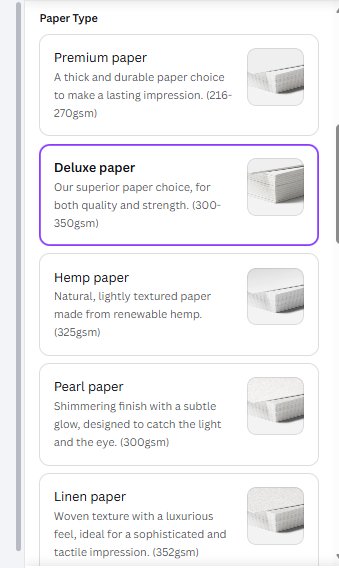
The print panel opened with the structure we now know from four prior categories: front page plus a blank back (you can design the back too), five paper types (Premium 216–270gsm, Deluxe 300–350gsm, Hemp 325gsm, Pearl 300gsm, Linen 352gsm), four finishes, square or rounded corners, and three "raised foil" print effects for the full wedding-stationery look:
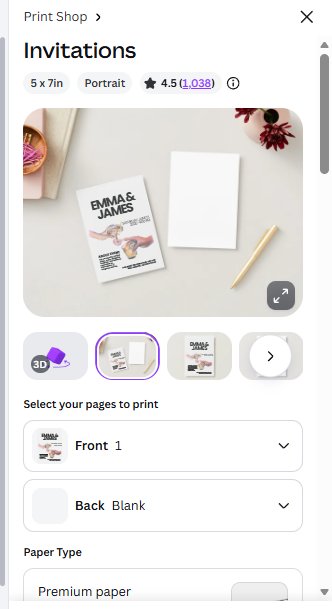
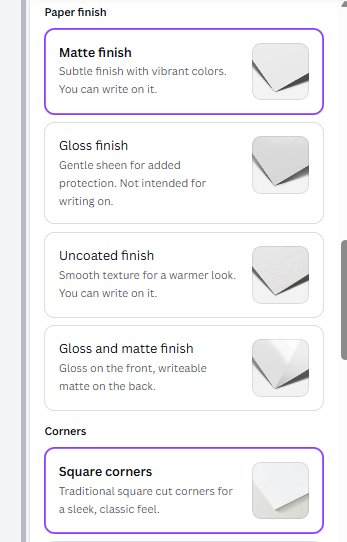
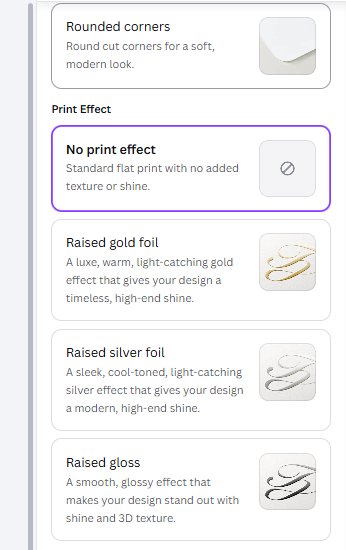
One warning worth enlarging: the Gloss finish is explicitly "not intended for writing on." If you plan to hand-write guest names on your invitations, Gloss will fight you — Matte or Uncoated are the writable finishes. No template gallery tells you this; the print panel buries it in small gray text.
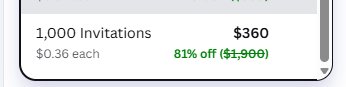
Then the price ladder, clicked through tier by tier (Deluxe paper, matte finish, free delivery on every line):
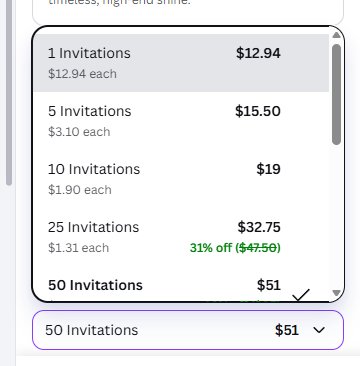
| Quantity | Total | Per card | Canva's discount badge |
|---|---|---|---|
| 1 | $12.94 | $12.94 | — |
| 5 | $15.50 | $3.10 | — |
| 10 | $19.00 | $1.90 | — |
| 25 | $32.75 | $1.31 | 31% off ($47.50) |
| 50 (default) | $51.00 | ~$1.02 | — |
| 100 | $93.00 | $0.93 | 51% off ($190) |
| 150 | $130.50 | $0.87 | 54% off ($285) |
| 200 | $168.00 | $0.84 | 56% off ($300) |
| 250 | $177.50 | $0.71 | 63% off ($475) |
| 500 | $255.00 | $0.51 | 73% off ($850) |
| 1,000 | $360.00 | $0.36 | 81% off ($1,900) |
Three things worth knowing before you order. First, the panel defaults to 50 invitations — $51. If you only need a dozen, change the quantity before checking out; the ladder shows 10 for $19. Second, $0.36 per card at 1,000 is exactly the per-piece rate we measured for 1,000 brochures — Canva's volume curve is identical across product lines, which tells you it's one pricing engine underneath. Third, envelopes are +$8 per order (not per card):
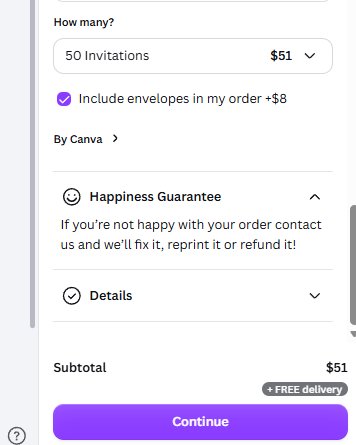
And the plot twist: the order is labeled "By Canva." In our poster test, the same panel said "By VistaPrint" — Canva routes posters to the giant commercial printer and discloses it only inside this menu. Invitations are the opposite: printed by Canva itself, with the same "Happiness Guarantee" (reprint or refund). So "does Canva print its own products?" now has a real answer: sometimes yes, sometimes VistaPrint — and the only place you can tell is this panel.
What's free vs what's Pro — the honest boundary
| Feature | Free plan? | Our evidence |
|---|---|---|
| Using crown-free invitation templates | ✅ Yes | 18 of first 20 results crown-free |
| Editing names, dates, venue, images | ✅ Yes | Full edit, zero prompts |
| Premium invitation fonts | ⛔ Pro | Crowns on Aprilime, Archetype Aubette, Avenir… |
| Uploading your own font | ⛔ Pro | "Upload a font" flagged with crown |
| PNG export | ✅ Yes | 878 KB download |
| PDF Print (RGB) | ✅ Yes | 1.1 MB, measured exactly 5×7 in, text machine-readable |
| CMYK color profile | ⛔ Pro | Crown on the option — fourth category running |
| Printing | 💵 Paid, all plans | $12.94 single → $0.36/card at 1,000, free delivery, envelopes +$8 |
| Who fulfills the order | — | "By Canva" — unlike posters ("By VistaPrint") |
Our honest take
Invitations are Canva's most free-friendly print category on the surface — one screen of genuinely free templates, free editing, free high-res export, and honest 5×7 dimensions. The business model lives just beneath: the typography. An invitation is 90% font choice, and that's exactly the layer Canva locks. Our test template's default font was free and looked fine — but the moment you want calligraphy for a wedding, you're shopping Pro, and you can't even bring your own font file to escape.
The printing itself is competitively priced at volume — $0.36 a card at 1,000 with free delivery is real stationery-shop math — and the "By Canva" fulfillment means one fewer middleman than our poster order. If you're printing, check the quantity default (50), add envelopes knowingly (+$8), and if guests will write on them, avoid Gloss.
And measure your exports. Across four print categories now, the only consistent thing about Canva's size labels is that they're sometimes exactly right and sometimes US Letter — and the file you downloaded is the only witness that counts.
Frequently asked questions
How much does it cost to print invitations on Canva?
In our October 2026 test, one Deluxe-paper invitation cost $12.94, 10 cost $19.00 ($1.90 each), the default order of 50 cost $51.00, and 1,000 cost $360.00 — $0.36 per card, 81% off the list rate. Delivery was free at every quantity; envelopes added a flat $8 per order.
Does Canva print its own invitations, or is it VistaPrint like the posters?
Invitations are fulfilled "By Canva" — the label inside the print panel says so directly. That surprised us because our poster test caught the opposite: posters are routed to VistaPrint, disclosed only inside the same panel. So Canva prints some product lines itself and outsources others, and the print menu is the only place a customer can see which is which.
Are Canva invitation templates free?
Mostly, at the top. In our test only 2 of the first 20 "invitation" search results carried the Pro crown — the cleanest first page of any Canva category we've measured (brochures 3/20, posters 3/20, Instagram posts 4/20, invoices 8–10/20). But the free shelf is about one screen deep: results 21–30 ran 60% Pro, and deeper pages settled around 35–43%.
What size are Canva invitation templates?
The template we tested was 5 × 7 inches, portrait — US card standard, not A-series. The template's label matched reality exactly: our exported PDF Print file measured 360 × 504 points, precisely 5.00 × 7.00 inches. Compare our invoice test, where an "A4" template exported as US Letter — Canva's size labels are accurate sometimes and not others, so measure the file.
Can you download a print-ready invitation PDF for free on Canva?
Yes. On a free account we downloaded a PDF Print preset (1.1 MB, one page) with advanced settings available at no charge, and the text stayed machine-readable — we extracted the full text programmatically. The consistent catch, now confirmed in a fourth product category: the Color profile offers RGB for free while CMYK (for professional printing) carries the Pro crown.
Wrapping up
This is the fifth Canva category we've pulled apart on a free account, and each one has yielded something the template galleries don't: the brochure fold-order trap, the invoice "table" that isn't a table, the locked Instagram publishing buttons, the VistaPrint plot twist — and now the crowned font list and a print ladder that treats one card like jewelry and a thousand like paper. If you're weighing Pro for the fonts or the CMYK unlock, read what Canva Pro actually costs first. And in our latest test, the YouTube thumbnail export revealed the same font wall on a different shelf — plus a readability finding that changes how you should design one. Five categories, one rule: screenshots or it didn't happen.
This guide is one of our 18 free-account Canva tests — crown counts, measured exports, print prices and paywalls, all in one place.