Canva Resume on a Free Account: ATS Readability, A4 vs US Letter, and the Resize Paywall
Search "canva resume" and you'll find hundreds of templates and a lot of advice — but almost none of it is tested. The three questions that actually matter to someone applying for a job in the US are left hanging: can an applicant tracking system read the PDF, is the page US Letter or A4, and does the free export stay clean. So we made a resume on a free Canva account, exported it, and pasted the PDF into a plain text editor to see exactly what a machine can pull out of it. Every claim below has a screenshot behind it.
Short answer: Free Canva resume templates work, and the PDF downloads clean, with no watermark. But four things caught us out. First, the free templates cluster at the top of the list and the crown icons get denser the further you scroll, and there is no price filter to sort them out. Second, every resume format Canva offers is A4 — the US Letter size your printer expects never appears in the free path, and switching to it is a Pro feature. Third, the ATS question: the text layer is fully readable (we recovered every word), but in a two-column template the reading order scrambles, with one skill item landing in the middle of the work experience. And fourth, printing through Canva starts at 25 copies, on A4 paper, priced in our account's currency.
How we ran the test
- Free account only — no trial started, no payment details, nothing bought, no Pro button pressed
- One real resume, end to end — template → edit → export → copy the text back out, so nothing is simulated
- The ATS check done the way a parser does it — open the PDF, select all, copy, paste into a plain text editor. If the text survives that, a machine can see it
- A US job seeker's assumptions tested — we looked specifically for US Letter at every step, from the format picker to the print shop
- Every upsell counted — crown icons and "Try it free for 30 days" buttons are recorded, not skipped over
Step 1: The templates — free up front, crowns underneath
Type Resume into Create a design and Canva suggests formats. Here's the list it offers:
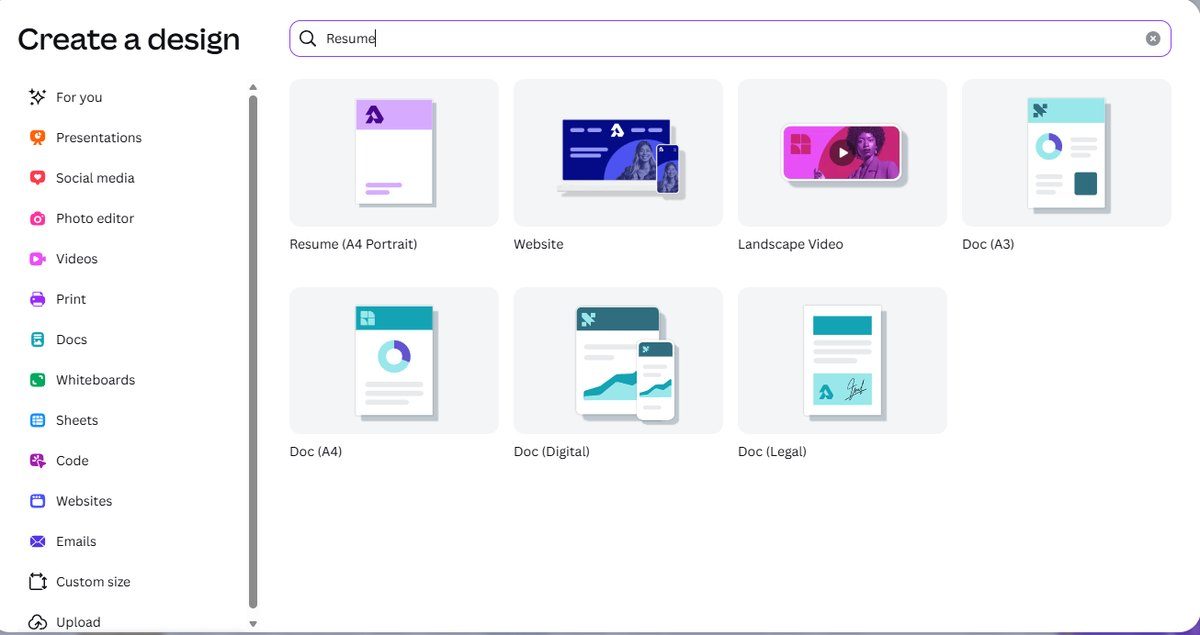
Look closely at that entry: Resume (A4 Portrait). There is no companion "US Letter" suggestion next to it — just the A4 one, sitting alongside Website, Landscape Video and the Doc family. That's the first sign of the problem we came to investigate, and it shows up before you've even picked a template.
Open the template list and the free-or-paid pattern is familiar: the first screen mixes free templates with a few crowned ones, and the further you scroll, the denser the crowns get. Further down, nearly every template carries the Pro badge:
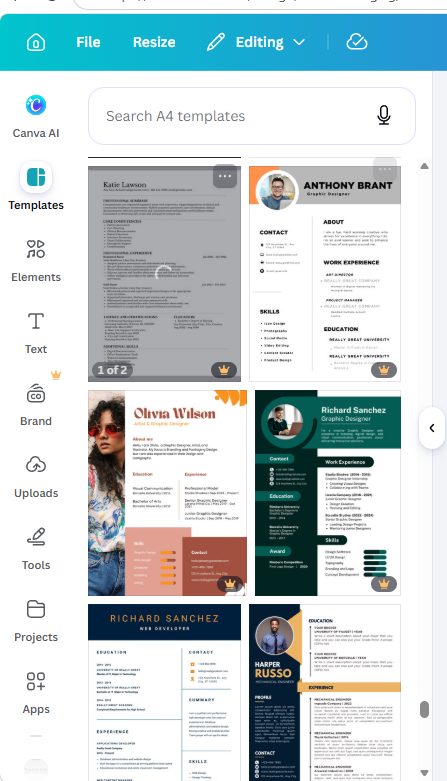
Scroll on and the ratio shifts hard toward paid:
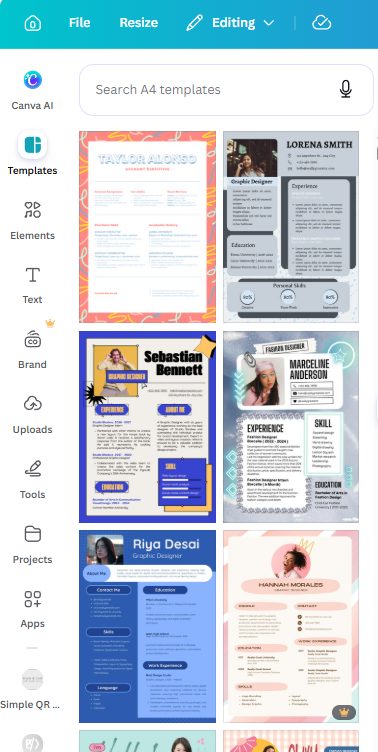
One practical frustration: the template panel in the editor offers no Filters control at all in our test — no price filter, no way to say "free only". (Canva's web template gallery used to expose a price filter; we reported the same disappearance when we tested Canva flyer templates.) So the workaround is boring but reliable: stay near the top of the list and check each thumbnail for the crown.
And then the detail that matters most to a US job seeker — the size written into the template itself:
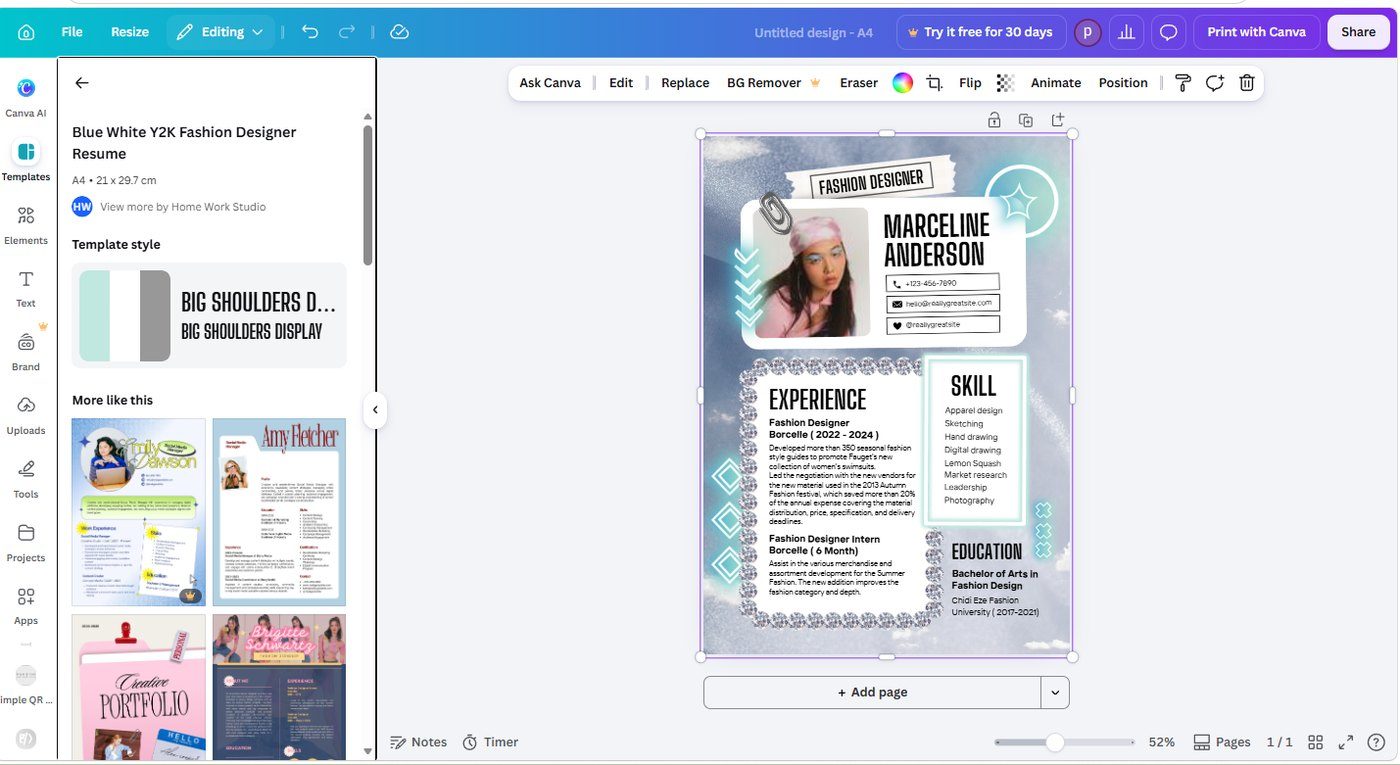
A4 — 21 × 29.7 cm. Not "Letter (8.5 × 11 in)". We checked more than one template and the story held. If you print this on US Letter paper, your printer will either scale it down slightly or clip the edges — and a scaled resume is a resume with unexpected margins.
Step 2: Editing — the canvas is clean
We picked a free (uncrowned) template, replaced the placeholder name and job title, and left everything else alone. Editing behaves exactly as you'd expect: click a text box, type, done.
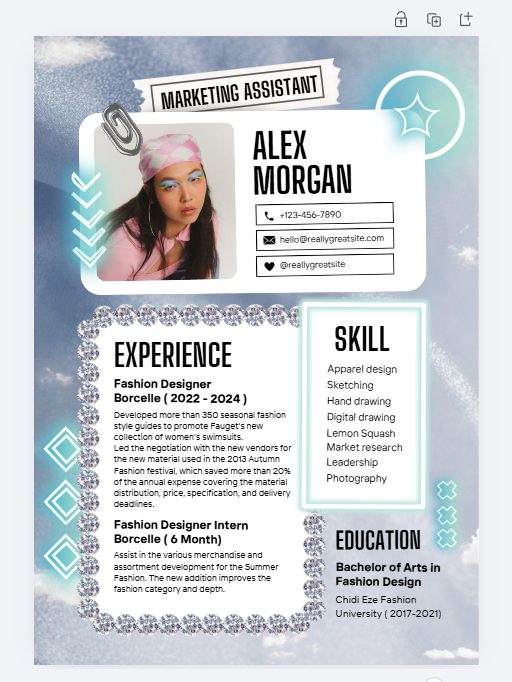
Worth noting: there was no Canva logo element and no watermark anywhere in the English-language template we used. Canva's help pages say any Canva branding in a design can simply be deleted, and in our template there was nothing to delete. If a template does include branding, it's usually an element you can select and remove — check before you export.
Step 3: Can an ATS read a Canva resume? Here's the actual test
This is the question that generates the most anxiety, and almost all of the answers online are opinions. An applicant tracking system can only use text it can extract, so rather than guess, we extracted it: download the PDF, open it, select all, copy, paste into Notepad. What comes out is what a parser has to work with.
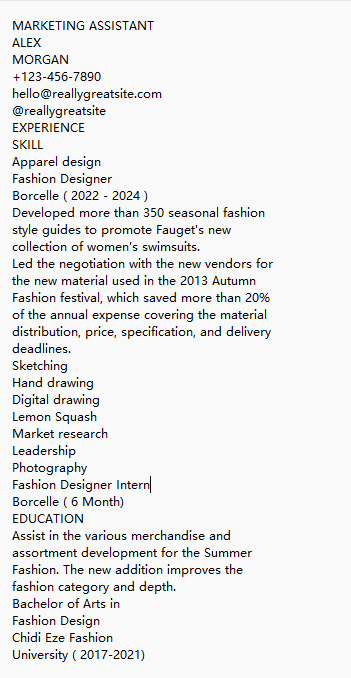
Here is the paste, in full:
Two conclusions, and the honest answer needs both:
- The good news: every word survived. Name, job title, phone, email, the whole work history, the full skills list — all present, no mojibake, no missing paragraphs, no "the PDF is just an image" disaster. If you've read that Canva resumes are unreadable to recruitment software, that was not true in our test.
- The catch: the order scrambles. Read the paste top to bottom and you'll see the section headings (EXPERIENCE, SKILL) arrive together, then a single skill — Apparel design — appears before the work experience paragraph, and the remaining seven skills appear after it. The two-column layout is read column-by-column by the text layer, then flattened into one stream.
| Check | Result in our test |
|---|---|
| Can the text be extracted at all? | Yes — 100% of it, no encoding damage |
| Is any content missing? | No — heading, contact details, experience and skills all present |
| Does the order match the visual layout? | Partly — single-column sections read fine; the two-column area interleaves |
| Is the photo readable? | No, and it never is — images carry no text for a parser |
What this does and does not prove. It proves the text layer of a Canva PDF is real, complete and machine-readable — that's the layer an ATS works from. It does not prove every ATS will file your details correctly: parsers differ, and one that reads strictly top-to-bottom could attach a stray skill to the wrong section. We tested one template and one extraction method, not a panel of commercial parsers.
The practical takeaway is a design choice, not a tooling choice: if you use Canva for a resume, prefer a single-column template, or keep your two-column content simple enough that a mixed-up reading order can't hurt you. Put your name, title and contact details in one clean block at the top, where every parser looks first.
Step 4: Exporting — clean files, and a Pro marker in an odd place
Share → Download. The file type menu for a resume looks slightly different from the one we saw on other document types:
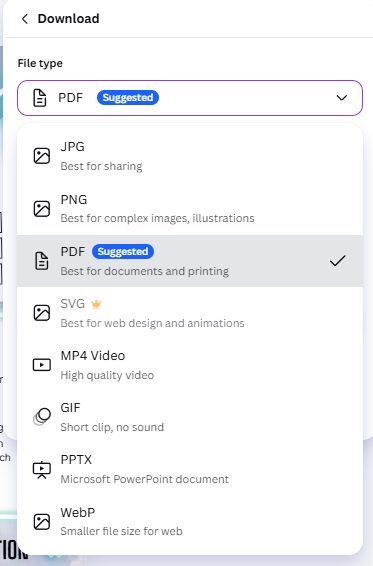
Three things worth knowing: PDF is flagged as Suggested (correct — that's what employers ask for), SVG carries a crown, and there is no separate "PDF Print" entry here. Instead, choosing PDF opens its own options panel:
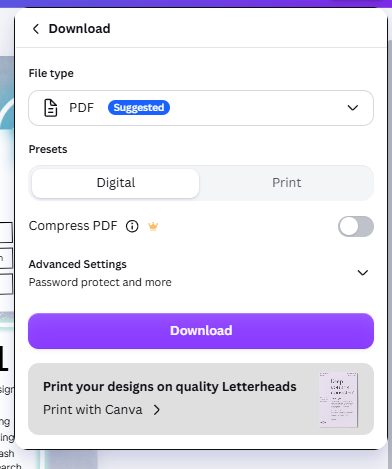
You get Digital and Print presets, and two extras: a crowned Compress PDF toggle, and an Advanced settings area offering password protection for the file. A password-protected resume is a bad idea in practice — it's one more reason for a parser or a recruiter to bounce — but it's there.
We downloaded both. The PNG arrives at 1414 × 2000 pixels, which is the A4 ratio again — Canva's PNG export is simply the page, at the page's size. And both files came out with no watermark and no paywall:
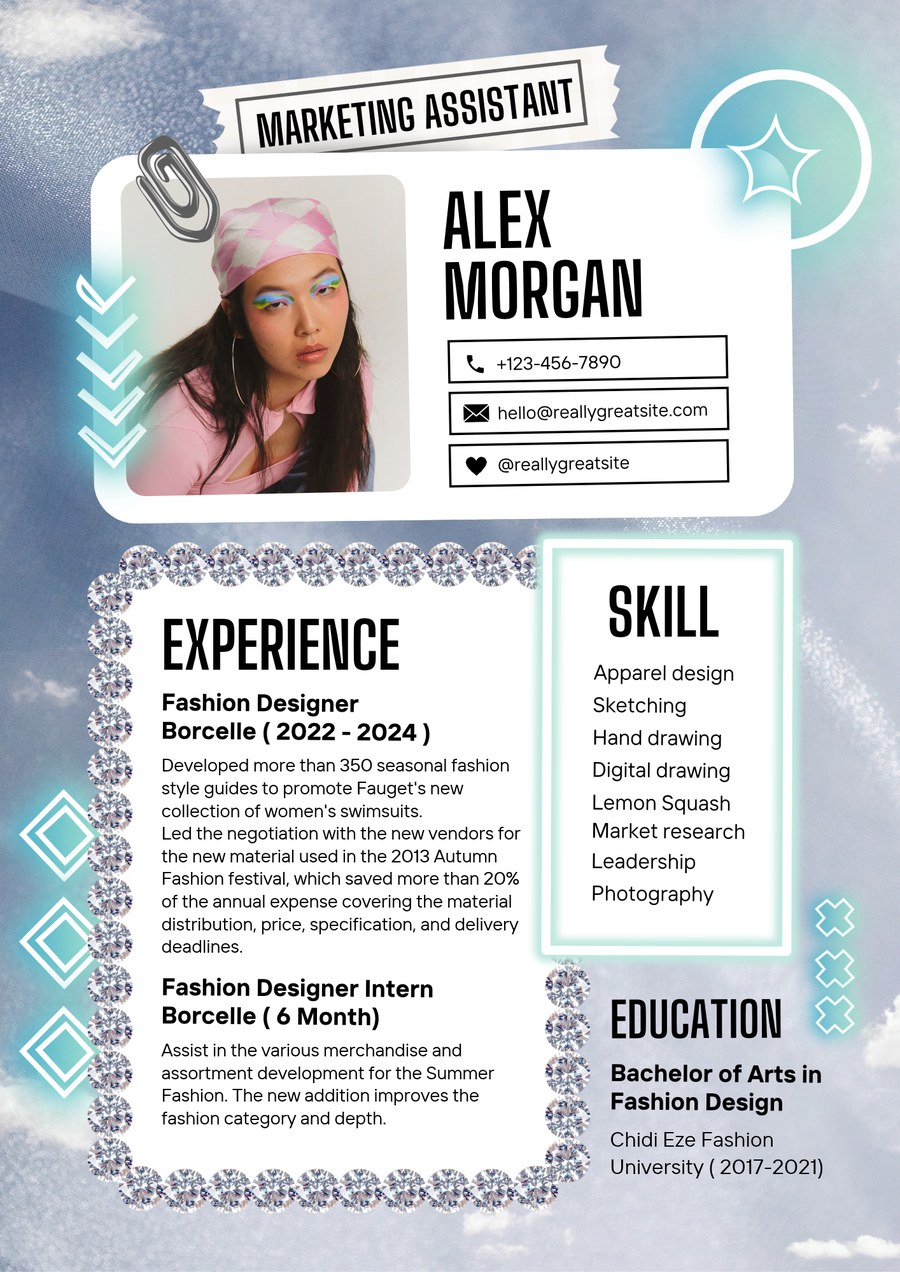
That's the clean result Canva promises, delivered — for the formats a resume actually needs.
Step 5: The US Letter problem — visible, but out of reach on free
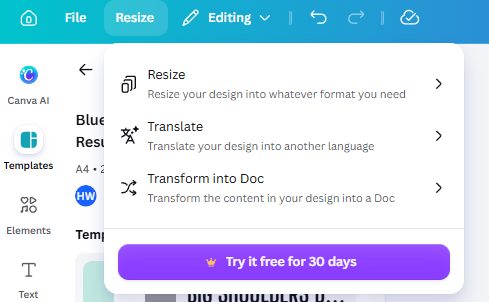
Here's the part that surprised us most. Canva does know about US Letter. Open the Resize menu and there it is in the suggested sizes: 8.5 × 11 in, right next to A4.
And the size library confirms both formats exist side by side:
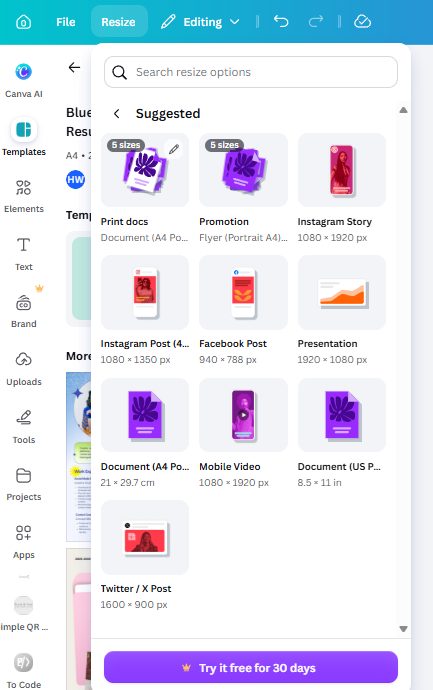
Now look at the button at the bottom of that panel. It isn't "Resize". It's "Try it free for 30 days" — the Pro trial. On a free account, resizing is a paid feature. So the shape of the problem is unusually specific:
- Every resume template is A4
- The export is A4
- US Letter is listed in the size picker, so you can see it
- But converting your finished resume to it costs a Pro subscription
The free workaround: create a blank design at US Letter size (the format is available when you start a document), then copy your resume content into it and re-flow the layout by hand. It costs time instead of money. That's the honest trade — we're not going to pretend a one-click free fix exists, because we looked and it doesn't.
Step 6: Printing through Canva — 25 copies minimum, still A4
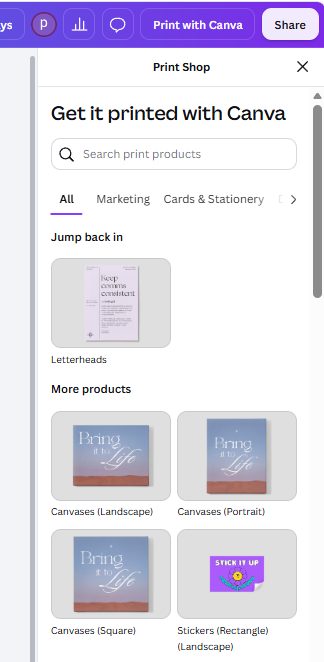
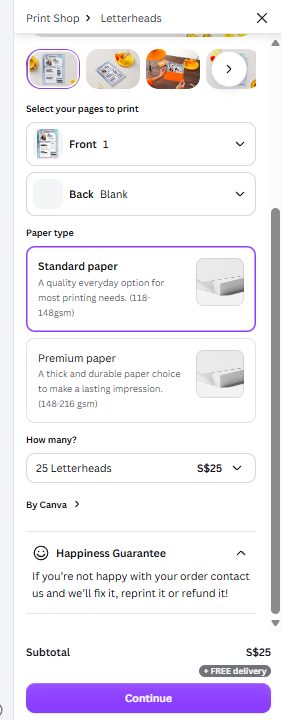
Share → Print with Canva. For a resume, Canva routes you to its Letterheads product — and the paper size on offer is 21 × 29.7 cm again:
Paper choices are Standard (118–148 gsm) and Premium (148–216 gsm):
And the pricing ladder in our test account:
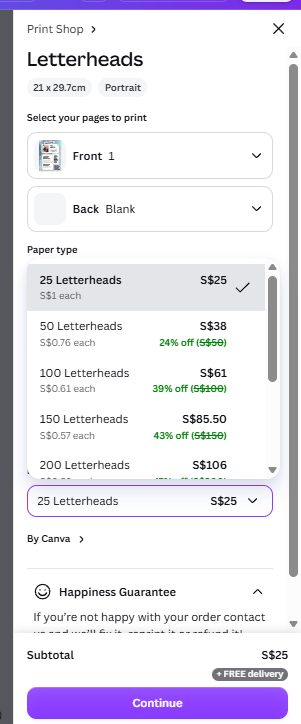
25 copies for S$25, 50 for S$38 (24% off), 100 for S$61 (39% off), 150 for S$85.50, 200 for S$106, with free delivery and Canva's Happiness Guarantee (reprint or refund if you're unhappy). Two caveats we have to be straight about: the currency shown is Singapore dollars, because that's what our account is set to — your region will show your own currency and it will not be the same number. And we stopped before checkout; we did not place an order.
The useful conclusion isn't the price, it's the pattern: even the paid print path serves A4 letterhead. For most people applying online, printing 25 sheets is the wrong purchase anyway — you want one clean PDF. This is only worth considering if you're handing out paper at a career fair.
What you'll read elsewhere vs what we found
| What you'll read elsewhere | What we found in October 2026 |
|---|---|
| "Canva resume templates are free" | Partly — plenty are free and cluster near the top, but crown density rises sharply as you scroll and there's no price filter |
| "ATS software can't read Canva resumes" | Wrong in our test — every word was extractable. The real risk is order, in two-column layouts |
| "Just resize to Letter before printing" | Not on free — US Letter is listed but the action button is a Pro trial offer |
| "Exports have a watermark unless you pay" | No watermark on the PDF or PNG we downloaded; the crowned extras are SVG, PDF compression and resizing |
So should you use Canva for your resume?
| If you… | Verdict | Why |
|---|---|---|
| Need a good-looking resume today, applying online | Yes, use Canva | Free templates, clean PDF, no watermark, and the text layer is fully machine-readable |
| Apply through large employers with ATS screening | Use a single-column template | Two-column layouts scramble the extracted reading order |
| Print at home in the US | Check the size first | The template is A4; printing on Letter paper scales or clips it |
| Want a US Letter version of a finished design | Rebuild manually or pay | Resize to Letter is a Pro feature on the account we tested |
| Need printed copies by mail | Only in bulk | Minimum order is 25 sheets, on A4 paper |
Frequently asked questions
Are Canva resume templates free?
Many are, and they tend to sit near the top of the results. In our test the crown icons became noticeably denser as we scrolled, and the template panel offered no price filter, so the practical approach is to stay near the top and check each thumbnail for the crown before you open it.
Can an ATS read a resume made in Canva?
The text layer, yes — completely. We exported a PDF on a free account, selected all, copied and pasted it into a plain text editor, and every word came through with no encoding damage and nothing missing. The caveat is order: in our two-column template, the extracted text interleaved the skills and experience sections, so a parser could associate content with the wrong heading. A single-column template avoids this. We tested extraction, not commercial ATS products.
Are Canva resumes A4 or US Letter?
A4. The format Canva suggests when you type "Resume" is A4 Portrait, the template pages are 21 × 29.7 cm, and the exported PNG is 1414 × 2000 pixels — the A4 ratio. US Letter appears in the size picker, but converting to it is a Pro feature.
Can I change a Canva resume to US Letter for free?
Not by resizing — that button is behind the Pro trial on the account we tested. The free route is to start a new blank design at US Letter size and rebuild the layout by hand. We didn't find a one-click free conversion.
Does Canva put a watermark on resumes?
No. The PDF and PNG we exported on the free plan had no watermark, and the template we used carried no Canva logo element either. The Pro markers we hit were SVG export, PDF compression and resizing.
What file type should I download my resume in?
PDF, and Canva flags it as Suggested. Use the Digital preset for emailing and online applications, and the Print preset only if you're sending it to a physical printer. Skip password protection — it adds a barrier for both humans and software.
Can I print my resume through Canva?
Yes, through Print with Canva, which routes resumes to its Letterheads product. In our test the minimum was 25 copies for S$25 with free delivery, on A4 paper, with Standard and Premium paper weights. Prices are shown in your account's currency — ours displayed Singapore dollars — so your numbers will differ.
Wrapping up
We took one resume from the template search all the way to a text extraction on a free account, and the honest verdict is more useful than either "Canva is great for resumes" or "ATS will destroy your Canva resume". The free path gives you a clean, watermark-free, machine-readable PDF with no payment details required — and it quietly defaults you to A4 paper and, in two-column templates, to a reading order that doesn't survive being flattened into text. Choose a single-column template, check the page size before you print, and you'll be fine. For more hands-on Canva tests, read our Canva flyer walkthrough, our Canva QR code test, and our export formats explained; if you're building a job-search kit, our Canva logo test covers the personal-brand side, and what Canva Pro actually costs tells you what the crown really buys. And if you're wondering what an AI chatbot sees in this exact PDF, we fed the same resume to ChatGPT and Claude on free accounts — ChatGPT summarized it (and missed our planted headline), Claude never got to read it at all.
Tested October 2026 on a free Canva account, web version, no payment details entered and nothing purchased. Interface details, template availability and print pricing can change without notice; prices shown here are in our account's currency and will differ by region. We've applied the same free-account method to free AI image generators and free AI voice tools.
This guide is one of our 18 free-account Canva tests — crown counts, measured exports, print prices and paywalls, all in one place.